web
You’re offline. This is a read only version of the page.
close
Skip to main content

Announcements

No record found.

News and Announcements icon
Community site session details

Community site session details

Session Id :
Small and medium business | Business Central, N...
Suggested Answer

Missing values from Choices in Dataverse virtual table

(0) ShareShare
ReportReport
Posted on by 10

Hi, 

I'm using the Business Central Virtual Table app for Dataverse and it's been working well for our custom tables and custom APIs in Business Central. I'm coming from the Powerapps side of things so have only sparse insight into the source code itself.

We have a field called "Fulfillment Status" added to our Sales Order table and I can see those in our dataverse Choice column.

However, recently we've had an issue where 2 new values in the enum [Completed, Cancelled] do not appear in the Choices column of the dataverse virtual table.

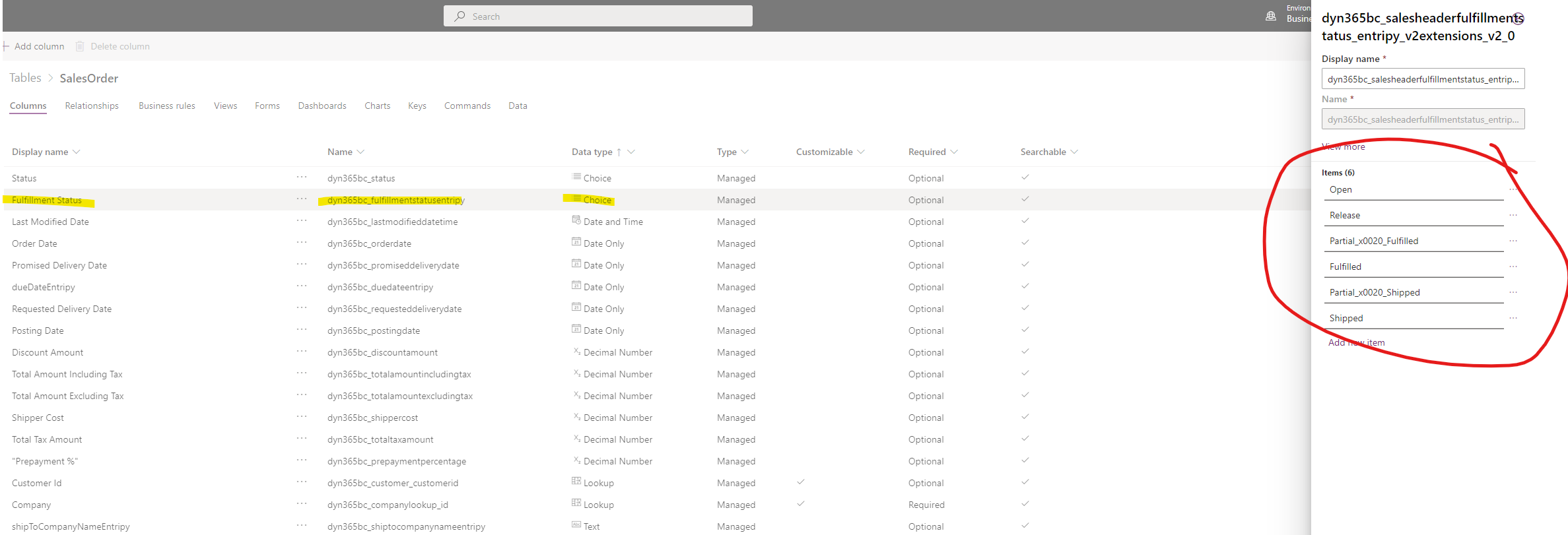
pastedimage1637687059764v1.png Dataverse.png

What can be going on here?

I have the same question (0)
  • Suggested answer
    Airbird22 Profile Picture
    2 on at

    Have you tried resynchronising BC to the Dataverse?

    See docs.microsoft.com/.../admin-common-data-service for more resources.

    Also, when an option is changed within Dataverse it needs to be synchronised and mapped to the BC equivalent, otherwise it will not be available.

    Hope this helps.

    Heinrich

  • virakones Profile Picture
    10 on at

    Hi Heinrich,

    Thank you for the suggestion.

    Forgive if I'm wrong, but my understanding is that we are only connecting to Business Central via Virtual Tables and the Business Central API, in our case specifically, a custom extension.

    We aren't directly integrated to Dataverse and so these mappings do not appear as a integrated table that we can synchronize/couple, etc.

    For the virtual table, my only approach was to head to the "Available Business Central Table" table > Data > Select Sales Order table > Edit Record > Refresh

    Usually this would refresh the metadata well enough and currently, I even see new Text fields that have been added recently. The only puzzling thing is that this Choice set is not updating with the new enum values of Completed/Cancelled in my previous screenshot (from one of our devs) even though its returning the other 6 options. Just very strange.

  • Suggested answer
    Airbird22 Profile Picture
    2 on at

    If this was published as an extension, did you refresh the Web Service in BC that you are using? It might be that the Web Service is still exposing the previous version of the extension metadata. Please check.

Under review

Thank you for your reply! To ensure a great experience for everyone, your content is awaiting approval by our Community Managers. Please check back later.

Helpful resources

Quick Links

Introducing the 2026 Season 1 community Super Users

Congratulations to our 2026 Super Stars!

Meet the Microsoft Dynamics 365 Contact Center Champions

We are thrilled to have these Champions in our Community!

Congratulations to the April Top 10 Community Leaders

These are the community rock stars!

Leaderboard > Small and medium business | Business Central, NAV, RMS

#1
OussamaSabbouh Profile Picture

OussamaSabbouh 2,012 Super User 2026 Season 1

#2
YUN ZHU Profile Picture

YUN ZHU 986 Super User 2026 Season 1

#3
Teagen Boll Profile Picture

Teagen Boll 659 Super User 2026 Season 1

Last 30 days Overall leaderboard

Featured topics

Product updates

Dynamics 365 release plans
