web
You’re offline. This is a read only version of the page.
close
Skip to main content

Announcements

No record found.

News and Announcements icon
Community site session details

Community site session details

Session Id :
Microsoft Dynamics CRM (Archived)

Where can I find the automatic case creation rules in the new CRM 2015 online ?

(0) ShareShare
ReportReport
Posted on by

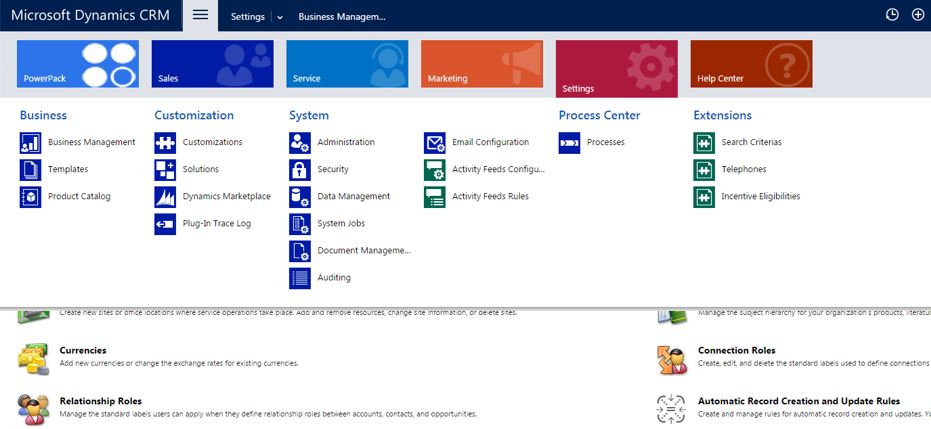
4682.Capture.JPG

Hi, 

 I am looking for the automatic case creation rules under the service management tab in setting.

 But I don't see the service management tab under the new 2015 update 1 per my picture above.

Can someone point me to that? 

Thanks.

*This post is locked for comments

I have the same question (0)
  • Verified answer
    Royal King Profile Picture
    27,686 on at

    it looks like link for service management is missing in your site map. You can use Xrmtoolbox Sitemap editor to reset your site map to crm 2015  default site map. If you dont want to do this and just want to configure auto case creation rule, create a new solution within the solution you have left nav to add auto case creation rules.

    here is how you can reset to default site map

    image

    Adding auto creation rule from solution

    2015_2D00_09_2D00_02_5F00_1834.png

  • Aileen Gusni Profile Picture
    44,524 on at

    Hi Charles,

    See this tips & trick:

    crmtipoftheday.com/.../if-you-are-missing-the-service-management-link-after-upgrading-to-sp1

    If you need fast just go to the Advanced find and then find the Case creation Rule entity.

    Thanks

  • Suggested answer
    Community Member Profile Picture
    on at

    Thank you Chritrarasan and Aileen.

    I found another quick solution after playing around with XrmToolBox.

    You can right click on the group menu then select "Add default SiteMap SubArea".3240.Capture2.JPG

    Select the menu that is missing from your sitemap. My case it is the "Homepage_ServiceManagement" and that's it.

Under review

Thank you for your reply! To ensure a great experience for everyone, your content is awaiting approval by our Community Managers. Please check back later.

Helpful resources

Quick Links

Introducing the 2026 Season 1 community Super Users

Congratulations to our 2026 Super Stars!

Meet the Microsoft Dynamics 365 Contact Center Champions

We are thrilled to have these Champions in our Community!

Congratulations to the March Top 10 Community Leaders

These are the community rock stars!

Leaderboard > 🔒一 Microsoft Dynamics CRM (Archived)

#1
AS-17030037-0 Profile Picture

AS-17030037-0 2

Last 30 days Overall leaderboard

Featured topics

Product updates

Dynamics 365 release plans
