web
You’re offline. This is a read only version of the page.
close
Skip to main content

Announcements

News and Announcements icon
Community site session details

Community site session details

Session Id :
Small and medium business | Business Central, N...
Unanswered

Post Sales Invoice Custom API

(0) ShareShare
ReportReport
Posted on by 50

Hi All,

I am doing development to create a new custom API to get response of posted sales invoice document no. as currently standard API just send response code as 204 with no content.

Standard API is POST https://<server address>:<server API port>/<server instance name>/api/v2.0/companies({id})/salesInvoices({id})/Microsoft.NAV.post

The response has no content; the response code is 204 but the customer require posted sales invoice document no. as response and to achieve this I've done below but no success so far.

To achieve this, I took copy of standard API and added additional code as below :-
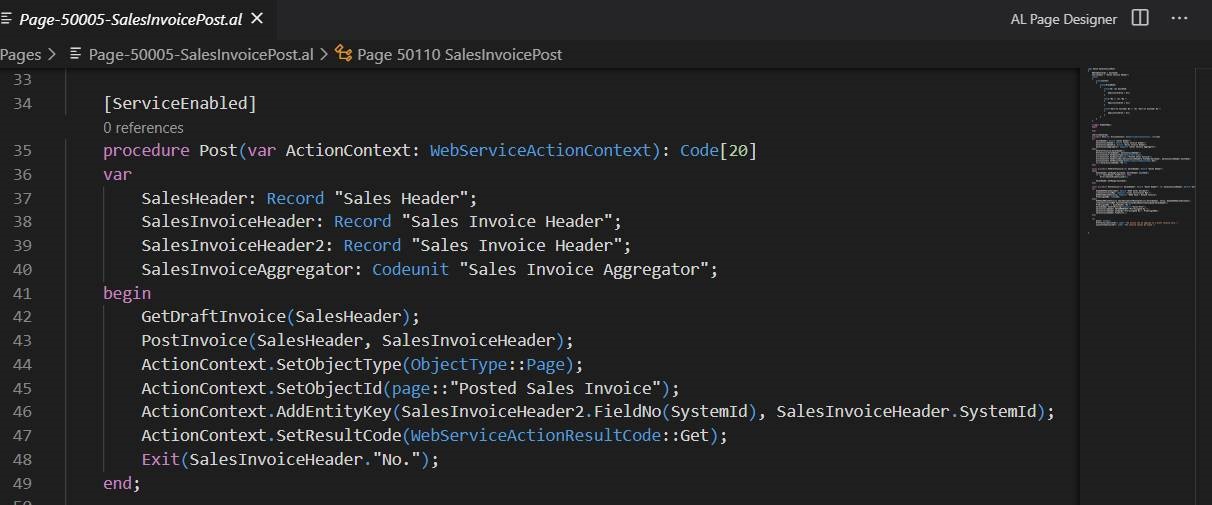
APIissue.jpg

I have the same question (0)
  • Lars Lohndorf-Larsen Profile Picture
    Microsoft Employee on at

    Hello,

    This way to call API is a be new to me so I hope also for other input. Does it run OK like this:

    GET api.businesscentral.dynamics.com/.../salesInvoices

    and

    POST https://api.businesscentral.dynamics.com/v2.0/123aa290c-d2ec-4e49-afcb-daf662adc134/Production/api/v2.0/companies(0f8058e0-affd-ea11-bb48-000d3a2fece2)/salesInvoices(b81b1d19-b0fd-ea11-bb48-000d3a2fece2)/Microsoft.NAV.post

    ? So standard API run OK, but you need a different response?

  • Dynamics Business Central Profile Picture
    50 on at

    Yes, Standard API works fine but in that response code 204 with no content and I need response code with content which should return posted sales invoice no. so the 3rd party using the API can save the document no. in their system.

Under review

Thank you for your reply! To ensure a great experience for everyone, your content is awaiting approval by our Community Managers. Please check back later.

Helpful resources

Quick Links

Season of Sharing Community Challenge Launch!

Jump in, show your community spirit, and win prizes!

Meet the Microsoft Dynamics 365 Contact Center Champions

We are thrilled to have these Champions in our Community!

Congratulations to the April Top 10 Community Leaders

These are the community rock stars!

Leaderboard > Small and medium business | Business Central, NAV, RMS

#1
OussamaSabbouh Profile Picture

OussamaSabbouh 2,273 Super User 2026 Season 1

#2
YUN ZHU Profile Picture

YUN ZHU 1,669 Super User 2026 Season 1

#3
AndrewThomas81 Profile Picture

AndrewThomas81 1,402

Last 30 days Overall leaderboard

Featured topics

Microsoft Training Manuals

Product updates

Dynamics 365 release plans



