web
You’re offline. This is a read only version of the page.
close
Skip to main content

Notifications

Announcements

No record found.

Community site session details

Community site session details

Session Id :
Microsoft Dynamics CRM (Archived)

Synchronize button is disappeared in Outlook

(0) ShareShare
ReportReport
Posted on by

Hi everyone,

I dont know why but the Synchronize button is disappeared in my OutLook 
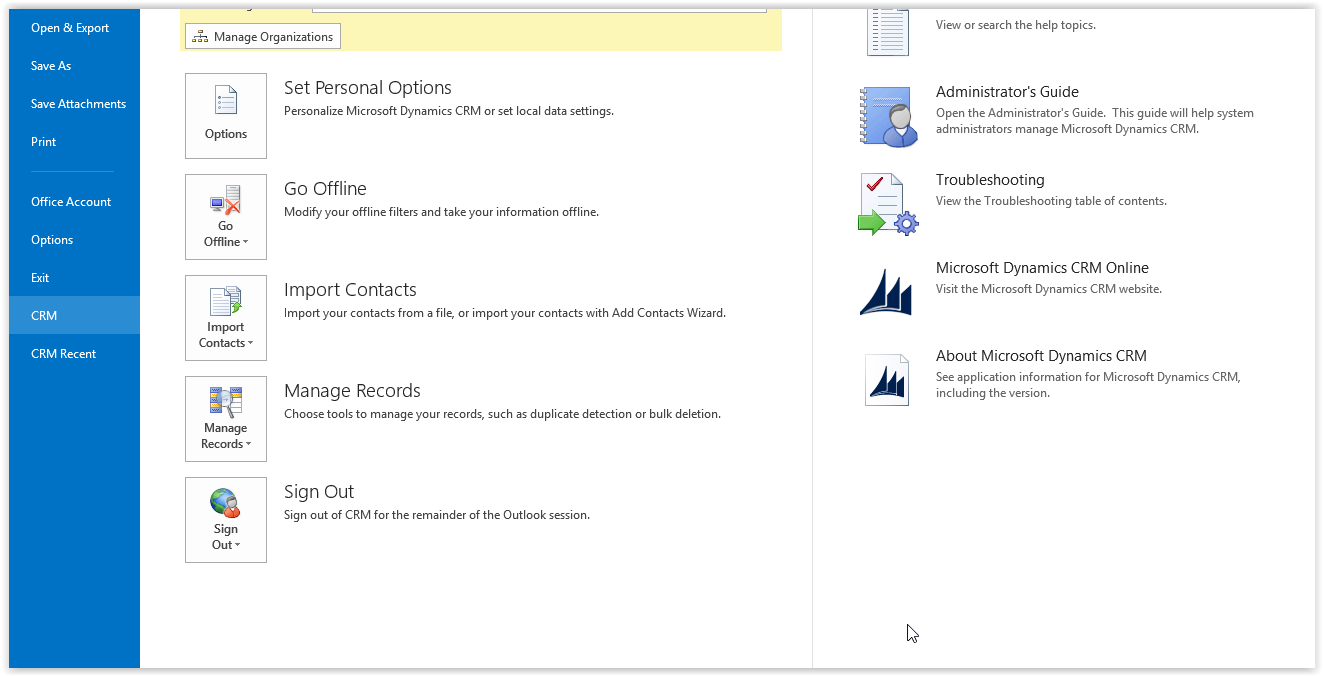
When I go to option, the option for synchronization also missing some parts :

I am appreciated all your comments,

Thank you,

*This post is locked for comments

I have the same question (0)
  • Suggested answer
    ScottDurow Profile Picture
    21 on at

    This could be because you have configured outlook sync on another computer?

    There can be only one outlook synced to CRM at any time.

  • Verified answer
    Logan Profile Picture
    on at

    You can also check if you have enabled Server Side Sync for this user.

  • Community Member Profile Picture
    on at

    I had to re-installing the add-on and after re-installing, the Sync button is gone from the ribbon as well as the CRM options under the File tab. It was there before. I have SSS enabled and this is the only machine I use. It will still sync when Outlook starts or using the Synchronization Wizard. My CRM for Outlook version is 8.0.0.1088.

    Any suggestions appreciated.

  • Community Member Profile Picture
    on at

    Hi, I had the same issue as you too. Had you found the solution?

  • Aad van der Velden Profile Picture
    600 on at

    searched for what seems like forever before I read the comment from Nasheem to change the synchronization method from server side to Outlook.. now the button is back.. together with my mental health and normal blood pressure... 

  • Suayip C. Profile Picture
    5 on at

    Hello,

    I had the same issue and solved by checking the Server-side synchronization settings in monitoring entity that into Email configuration.

    I had chosen the user that the Synchronization button disappeared and changing the Incoming and Outgoing Email synchronization method with any other. Synchronization button appeared after that.

    pastedimage1563870043605v1.png

Under review

Thank you for your reply! To ensure a great experience for everyone, your content is awaiting approval by our Community Managers. Please check back later.

Helpful resources

Quick Links

Responsible AI policies

As AI tools become more common, we’re introducing a Responsible AI Use…

Neeraj Kumar – Community Spotlight

We are honored to recognize Neeraj Kumar as our Community Spotlight honoree for…

Leaderboard > 🔒一 Microsoft Dynamics CRM (Archived)

#1
SA-08121319-0 Profile Picture

SA-08121319-0 4

#1
Calum MacFarlane Profile Picture

Calum MacFarlane 4

#3
Alex Fun Wei Jie Profile Picture

Alex Fun Wei Jie 2

Last 30 days Overall leaderboard

Featured topics

Product updates

Dynamics 365 release plans
