web
You’re offline. This is a read only version of the page.
close
Skip to main content

Notifications

Announcements

No record found.

Community site session details

Community site session details

Session Id :
Microsoft Dynamics CRM (Archived)

Word Templates - Personal Word Template

(0) ShareShare
ReportReport
Posted on by 222

Hi Guys,

I have successfully mapped and imported a word template, which produces required information. They are currently sitting under my Personal Word Templates.

Is there anyway I could convert these, so that other people are able to use the same template?
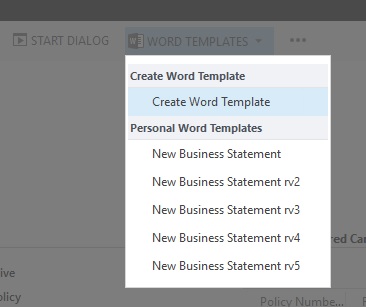
personal.jpg

Thanks

*This post is locked for comments

I have the same question (0)
  • Verified answer
    Nithya Gopinath Profile Picture
    17,078 on at

    Hi,

    See the links below.

    community.dynamics.com/.../crm2016-template-management

    community.dynamics.com/../216359

    Hope this helps.

  • Verified answer
    Andreas Cieslik Profile Picture
    9,267 on at

    Hi Rasi,

    on this guide it is described on Step 4:

    www.microsoft.com/.../using-word-templates-in-dynamics-365.aspx

    For admins: In Dynamics 365, go to Settings > Templates > Document Templates

    to create a global template.

    Cheers,

    Andreas

  • Rasi Profile Picture
    222 on at

    Hi Guys,

    I have one more question -  I have a policy and associated cars which I have mapped on the word template, however some policies have more then 1 associated car.  how could I map these on the template so that all cars are listed? Same for drivers, there are several drivers on one policy.

    Thank you

  • Andreas Cieslik Profile Picture
    9,267 on at

    maybe this sample helps to create what you need:

    debajmecrm.com/.../tips-tricksshow-repeating-content-in-dynamics-crm-2016-word-templates

  • Suggested answer
    Rajkumar Rajaraman Profile Picture
    on at
  • Suggested answer
    MAmir Profile Picture
    10 on at

    Hi,

    You can enable Security Roles for everyone or for the selected group of users. This can be done through Settings---> Templates--->Select the Word tmplate and then go to 'ENABLE SECURITY ROLES'.

    Thanks,

Under review

Thank you for your reply! To ensure a great experience for everyone, your content is awaiting approval by our Community Managers. Please check back later.

Helpful resources

Quick Links

Responsible AI policies

As AI tools become more common, we’re introducing a Responsible AI Use…

Neeraj Kumar – Community Spotlight

We are honored to recognize Neeraj Kumar as our Community Spotlight honoree for…

Leaderboard > 🔒一 Microsoft Dynamics CRM (Archived)

#1
SA-08121319-0 Profile Picture

SA-08121319-0 4

#1
Calum MacFarlane Profile Picture

Calum MacFarlane 4

#3
Alex Fun Wei Jie Profile Picture

Alex Fun Wei Jie 2

Last 30 days Overall leaderboard

Featured topics

Product updates

Dynamics 365 release plans
