web
You’re offline. This is a read only version of the page.
close
Skip to main content

Announcements

No record found.

News and Announcements icon
Community site session details

Community site session details

Session Id :
Microsoft Dynamics GP (Archived)

Workflow - Add AD Groups

(0) ShareShare
ReportReport
Posted on by 1,912

Hi all,

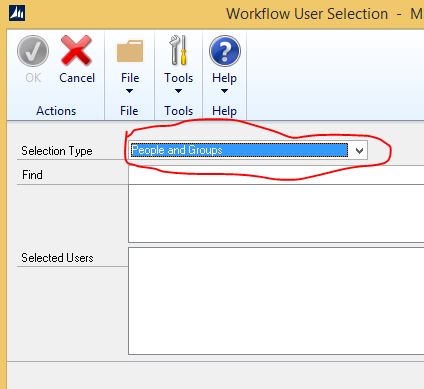
I am trying to assign AD groups to a workflow step, under 'People & Groups' without success. Is the assignment limited to AD users only, and doesn't include the groups. Any feedback is welcome.
*This post is locked for comments

I have the same question (0)
  • babubaskaran@outlook.com Profile Picture
    12 on at

    Hi Peter,

    After selecting the People & Groups, are you able to type the name on find field and press find button and see the AD users.

  • Peter Muchira Profile Picture
    1,912 on at

    Hi Babu,

    Yes I am able to type the name, and the domain resolves it properly e.g. DOMAINXX\gpusers, but it won't add that name to the assigned to field in workflow step.

  • Peter Muchira Profile Picture
    1,912 on at

    Babu,

    Any other ideas?

  • Suggested answer
    Manjunath Vemula Profile Picture
    1,197 on at

    Hi Peter,

    I am able to add groups successfully. Just type the starting letters of group and click on find. This should let you add the group.

    Make sure you followed the steps defined for workflow.

  • Peter Muchira Profile Picture
    1,912 on at

    Hi Manjunath,

    I have been following the steps you have outlined, the group resolves well, but it is not added to the 'Assigned to'. Am using GP 2015. See the screenshot below:

  • Peter Muchira Profile Picture
    1,912 on at

    Hi Manjunath,

    See my response below.

  • Verified answer
    Peter Muchira Profile Picture
    1,912 on at

    The article by Chris explains the challenges and solutions:

    https://community.dynamics.com/gp/b/dynamicsgp/archive/2015/09/01/workflow-2-0-adding-an-ad-security-group-to-a-workflow

    My issue had to do with missing 'Display Name' and in some cases the 'pre-windows 2000' length of the Security group was longer than the required length.

Under review

Thank you for your reply! To ensure a great experience for everyone, your content is awaiting approval by our Community Managers. Please check back later.

Helpful resources

Quick Links

Introducing the 2026 Season 1 community Super Users

Congratulations to our 2026 Super Stars!

Meet the Microsoft Dynamics 365 Contact Center Champions

We are thrilled to have these Champions in our Community!

Congratulations to the March Top 10 Community Leaders

These are the community rock stars!

Leaderboard > 🔒一 Microsoft Dynamics GP (Archived)

Last 30 days Overall leaderboard

Featured topics

Product updates

Dynamics 365 release plans
