web
You’re offline. This is a read only version of the page.
close
Skip to main content

Notifications

Announcements

No record found.

Community site session details

Community site session details

Session Id :
Supply chain | Supply Chain Management, Commerce
Suggested Answer

Cycle counting and work pools

(0) ShareShare
ReportReport
Posted on by 535

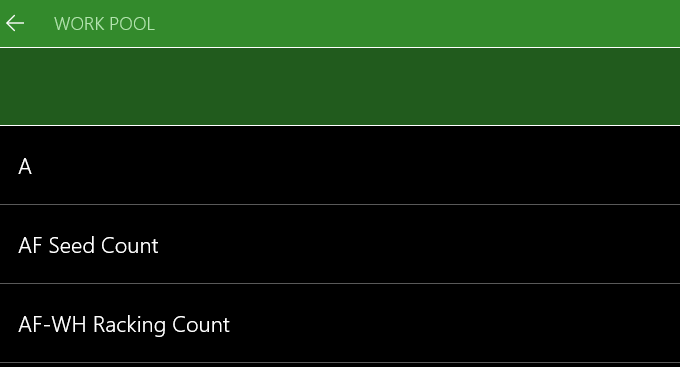
I have set up for cycle counting work pools and have this all working so each worker can count one racking aisle at a time..all good. my question is currently to access this work pool you have to manually select to work pool, like i show below.

Anyone know a way this can be scanned (barcode for each) when you first enter the mobile menu? I have tried changing the menu to system grouping or work list, but it just says now work available. is the manual method of entering a work pool the only way here?
pastedimage1586171157558v1.png

I have the same question (1)
  • Suggested answer
    CU21011815-0 Profile Picture
    1,943 on at

    I set up your scenario in my test environment and I get a scan zone(workpool).

    Snag_5F00_6a982c37.png

    Here's how I have my menu setup.

    Snag_5F00_6a987045.png

    Let me know if this doesn't help and I'll look further.

  • Suggested answer
    CU21011815-0 Profile Picture
    1,943 on at

    Sorry I also wanted to mention my setup....

    I have work templates setup with work pool ids

    Snag_5F00_6a9cd9f8.png

    Then on the cycle count template I specify the work template.

  • tl82 Profile Picture
    535 on at

    Thanks Scott will look into this and see if i can get it to work

  • tl82 Profile Picture
    535 on at

    Tried to replicate this now and it wont allow. The work is created and can be processed but only if i go and manually select the work pool rather than by scanning a work pool. Could it be that the version we have in UAT is 8.4 i wonder? We will be moving to 10.0.7 at some point in the future.

  • Suggested answer
    CU21011815-0 Profile Picture
    1,943 on at

    I did an issue search and this one looked similar to what you are experiencing.  There's a recommended process here.  Is your directed by set to Cycle Count Grouping?

    Might give that a try...

    pastedimage1586958037140v1.png

  • tl82 Profile Picture
    535 on at

    Yes when i set as cycle count grouping it works for manually selecting the work pool, but not to scan a work pool.

    then when i try system grouping or even work list to scan the work pool, same outcome. Not sure why i dont get the same outcome you did. looks like will have to live with manual entry.

    thanks.

Under review

Thank you for your reply! To ensure a great experience for everyone, your content is awaiting approval by our Community Managers. Please check back later.

Helpful resources

Quick Links

Responsible AI policies

As AI tools become more common, we’re introducing a Responsible AI Use…

Neeraj Kumar – Community Spotlight

We are honored to recognize Neeraj Kumar as our Community Spotlight honoree for…

Leaderboard > Supply chain | Supply Chain Management, Commerce

#1
Siv Sagar Profile Picture

Siv Sagar 266 Super User 2025 Season 2

#2
Laurens vd Tang Profile Picture

Laurens vd Tang 213 Super User 2025 Season 2

#3
André Arnaud de Calavon Profile Picture

André Arnaud de Cal... 140 Super User 2025 Season 2

Last 30 days Overall leaderboard

Featured topics

Product updates

Dynamics 365 release plans
