web
You’re offline. This is a read only version of the page.
close
Skip to main content

Announcements

No record found.

News and Announcements icon
Community site session details

Community site session details

Session Id :
Microsoft Dynamics CRM (Archived)

CRM 4.0 Issue Displaying External Webpage in Iframe

(0) ShareShare
ReportReport
Posted on by 60

Hi,

Currently, in CRM 4.0, we use an iframe within a custome entity to display tracking information from Canada Post. Up until recently this was working just fine, now when the iframe renders we are recieving the following error:
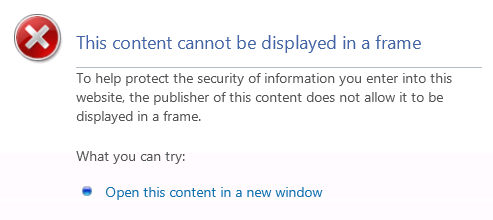
I have done a bit of googling to see what others had to say on the error message. Most say it is due to the website owner using the X-Frame-Options set to SAMEORGIN. This is to prevent ClickHijacking. To try and figure out if the web page url we are calling in the iframe uses this, I used IE Developer Tools and ran the Network Capture. Then I found the GET for the url and viewed it's details, on the Response headers options, there is indeed a X-frame-options set to SAMEORGIN. I tried several other pages, like google, and found they also gave me the same error when I tried to use them in the iframe and also had this same option. I did however find that when I used a wikipedia article as the url that it displayed the content fine and it did not contain the X-frame-options option in the Response headers.

As I am a bit inexperienced with webpage development, can someone please confirm that this is the issue my iframe is experiencing or if the problem is something else? If it is something else, can someone please explain what is now causing the page to fail? If it is the X-frame-option now being used by the original host page, does anyone know of a work around?

Thanks!

*This post is locked for comments

I have the same question (0)
  • Patric Profile Picture
    342 on at

    1. is your CRM Application running on HTTPS if so your custom pages also must be running on HTTPS?

    2. Try to reduce the IE browser security and load the page

    3. Turn-off the pop-up blocker from IE or any other add-ons running your browser

    4. have your tried this on your server machine and any other laptop/pcs?

  • MicheleP Profile Picture
    60 on at

    Thanks for replying Patric.

    No the CRM application is not running HTTPS. We have tried reducing the browser security and reloading the page, as well as turning off pop-up blockers and other add-ons and the issue still persists. The issue has been tested in a variety of environments and happens not only in our production CRM but in our development and testing. As stated that this iframes content was working and only recently stopped working. The code behind and the entity that holds this iframe, nor the security for the area of the application have had any changes done to them recently.

  • Suggested answer
    tazplay Profile Picture
    50 on at

    I would have to agree with your assumption in terms of the iframe security applied by the website you are trying to view. They must have made changes to their apache server and should probably review the present configuration.

Under review

Thank you for your reply! To ensure a great experience for everyone, your content is awaiting approval by our Community Managers. Please check back later.

Helpful resources

Quick Links

Introducing the 2026 Season 1 community Super Users

Congratulations to our 2026 Super Stars!

Meet the Microsoft Dynamics 365 Contact Center Champions

We are thrilled to have these Champions in our Community!

Congratulations to the March Top 10 Community Leaders

These are the community rock stars!

Leaderboard > 🔒一 Microsoft Dynamics CRM (Archived)

#1
JS-09031509-0 Profile Picture

JS-09031509-0 3

#2
AS-17030037-0 Profile Picture

AS-17030037-0 2

#2
Mark Eckert Profile Picture

Mark Eckert 2

Last 30 days Overall leaderboard

Featured topics

Product updates

Dynamics 365 release plans
