web
You’re offline. This is a read only version of the page.
close
Skip to main content

Notifications

Announcements

No record found.

Community site session details

Community site session details

Session Id :
Small and medium business | Business Central, N...
Suggested Answer

Item Search Description

(0) ShareShare
ReportReport
Posted on by 1,200

We have updated the Search Description on the item cards with text we wish to be able to find items on various screens. 

1) The search feature from the item list does not seem to be working.   Is it required to use wild cards or should the search find items based on any part of the search description?

2) When adding an item on an order (or invoice) the search does not seem to be working.  It will find items based on the item number and description but not the search description.  Has anyone else encountered this issue?

I have the same question (0)
  • mysamza Profile Picture
    358 on at

    Is search description you are talking about a new field you added by extending the Item table?

  • rcboiler Profile Picture
    1,200 on at

    Search Description is a standard field on the item card.

  • Suggested answer
    Teddy Herryanto (That NAV Guy) Profile Picture
    14,284 Super User 2025 Season 2 on at

    It only search if the Search Description is part of the fields shown on the page.

  • Erik KOhler Profile Picture
    418 on at

    Hello all,

    We've run into the same problem (only on the contacts list). The field is shown on the comtact page and the contact list.  But it still isn't working. Is there a special spelling I need to consider when searching for the search description?

    Thanks

    Erik

  • Suggested answer
    Ashish K Profile Picture
    154 on at

    Hello @rcboiler, We need to see how Search Description works, It's good that you have updated Search Description on Item card but how does it work on Purchase order, for example. Unfortunately it doesn't work either on Item list page because we do not have a column for Search description on Item list page.

    If we observe the Purchase Order, Item No. lookup, we do not have Search Description column, hence unfortunately it doesn't work.
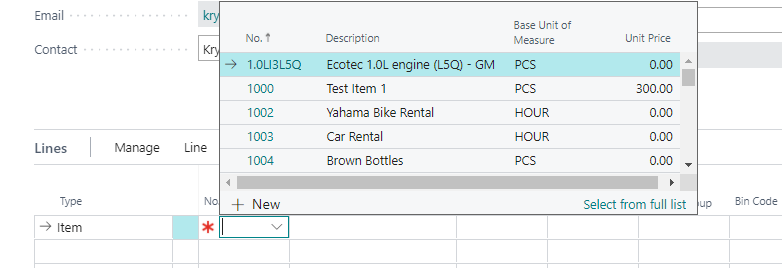
    pastedimage1616782500283v1.png

    Below is what Microsoft says about Search:

    Business Central applies the search criteria to all fields that are visible on the page. If a field has been hidden, such as by using personalization, search won't consider this field. Search criteria are applied to fields only if their data type matches that of the search criteria. For example, searching for the term today will search all text and code fields for the literal value "today", and also any date fields where today is evaluated as an expression for the current date, but won't search in any numeric fields.

    Solution:

    In order to work that, we may have to see the below fieldGroups" defined on the Item table = 27

    Anyhow, I did not tried to change this. Not sure if this can be changed to add Search Description field then, this field should appear on PO--> Item No. lookup
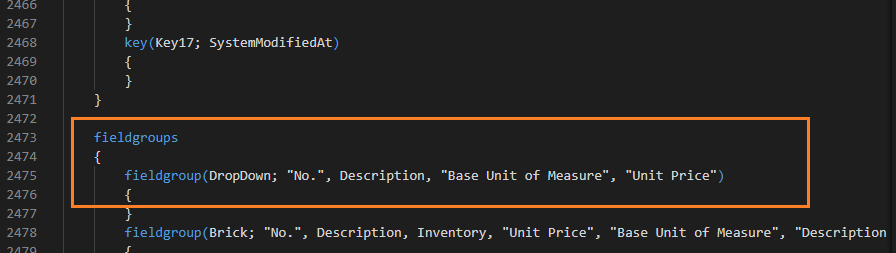
    pastedimage1616782710144v2.png

Under review

Thank you for your reply! To ensure a great experience for everyone, your content is awaiting approval by our Community Managers. Please check back later.

Helpful resources

Quick Links

Responsible AI policies

As AI tools become more common, we’re introducing a Responsible AI Use…

Neeraj Kumar – Community Spotlight

We are honored to recognize Neeraj Kumar as our Community Spotlight honoree for…

Leaderboard > Small and medium business | Business Central, NAV, RMS

#1
OussamaSabbouh Profile Picture

OussamaSabbouh 3,177

#2
Jainam M. Kothari Profile Picture

Jainam M. Kothari 2,467 Super User 2025 Season 2

#3
YUN ZHU Profile Picture

YUN ZHU 1,435 Super User 2025 Season 2

Last 30 days Overall leaderboard

Featured topics

Product updates

Dynamics 365 release plans
