web
You’re offline. This is a read only version of the page.
close
Skip to main content

Announcements

No record found.

News and Announcements icon
Community site session details

Community site session details

Session Id :
Small and medium business | Business Central, N...
Suggested Answer

Problem with payment method mapping in BC/Shopify

(7) ShareShare
ReportReport
Posted on by 457
Hi, 
 
I have problems with the payment method mapping in Shopify Shop in BC. 
 
When the order from shopify comes to shopify order in BC, the payment method is always empty:
 
 
And when I look at the payment method mapping in the shop I have added klarna (we only have klarna in shopify) it looks like this: 
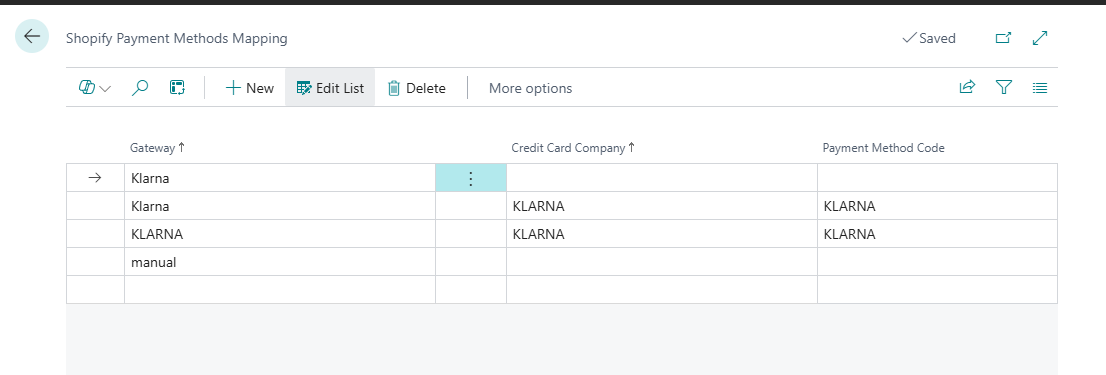
 
We have Klarna three klarna? and when I add klarna in the payment methd code in the empty one and we get a new order from shopify one more gateway klarna which then will be empty in the payment method code. 
 
1. what I'm I doing wrong?
2. How can I get a value in payment method on the shopify order?
3. we want to have payment method invoice on the customer card, but when our customer orders from shopify we want the order to have klarna. How do I do that?
I have the same question (0)
  • Suggested answer
    OussamaSabbouh Profile Picture
    12,803 Super User 2026 Season 1 on at
    Hello,
     
    BC creates a new gateway record each time Shopify sends a name variant (e.g., Klarna, KLARNA), leaving the Payment Method Code blank.
    Keep one line for Klarna in Shopify Payment Method Mapping, set its Payment Method Code = KLARNA, and delete duplicates.
    Shopify orders will then show Klarna as the payment method; other sales stay as Invoice.
     
    Regards,
    Oussama Sabbouh
  • Suggested answer
    Jainam M. Kothari Profile Picture
    15,732 Super User 2026 Season 1 on at
    Hello,
     
    Your issue occurs because Shopify sends different Klarna gateway names (e.g., klarna, klarna_payments, klarna_checkout), and if these aren’t mapped correctly in Shopify Shop → Payment Method Mapping in Business Central, the Payment Method field stays empty.
     
    To fix this, identify all Klarna gateway names from Shopify orders and map each to the same BC Payment Method Code (e.g., KLARNA).
     
    This ensures Shopify orders show Klarna while your Customer Card can still default to INVOICE for internal orders, as Shopify mapping overrides the customer setting.
  • Suggested answer
    Khushbu Rajvi. Profile Picture
    22,128 Super User 2026 Season 1 on at
  • Suggested answer
    YUN ZHU Profile Picture
    99,055 Super User 2026 Season 1 on at

Under review

Thank you for your reply! To ensure a great experience for everyone, your content is awaiting approval by our Community Managers. Please check back later.

Helpful resources

Quick Links

Introducing the 2026 Season 1 community Super Users

Congratulations to our 2026 Super Stars!

Congratulations to our 2025 Community Spotlights

Thanks to all of our 2025 Community Spotlight stars!

Leaderboard > Small and medium business | Business Central, NAV, RMS

#1
OussamaSabbouh Profile Picture

OussamaSabbouh 1,926 Super User 2026 Season 1

#2
YUN ZHU Profile Picture

YUN ZHU 1,158 Super User 2026 Season 1

#3
Khushbu Rajvi. Profile Picture

Khushbu Rajvi. 533 Super User 2026 Season 1

Last 30 days Overall leaderboard

Featured topics

Product updates

Dynamics 365 release plans
