Hello all,
We are currently facing an issue in Dynamics 365 Business Central (SaaS) where a custom table (e.g., Table 50010) is not visible or accessible, even though our license clearly allows the use of 20 custom tables, as per:
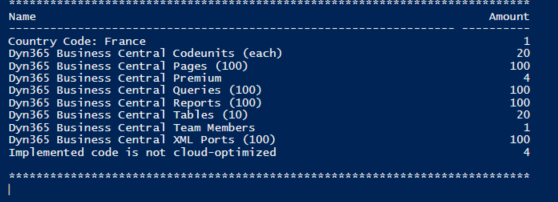
This indicates we have a valid license for 20 custom tables (2 packs of 10). However, when deploying or accessing a table like 50010, the system does not display it or allow access via pages.
Note: I'm able to access between 50000-50009.
If requesting support, please provide the following details to help with troubleshooting:
Error message:
Sorry, the current permissions prevented the action. (Table 50010 )
Page Check Books has to close.
To view details about your permissions, see the Effective Permissions page. To report a problem, refer to the following server session ID: '29'.
Internal session ID:
f932a3e7-54e1-4fd3-be18-c4cf320920e9
Application Insights session ID:
31303f1f-9997-45be-80fd-4087f62527b1
Client activity ID:
a84bc77f-b40d-ba3c-d997-4cfe67c6f830
Time stamp on error:
2025-07-22T03:24:40.5775070Z
User telemetry ID:
73a4cdfd-17bb-4cd4-8024-d26a4ce30342


