web
You’re offline. This is a read only version of the page.
close
Skip to main content

Notifications

Announcements

Community site session details

Community site session details

Session Id :
Small and medium business | Business Central, N...
Answered

how to check if field exists by name in a table business central

(1) ShareShare
ReportReport
Posted on by 120

Hi All,

How can I check if a Field exist by name in a selected table. for example, I need to check if  'Document Type' field exists in Customer table?

Please Advice,

Regards,

Nalin.

I have the same question (0)
  • Suggested answer
    JAngle Profile Picture
    150 on at

    From the web client you can use page inspection: docs.microsoft.com/.../across-inspect-page

    From VS code you have the ability to reference the field list when you declare the table. There are handy vs code extensions to do this in other ways too. AZ AL is a good one.

  • Verified answer
    Tabrez Ajaz Profile Picture
    787 on at

    Hi Nalin,

    As Josh Suggested, You can do page inspection on the web client, or you can also check in VS Code by declaring a variable or using AZ AL Dev Tool.

    But as far I can understand you want to know how you can check if a certain field exists in the customer/any table, this check may be on runtime if it is then here is the procedure/code that you can use, just pass the table name and the field name that you want to search, this procedure will return true if the field is available in the table otherwise return false:

            
        procedure CheckFieldExistinGivenTable(TableName: Text; FieldName: Text): Boolean
        var
            RecField: Record Field;
        begin
            RecField.Reset();
            RecField.SetRange(TableName, TableName);
            RecField.SetRange(FieldName, FieldName);
            if RecField.FindFirst() then
                exit(true)
            else
                exit(false);
        end;
     
    The following link will give you a brief detail about Virtual Table [Field (Table ID - 2000000041)
    https://docs.microsoft.com/en-us/dynamics-nav/field-virtual-table 
    Happy Coding
  • Nalin.karu Profile Picture
    120 on at

    Hi  Josh Anglesea ,

    Thanks for your quick reply.

    It seems I haven't ask my question properly.Let me explain my requirement in detail.

    I'm developing AL extension. It read an excel uploaded by user and insert record to a table say, Customer table. First row of the excel contain field names. I want to validate weather these fields are in the Customer table and if not I'm going give a message for mismatching fields. for that, I need to check if these fields(columns of first row) exist by name in the Customer table.
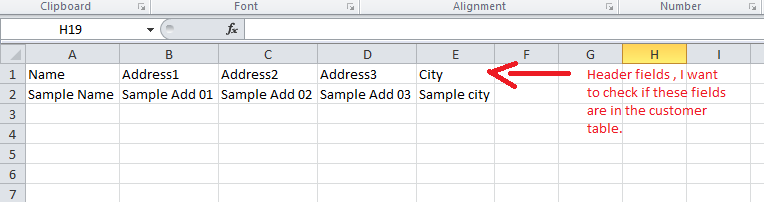
    sc.png

  • Nalin.karu Profile Picture
    120 on at

    Hi Tabrez Ajaz,

    This is what i exactly searching for.Many thanks for sharing code sample. I will check code and verify it.

    Thanks,

    Nalin.

  • Suggested answer
    Tabrez Ajaz Profile Picture
    787 on at

    Welcome Nalin, yeah sure check this code in your extension after testing verify it so it can help others.

    You can directly go to the below URL to see all the fields along with their table names:
    http://YOURBCWEBCLIENTURL/?table=2000000041

Under review

Thank you for your reply! To ensure a great experience for everyone, your content is awaiting approval by our Community Managers. Please check back later.

Helpful resources

Quick Links

Responsible AI policies

As AI tools become more common, we’re introducing a Responsible AI Use…

Congratulations to our 2025 Community Spotlights

Thanks to all of our 2025 Community Spotlight stars!

Leaderboard > Small and medium business | Business Central, NAV, RMS

#1
OussamaSabbouh Profile Picture

OussamaSabbouh 2,164 Super User 2026 Season 1

#2
Dhiren Nagar Profile Picture

Dhiren Nagar 1,242 Super User 2026 Season 1

#3
YUN ZHU Profile Picture

YUN ZHU 1,197 Super User 2026 Season 1

Last 30 days Overall leaderboard

Featured topics

Product updates

Dynamics 365 release plans
