web
You’re offline. This is a read only version of the page.
close
Skip to main content

Announcements

No record found.

News and Announcements icon
Community site session details

Community site session details

Session Id :
Microsoft Dynamics GP (Archived)

Security Task ID

(0) ShareShare
ReportReport
Posted on by

Hi,

Does someone know which Security Task ID should give the possibility to do account assighments in an Organizational Structure? Because it looks like i do not have this possibility in the "Card" menu (see below)
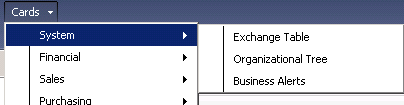
Thank you for your help

*This post is locked for comments

I have the same question (0)
  • Verified answer
    Heather Roggeveen Profile Picture
    9,150 on at

    Hi Richard

    It is on task CARD_0002.

    FYI - I found that out in seconds by using the Support Debugging Tool - do you know about that tool and do you have it installed?  In my opinion a MUST for every site.  I first came across it when trying to troubleshoot security.  It has a wonderful security profiler.  You just open the window with it running and it tells you exactly what tasks are needed to be assigned and who has access etc.

    Cheers

    Heather

  • Verified answer
    Mahmoud Saadi Profile Picture
    32,738 on at

    That's right, CARD_0002* (Maintain organizational tree)

    When it comes to finding the security roles and tasks associated with specific window, two methods are highly recommended for me which are:

    1- Support debugging tool

    2- Security Task/Role associated with a Dynamics GP Window. By JIVTESH SINGH

    Let us know if you need any further assistance, 

  • rmalouin Profile Picture
    on at

    Thank you for your help Heather,

    Here is the selection we had for "Card_002"

    I had also activated choice "Organizational Structure assignment", but it still unappear in the "Card" menu.

    And i use a "Poweruser" account.

    What should i do?

    Thanks for all

  • Heather Roggeveen Profile Picture
    9,150 on at

    Hi

    Have you set the Organisational Structure up?  Not sure if it is a factor - mine is just working and I can't see how to "unset" it to test.

    Tools --> Setup --> System --> Organisational Structure

    Check that you have some levels defined - it may have an impact.

  • rmalouin Profile Picture
    on at

    Hi,

    Yes the Organizational Structure is setup. And i made the Relationship as well.

    Thanks for your help

  • Heather Roggeveen Profile Picture
    9,150 on at

    Hi Richard

    I just spotted this post you started that gave me the answer to the above question:

    community.dynamics.com/.../333185.aspx

    I have just clicked you are after the "Assignment" window rather than what we suggested.  I will have a look to see whether it needs to have "sa" style privileges.

  • Heather Roggeveen Profile Picture
    9,150 on at

    I can't see why  you wouldn't be able to see it - can you see it if you log in as sa?

  • rmalouin Profile Picture
    on at

    Hi Heather,

    I used the "sa" account and i'm unable to see it. :-(

    Thank you

Under review

Thank you for your reply! To ensure a great experience for everyone, your content is awaiting approval by our Community Managers. Please check back later.

Helpful resources

Quick Links

Introducing the 2026 Season 1 community Super Users

Congratulations to our 2026 Super Stars!

Congratulations to our 2025 Community Spotlights

Thanks to all of our 2025 Community Spotlight stars!

Leaderboard > 🔒一 Microsoft Dynamics GP (Archived)

#1
HP-11021721-0 Profile Picture

HP-11021721-0 1

Last 30 days Overall leaderboard

Featured topics

Product updates

Dynamics 365 release plans
