web
You’re offline. This is a read only version of the page.
close
Skip to main content

Notifications

Announcements

No record found.

Community site session details

Community site session details

Session Id :
Supply chain | Supply Chain Management, Commerce
Suggested Answer

Correct/Cancel packing slip sales order

(0) ShareShare
ReportReport
Posted on by 25

Hello everyone,

We're using D365 Finance and operations product version 10.0.20 (10.0.886.109) including the advanced warehouse management.

After posting the packing slip from the PACK transaction, we've noticed an error in the item description. We've adjusted the item description on the item, but now want to correct the packing slip.

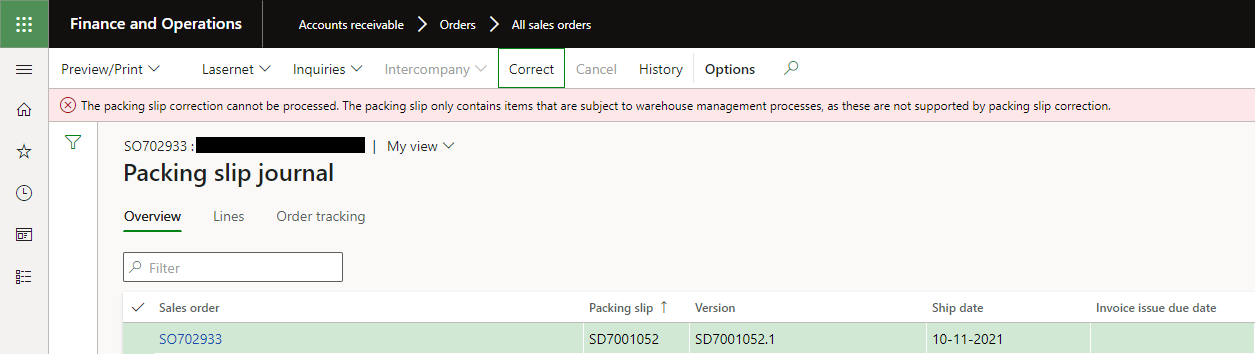
The Cancel button is greyed out and Correct gives us the error message: "The packing slip correction cannot be processed. The packing slip only contains items that are subject to warehouse management processes, as these are not supported by packing slip correction."
pastedimage1636542739477v1.png

Other topics mention that because of the warehouse management processes, the only way to cancel the packing slip is via the load. However, the Cancel packing slips button is grayed out.

pastedimage1636543040356v2.png

Confirming the Outbound shipment will make the Reverse shipment confirmation button available, which makes the Confirm Outbound shipment button available again, creating a never ending loop.

I've also tried to Reduce picked quantity on the shipment details, but this results in an error "Quantity X cannot be reversed because the items already have been reversed."

There are no open lines on the inventory transactions, so no reservations, markings or inventory blockings. Also, we are not using serialized items.

I have the same question (0)
  • WillWU Profile Picture
    22,361 on at

    Hi partner,

    To correct posted packing slips for items that are enabled for advanced warehouse management (WMS), you must do the posting from the load, not directly from the order.

    And please follow the blog:

    msdynamicsworld.com/.../reverse-transactions-microsoft-dynamics-365-finance-and-operations-part-1

  • Alico64 Profile Picture
    25 on at

    Hi Will,

    Thanks for your reply! I indeed found that blog, but unfortunately it doesn't solve the issue I'm having with this particular order.

    For other orders that need to be reversed, it works in this order:

    - Confirm outbound shipment on the load details

    - Cancel packing slips on the load details (brings sales order status to Open)

    - Reverse shipment confirmation on the load details (brings load status to In process)

    - Re-open container (not 100% sure if this is needed)

    - Reduce picked quantity (to put items back on stock)

    Just in this case, the "Cancel packing slips" is not appearing, and also the "Reverse work" is grayed out both before and after the shipment has been confirmed.

    I'm afraid we'll have to add negative sales order lines, register the products back on stock and deliver out again. Unfortunately, that will make a big mess on the invoicing part.

    I must add that we are not using the load work bench, nor are we using the full potential around loads and shipments. We always print the packing slip from the PACK transaction or directly from the order.

    Kind regards,

    Arnold

  • twegrowski Profile Picture
    10 on at

    Were you able to find a solution to this? I have the same issue.

  • Suggested answer
    ColbyGallagher Profile Picture
    3,666 on at

    twegrowski you and @Arnold de Vries picked the items using warehouse management processes (Work), then posted the packing slip from the Sales order header, or using the periodic job at sales and marketing -> order shipping -> post packing slip.  Either way, those methods don't write a record to WHSLoadTableCustPackingSlipJour, which is the table that maintains the relationship between the Load and the packing slip journal, and enables the "Cancel packing slip" button on the load.   Additionally, the "Correct" and "Cancel" button on the packing slip journal both check to see if warehouse processes were used, and if so deny the action.  

    Your options are:

    1.) Insert records into WHSLoadTableCustPackingSlipJour and use the "Cancel packing slip" button on the load.  I wouldn't really recommend this approach

    2.) Add negative quantity lines to the sales order, register & receive the inventory for the net difference OR if a batch / serial tracked item needs swapped out, you'll also need a positive quantity line to ship against with the correct tracking dimensions.  

  • Blanc Richard Profile Picture
    10 on at

    Hello,

    I face the same issue. It looks like we miss a periodic task in WMS to post packing slip on "loaded" Loads...

Under review

Thank you for your reply! To ensure a great experience for everyone, your content is awaiting approval by our Community Managers. Please check back later.

Helpful resources

Quick Links

Responsible AI policies

As AI tools become more common, we’re introducing a Responsible AI Use…

Neeraj Kumar – Community Spotlight

We are honored to recognize Neeraj Kumar as our Community Spotlight honoree for…

Leaderboard > Supply chain | Supply Chain Management, Commerce

#1
Siv Sagar Profile Picture

Siv Sagar 266 Super User 2025 Season 2

#2
Laurens vd Tang Profile Picture

Laurens vd Tang 213 Super User 2025 Season 2

#3
André Arnaud de Calavon Profile Picture

André Arnaud de Cal... 140 Super User 2025 Season 2

Last 30 days Overall leaderboard

Featured topics

Product updates

Dynamics 365 release plans
