web
You’re offline. This is a read only version of the page.
close
Skip to main content

Announcements

No record found.

News and Announcements icon
Community site session details

Community site session details

Session Id :
Microsoft Dynamics CRM (Archived)

Can not update required bundle item in D365 v9.0

(0) ShareShare
ReportReport
Posted on by 30

Hi All,

I'm facing below issue while assigning Opportunity to different user:

Current Dynamics 365 version:

Microsoft Dynamics 365
Version 1612 (9.0.2.449) (DB 9.0.2.449) online
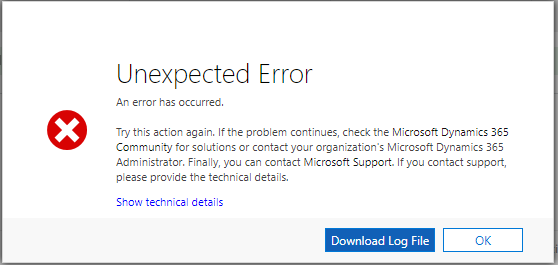
 Can-not-update-required-bundle-item.png

Message: Can not update required bundle item
StackTrace: 
at System.Environment.GetStackTrace(Exception e, Boolean needFileInfo)
at System.Environment.get_StackTrace()
at Microsoft.Dynamics.Solution.Common.CrmException.BuildOrganizationServiceFault(Exception innerException, Int32 errorCode, String message)
at Microsoft.Dynamics.Solution.Common.CrmException..ctor(String message, Exception innerException, Int32 errorCode, Boolean isFlowControlException, Boolean enableTrace)
at Microsoft.Dynamics.Solution.Common.CrmException..ctor(String message, Exception innerException, Int32 errorCode, Boolean isFlowControlException)
at Microsoft.Dynamics.Solution.Common.CrmException..ctor(String message)
at Microsoft.Crm.Sales.ObjectModel.QOIDetailService.ValidateUpdateforRequiredBundleItem(Entity qoiDetail, IPluginContext context)
at Microsoft.Crm.Sales.ObjectModel.QOIDetailService.ValidateBeforeUpdate(Entity entity, IPluginContext context, Bool...)., Correlation Id: 7f0da793-14eb-45a8-b406-6db8abcf3023, Initiating User: 6f7d2902-f4c5-4162-bc66-269c39b7f665
Exiting Microsoft.Dynamics.Sales.Plugins.PreOperationOpportunityLineUpdate.Execute(), Correlation Id: 7f0da793-14eb-45a8-b406-6db8abcf3023, Initiating User: 6f7d2902-f4c5-4162-bc66-269c39b7f665
</TraceText>
</OrganizationServiceFault>


Steps to replicate issue:

  1. I've created "Mouse" product record and published it.
  2. Then created "Desktop Setup" as Bundle Product.
  3. Added "Desktop Setup" as Opportunity Line Item in Opoprtunity.
  4. Now, try to change the Owner of the Opportunity to User B and it gives above error.

Able to replicate same in trial D365 environments v9.0.

I've tried same on below version of Dynamics 365 and it works without any issue:

Microsoft Dynamics 365
Version 1612 (8.2.2.2060) (DB 8.2.2.2060) online


Thanks!

Akshay

*This post is locked for comments

I have the same question (0)
  • Suggested answer
    Drew Poggemann Profile Picture
    4 on at

    Hi Akshay,

    I am using 9.0.2.449 online and I repeated the steps:

    1.  Created Mouse and assigned to Retail Price List and Published

    2.  Created Desktop Setup as Bundle (with only the Mouse Product as a bundled product and required), added to Retail Price List and Published

    3.  Added line to Opportunity and it worked successfully

    Screen-Shot-2018_2D00_07_2D00_21-at-5.33.26-AM.png

    Hopefully this helps.

  • akshay.m92 Profile Picture
    30 on at

    Hi Drew,

    Are you able to assign same opportunity to different user now by changing value in Owner field ?

    Thanks,

    Akshay

  • Suggested answer
    Drew Poggemann Profile Picture
    4 on at

    Sorry!  I totally missed the last step. :)

    I did this and it failed with error as well.  I think you found a bug!

  • akshay.m92 Profile Picture
    30 on at

    Thank you Drew, for trying the steps and hope this bug will be resolved soon :)

  • MezMarianne Profile Picture
    1,267 on at

    I have the same problem for a client using 2016 on prem. Trying to update a field on a required bundle item.

    "Required bundle item cannot be updated"

    Did you find a solution to your problem?

  • Suggested answer
    akshay.m92 Profile Picture
    30 on at

    Hi Marianne,

    I received below feedback from microsoft support and it works for me.

    1. Go to Settings -> Customization -> Customize the system

    2. Entities -> Opportunity- > 1:N relationships -> Open product_opportunities

    Can-not-update-required-bundle-item-in-D365-v9.0_5F00_2.png

    3. In the Navigation Pane item for Primary Entity section

    Change display option to "Use Plural Name"  

    Can-not-update-required-bundle-item-in-D365-v9.0_5F00_2.png

    4. Save -> Publish All Customizations

    Hopefully that helps.

  • MezMarianne Profile Picture
    1,267 on at

    Hi Akshay

    This sound like the weirdest fix. I think I would have tried 1000 other things before changing the plural name. But I will of course give it a go. Thank you very much.

    /Marianne

  • MezMarianne Profile Picture
    1,267 on at

    Alas, changing this setting did nothing for my opportunity products.

    MD_5F00_Support-253.png

  • akshay.m92 Profile Picture
    30 on at

    Did you publish customizations using Internet Explorer browser?

  • MezMarianne Profile Picture
    1,267 on at

    Yes, and I can assign the opportunity to another user which seemed to be your initial problem. My issue is that I need to change some fields on the line item.

Under review

Thank you for your reply! To ensure a great experience for everyone, your content is awaiting approval by our Community Managers. Please check back later.

Helpful resources

Quick Links

Introducing the 2026 Season 1 community Super Users

Congratulations to our 2026 Super Stars!

Congratulations to our 2025 Community Spotlights

Thanks to all of our 2025 Community Spotlight stars!

Leaderboard > 🔒一 Microsoft Dynamics CRM (Archived)

#1
JS-09031509-0 Profile Picture

JS-09031509-0 3

#2
AS-17030037-0 Profile Picture

AS-17030037-0 2

#2
Mark Eckert Profile Picture

Mark Eckert 2

Last 30 days Overall leaderboard

Featured topics

Product updates

Dynamics 365 release plans
