web
You’re offline. This is a read only version of the page.
close
Skip to main content

Notifications

Announcements

No record found.

Community site session details

Community site session details

Session Id :
Microsoft Dynamics CRM (Archived)

have campaign name in the contact entity .

(0) ShareShare
ReportReport
Posted on by 19

Hallo together,

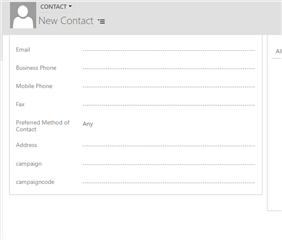
i have two field in the entity contact the first one is a text field and the second one is a lookup field (entity Campaign). 

i try to give a code from a campaign in the text field and i want to have automticly  the name of this  campaign in the lookup field.

can sameone help me thanx.
pastedimage1563351480298v1.png1072.Unbenannt1.PNG

*This post is locked for comments

I have the same question (0)
  • Suggested answer
    StefanS365 Profile Picture
    3,575 Most Valuable Professional on at

    Hi Hedi,

    Why not use only the lookup field to Campaign for this, and be sure the search fields include the Campaign Code field (is default).

    So you can enter the code in the lookup field and it will find the Campaign record.

    2019_2D00_07_2D00_17-10_5F00_33_5F00_24_2D00_Solution_5F00_-Default-Solution-_2D00_-Microsoft-Dynamics-365.png

  • hedi bouneni Profile Picture
    19 on at

    hallo stefan,

    It is not the perfect way

    example : u have a campain with the code 123 and another with the code 1234 and another with code 12345

    and u need the name of the campaign wit the code 123. if u give the code 123 in the lookup u will see the 3 name of compaign with the code (123,1234,12345) .

    thanx for your opinion

  • gdas Profile Picture
    50,091 Moderator on at

    If my understanding is correct you want to display campaign code in the contact entity on select of campaign lookup. If this is your requirement , I would not recommend to create new field CampainCode  in the contact entity as creating any additional field you need to do lot of additional task to sync the data with campaign entity. Let say in future you change the campaign code or name  , in that case you need to update also the new field.

    So  better to  create quick view form in campaign entity with campaign code   and  add the quick view form in the contact entity. Hope this make sense  -

    www.websan.com/.../720-create-d365-quick-view-forms-in-3-easy-steps

  • Suggested answer
    StefanS365 Profile Picture
    3,575 Most Valuable Professional on at

    Hallo Hedi,

    You need javascript for this or the Auto Complete custom control.

    See thread where Goutam also replied to:

    community.dynamics.com/.../how-to-implement-autocomplete-functionality-in-dynamics-crm-v9-uci

Under review

Thank you for your reply! To ensure a great experience for everyone, your content is awaiting approval by our Community Managers. Please check back later.

Helpful resources

Quick Links

Responsible AI policies

As AI tools become more common, we’re introducing a Responsible AI Use…

Neeraj Kumar – Community Spotlight

We are honored to recognize Neeraj Kumar as our Community Spotlight honoree for…

Leaderboard > 🔒一 Microsoft Dynamics CRM (Archived)

#1
SA-08121319-0 Profile Picture

SA-08121319-0 4

#1
Calum MacFarlane Profile Picture

Calum MacFarlane 4

#3
Alex Fun Wei Jie Profile Picture

Alex Fun Wei Jie 2

Last 30 days Overall leaderboard

Featured topics

Product updates

Dynamics 365 release plans