web
You’re offline. This is a read only version of the page.
close
Skip to main content

Notifications

Announcements

No record found.

Community site session details

Community site session details

Session Id :
Small and medium business | Business Central, N...
Answered

assigning global dimensions

(0) ShareShare
ReportReport
Posted on by 113

Greetings and thanks in advance for any help you can give me! I'm having trouble fixing my global dimensions.

I have set up seven total dimensions and added their dimensions values:
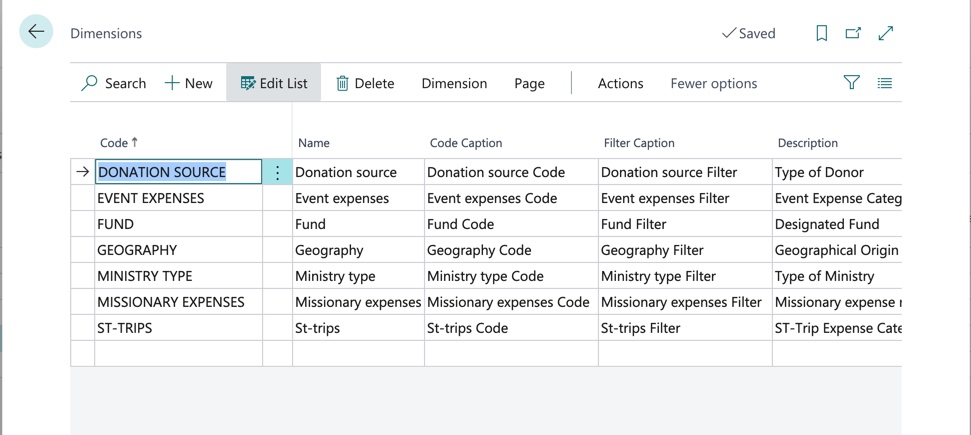
Image-9_2D00_13_2D00_21-at-9.08-AM.jpg

I've named five of them as shortcut dimensions:

Image-9_2D00_8_2D00_21-at-8.29-AM.jpg

The only way I see to define the global dimensions is with the "change global dimensions window," but when I try that it obviously expects to have something already defined to change from. There must be something simple that I'm missing, but after many hours of searching, I have found nothing explaining how to define global dimensions. I would be most grateful for any help you could give!

Image-9_2D00_8_2D00_21-at-8.30-AM.jpg

I have the same question (0)
  • Suggested answer
    MahGah Profile Picture
    15,529 on at

    Hi

    Are you trying to define global dimension after going live? I mean you did not set any dimension up before go live and now you want to set them up? if this is correct I hope the following article help. 

    https://yzhums.com/5983/

  • Atahualpa Profile Picture
    113 on at

    Thanks for the response. I'll take a look at the article.

    We have not gone live yet. Still just in set up.

  • Suggested answer
    MahGah Profile Picture
    15,529 on at

    Ok , then you are not missing anything

    All you need to do is in "Change Global Dimensions" define global dimension and you should be able to save it and be done with it. see follow

    help2016.eos-solutions.it/.../tskSetUpGlobalDimensions.htm

    www.cbsi-corp.com/.../NA2009_05_Setup_Dimensions.pdf

  • Atahualpa Profile Picture
    113 on at

    Ha! So all I needed to do was click the "start" button. Thank you. That solved my problem. I knew it had to be something simple and obvious!

Under review

Thank you for your reply! To ensure a great experience for everyone, your content is awaiting approval by our Community Managers. Please check back later.

Helpful resources

Quick Links

Responsible AI policies

As AI tools become more common, we’re introducing a Responsible AI Use…

Neeraj Kumar – Community Spotlight

We are honored to recognize Neeraj Kumar as our Community Spotlight honoree for…

Leaderboard > Small and medium business | Business Central, NAV, RMS

#1
OussamaSabbouh Profile Picture

OussamaSabbouh 3,229

#2
Jainam M. Kothari Profile Picture

Jainam M. Kothari 1,867 Super User 2025 Season 2

#3
YUN ZHU Profile Picture

YUN ZHU 1,153 Super User 2025 Season 2

Last 30 days Overall leaderboard

Featured topics

Product updates

Dynamics 365 release plans
