web
You’re offline. This is a read only version of the page.
close
Skip to main content

Notifications

Announcements

No record found.

Community site session details

Community site session details

Session Id :
Microsoft Dynamics CRM (Archived)

Set night shift work hours for any user

(0) ShareShare
ReportReport
Posted on by

Hi All,

We want to use the OOB work hours entity for the users in our support CRM Org. But while scheduling their weekly schedule we found that one cannot set the hours beyond midnight. If I want to set the night shift for an agent who works from 10 PM to 6AM then how can we configure it in CRM. Appreciate the responses.
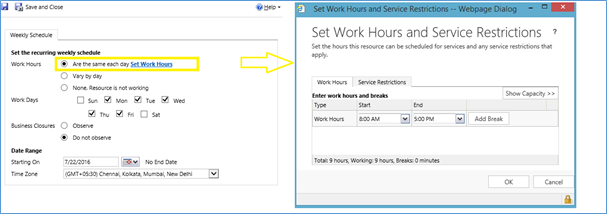
set work hours and service restrictions

Thanks,

Sanchita

*This post is locked for comments

I have the same question (0)
  • Suggested answer
    Thomas David Dayman Profile Picture
    11,323 on at

    Hi Sanchita,

    I had a look for you and found that there is no way to do this. Its because you are going across 2 days rather than 1. I think the only way to do this is to make there working hours 24 hours.

    Are you using the Service Calendar or Field Service?

  • Community Member Profile Picture
    on at

    Thanks Thomas for looking into it. We are trying to get the user's availability in a plugin from his work hours and assign the case if user is available. If we mark the night shift users available for 24 hours then there will wrong case assignments. Any other solution to this issue?

  • Thomas David Dayman Profile Picture
    11,323 on at

    I think your solution is the only way. If you were using field Service then you could use a booking rule to check if the job is out of hours. But as you are using the service calendar then plugin will be the only way.

  • Suggested answer
    gdas Profile Picture
    50,091 Moderator on at

    Hello Sanchita ,

    As per Microsoft the you can set the work hours for a single day , please have a look below reference - 

    https://docs.microsoft.com/en-us/dynamics365/customer-engagement/customer-service/set-work-hours-resource

    2821.bh.png

    Seems this was restricted by design , you can not set work hours which has end time is earlier then start time or you can say two day work hours .

    However I am thinking some alternate way  let say your night shift working hour is 17:00 PM to  next day 4:00 AM. You can set like this 

    00:00 AM to 4:00 AM  -> Work Hours at morning 

    4:00 AM to 17:00 PM --> Non working Hour or Break

    17:00 AM to 00:0 AM --> Working hour 

    Have a look below screenshot , I hope this may be resolved your issue . Not sure how it will impacted in the business scenario as I have not tried , let me know .

    2821.bh.png

  • Community Member Profile Picture
    on at

    Hi Goutam,

    Thanks for the suggestion. I've already tried to give work hours by distributing it into 2 days with 13-14 hours break. But then in plugin I am getting that agent's availability as 24 hours, in break time also agent will get the cases in this scenario.

    Thanks,

    Sanchita

  • Community Member Profile Picture
    on at

    Hi Thomas, in Field Service can we give night shift work hours as per the my requirement. If it's sure then we will look into that. Thanks.

  • Thomas David Dayman Profile Picture
    11,323 on at

    Hi Sanchita,

    Field Service uses the same Work Hours system as what you are using now but you can use booking rules (JavaScript) to prevent a job from being booked on the schedule board at a wrong time.

  • Suggested answer
    chakkay Profile Picture
    594 on at

    Hi Sanchita,

    I had similar business requirement where before assigning a case we need to check the working hours of user's service calendar and based on his availability assigned case to him.

    Since your working hours are from 10 PM to 4 AM Monday till Friday, everyone though below setting might work:

    10311.3.PNG

    But CRM wont consider the break while setting a work schedule for every day and thus you see All day (12 am to 12 am). I have tried setting work hours from 8 AM to 5 PM with 1hr of lunch break in between for 5 working days. But still CRM neglected the break and counted my working hours from 8 AM till 5 PM. This is by CRM design and we are handicapped from including breaks in our weekly working schedule (Hopefully CRM resolve this issue in future release).

    However there is a work around to your problem. My solution sounds wise if you only have few users working during night shifts. If the count of users working night shift is high, then practically my solution is burdensome for your business scenario.

    Try setting the time off hours from 4AM till 10 PM.

    10311.3.PNG

    This will clearly define your working hours are from 12 AM till 4 AM and 10 PM till 12 AM and remaining 18 hrs is break. The main advantage is you if you are able to clearly set the time off hours then your plugin must be able to identify if at present moment the user is available or not. I guess you are using the below class:

    QueryScheduleRequest scheduleRequest = new QueryScheduleRequest
    {
    ResourceId = _key, //_key is GUID of user
    Start = DateTime.UtcNow,
    End = DateTime.UtcNow.AddMinutes(2), //2 minutes gap between start & end date
    TimeCodes = new TimeCode[] { TimeCode.Available }
    };
    QueryScheduleResponse scheduleResponse = (QueryScheduleResponse)service.Execute(scheduleRequest);
    if (scheduleResponse.TimeInfos.Length == 0) {//user is not available between the start & end hours}

    else if (scheduleResponse.TimeInfos.Length > 0) {//user is available}

    This way you can easily check if at present moment the user is working or on break and assign case to him based on your business logic.

    The downside of my solution is you have to manually set the time off hours (4 AM to 10 PM) for all working days to all users working during night shift. If you dont feel this as arduous task, then my solution will exactly fit your business requirement.

  • Suggested answer
    sandeepstw Profile Picture
    4,601 on at

    Hi,

    Please follow this article -

    www.inogic.com/.../scheduling-work-hours-for-users-in-dynamics-crm

  • Community Member Profile Picture
    on at
    [deleted]

Under review

Thank you for your reply! To ensure a great experience for everyone, your content is awaiting approval by our Community Managers. Please check back later.

Helpful resources

Quick Links

Responsible AI policies

As AI tools become more common, we’re introducing a Responsible AI Use…

Neeraj Kumar – Community Spotlight

We are honored to recognize Neeraj Kumar as our Community Spotlight honoree for…

Leaderboard > 🔒一 Microsoft Dynamics CRM (Archived)

#1
SA-08121319-0 Profile Picture

SA-08121319-0 4

#1
Calum MacFarlane Profile Picture

Calum MacFarlane 4

#3
Alex Fun Wei Jie Profile Picture

Alex Fun Wei Jie 2

Last 30 days Overall leaderboard

Featured topics

Product updates

Dynamics 365 release plans
