web
You’re offline. This is a read only version of the page.
close
Skip to main content

Notifications

Announcements

Community site session details

Community site session details

Session Id :
Small and medium business | Business Central, N...
Suggested Answer

SUPER permission conflict in the product environment

(0) ShareShare
ReportReport
Posted on by 5

D365 BC cloud version: 16.3.14085.14287

I'm testing the Item Journal posting in the production environment and got an error like this:
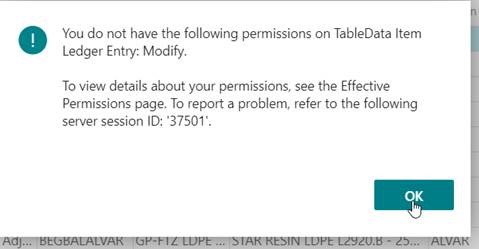
Permissoin-error.jpg

it's just regular Item Journal posting after I calculate and generate the Warehouse Adjustment entries. And I check my Effective Permission and see the conflict with my SUPER permission on the Item Ledger Entries TableData:
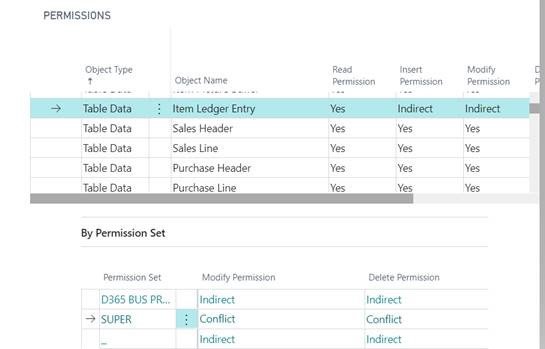
Permission-Conflict.jpg

Then I go back to my sandbox and test item journal posting. It works fine. Here's the Effective Permission for the same login in the sandbox with SUPER permission:
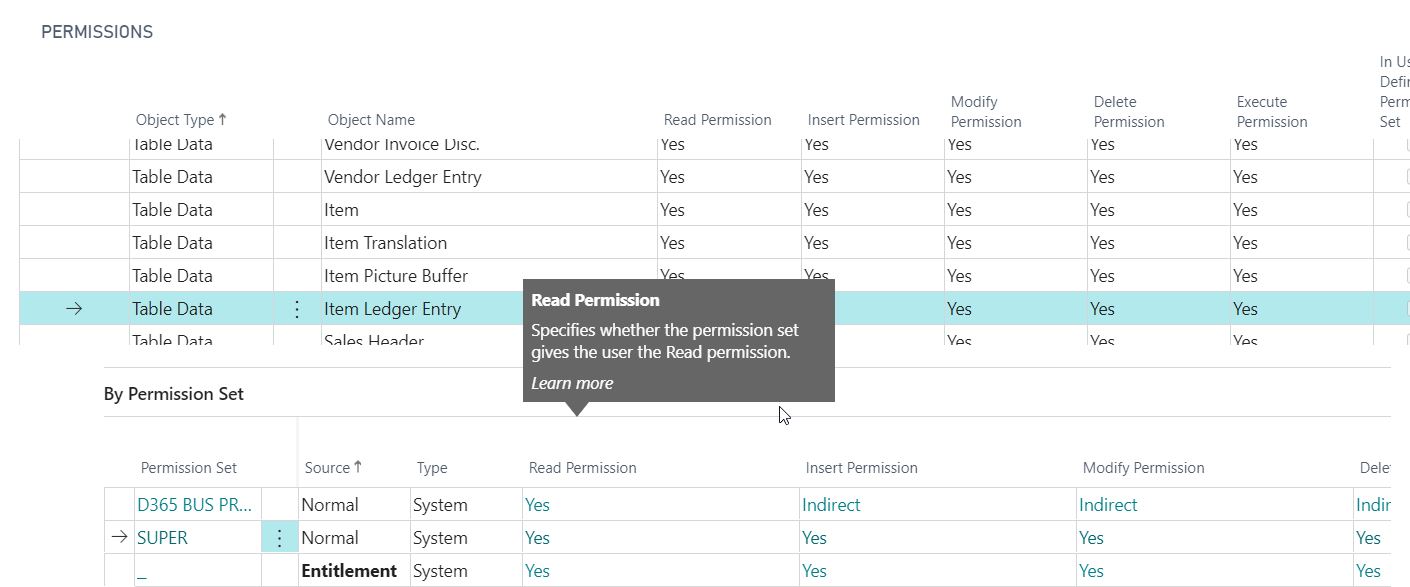
Permission-Conflict_2D00_sandbox.jpg

I wonder why for the same tabledata Item Ledger Entry with the same login, the SUPER permission in the sandbox is different from the production. How do I resolve this issue in the production? 

I have the same question (0)
  • Suggested answer
    Renni Profile Picture
    960 on at

    Is there a user group or specific company mentioned in the main user card ?

  • Suggested answer
    Teddy Herryanto (That NAV Guy) Profile Picture
    14,284 Super User 2025 Season 2 on at

    I am guessing it is because you are not supposed to modify or delete the item ledger entry, especially in Production environment. Microsoft probably setup stricter permission in Production compared to sandbox.

  • Suggested answer
    raelhefn Profile Picture
    on at

    Hi Andy,

    If you can't post item journal with supper permission on production environment, open support ticket with Microsoft. otherwise, please check the custom permission assigned to this permission set. Specially any other tables related to table data to item ledger entry. screenshot from production environment.

    pastedimage1595801052766v1.png

  • Suggested answer
    Teddy Herryanto (That NAV Guy) Profile Picture
    14,284 Super User 2025 Season 2 on at

    Click on the Conflict word. You will be able to see the error message. It is usually related to license.

Under review

Thank you for your reply! To ensure a great experience for everyone, your content is awaiting approval by our Community Managers. Please check back later.

Helpful resources

News and Announcements

Season of Giving Solutions is Here!

Quick Links

Responsible AI policies

As AI tools become more common, we’re introducing a Responsible AI Use…

Neeraj Kumar – Community Spotlight

We are honored to recognize Neeraj Kumar as our Community Spotlight honoree for…

Leaderboard > Small and medium business | Business Central, NAV, RMS

#1
OussamaSabbouh Profile Picture

OussamaSabbouh 1,585

#2
Khushbu Rajvi. Profile Picture

Khushbu Rajvi. 780 Super User 2025 Season 2

#3
YUN ZHU Profile Picture

YUN ZHU 712 Super User 2025 Season 2

Last 30 days Overall leaderboard

Featured topics

Product updates

Dynamics 365 release plans
