web
You’re offline. This is a read only version of the page.
close
Skip to main content

Notifications

Announcements

No record found.

Community site session details

Community site session details

Session Id :
Small and medium business | Business Central, N...
Suggested Answer

Permission sets not applied in effective permission

(0) ShareShare
ReportReport
Posted on by 377

We are having an issue with permission sets and effective permissions.

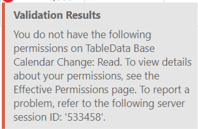
Since a few days, users are getting permission errors on the base calendar change table in the item reclassification journal. They have been using that are of the system for months without any issue.
pastedimage1653489213929v1.png

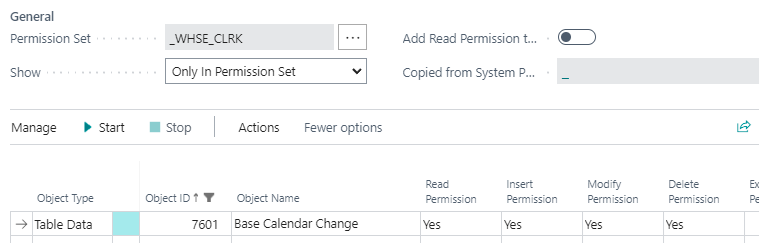
They have a custom permission set that gives access to that table
pastedimage1653489247268v2.png

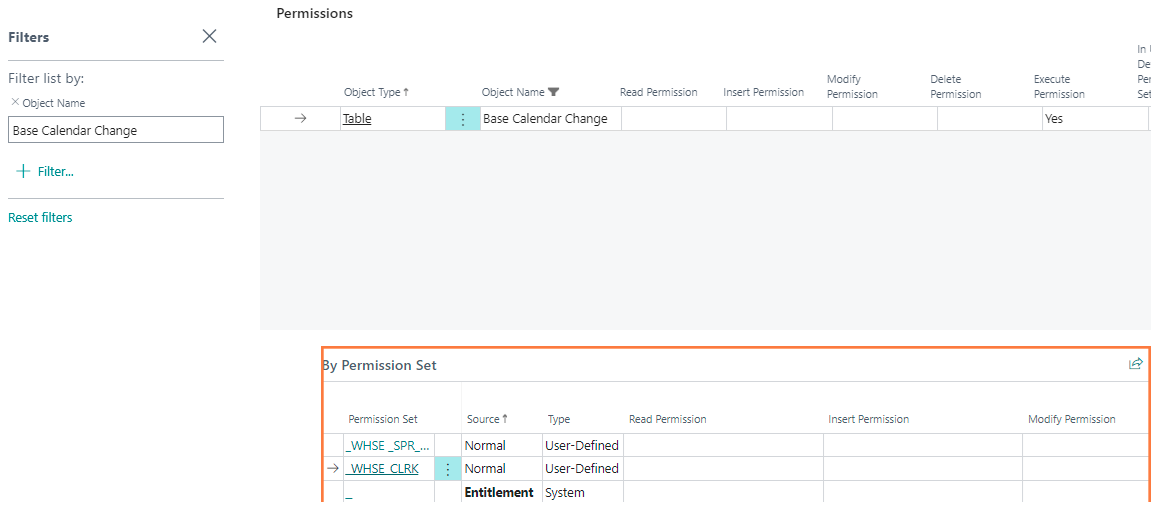
However, in the effective permissions, this is not reflected
pastedimage1653489412019v3.png

What are we missing?

I have the same question (0)
  • Suggested answer
    MahGah Profile Picture
    15,529 on at

    Hi

    Quick question: did you assign this Permission Set to User Group then assigned User to User Group? Or did you add this permission set to each user individually?

    In case of user group can you go to that user group, delete the permission set -> exit -> go back -> add the permission set? Also make sure user is part of user group

    For individual user do the same for each user. Make sure to select correct company.

    I hope this resolve the issue.

  • Juliem Profile Picture
    377 on at

    Permission set was added to user group and then user was assigned to user group

    We've tried what you suggested and it doesn't make any difference

    Still nothing in the effective permissions

  • Suggested answer
    MahGah Profile Picture
    15,529 on at

    Hi

    I hope yzhums  can provide more info ( https://yzhums.com/8417/ ). I tried to replicate this issue and had no success. 

    I created a new permission set -> TableData 7601 -> Create new User Group -> Assigned Permission Set to it -> User Card -> Assign User Group -> Under Permission Set can see that Permission Set -> Then under manage I can see permissions correctly. 

    pastedimage1653515594592v1.png

    pastedimage1653515605562v2.png

    pastedimage1653515622020v3.png

    pastedimage1653515649048v4.png

    pastedimage1653515660289v5.png

  • Juliem Profile Picture
    377 on at

    We do see it as well under the User Card, manage, permissions

    It's under the effective permissions that it's not reflected anymore

  • Juliem Profile Picture
    377 on at

    If we add the D365 BASIC base permission set to the user group, it works

    It looks like the tenant / custom permission set is not being applied properly

  • Suggested answer
    MahGah Profile Picture
    15,529 on at

    Thanks for extra info, it looks strange. Do you have a method to open ticket with Microsoft on this?

  • Juliem Profile Picture
    377 on at

    Yes, opening a ticket will be the next step

    Just thought I would ask here first, just in case

  • Suggested answer
    MahGah Profile Picture
    15,529 on at

    Hi

    Friend of mine mentioned they had similar issue before and the recommendation was do not use character such as _ or - in the name of permission set or description. I do not know if this helps or not but thought to share.

  • Juliem Profile Picture
    377 on at

    We have plenty of other user groups and permission sets using _ and - characters without any issue.

    Also, please note that this permission set has been used for a few months already, without any problem. Nothing was changed on our side.

    Permission error started happening in the past few days only.

    Still digging into this and found something weird

    If I filter on the object ID 7601 in the permission set, based on the value of the Show field (All or Only In Permission Set), I get a different result

    Why???

    Only In Permission Set:

    pastedimage1653572075995v4.png

    All:

    pastedimage1653572141029v5.png

  • MahGah Profile Picture
    15,529 on at

    Hi

    I asked around to see if anyone knows anything and received no answer. I hope MS can provide an answer and please share the answer here.

Under review

Thank you for your reply! To ensure a great experience for everyone, your content is awaiting approval by our Community Managers. Please check back later.

Helpful resources

Quick Links

Responsible AI policies

As AI tools become more common, we’re introducing a Responsible AI Use…

Neeraj Kumar – Community Spotlight

We are honored to recognize Neeraj Kumar as our Community Spotlight honoree for…

Leaderboard > Small and medium business | Business Central, NAV, RMS

#1
OussamaSabbouh Profile Picture

OussamaSabbouh 3,229

#2
Jainam M. Kothari Profile Picture

Jainam M. Kothari 1,867 Super User 2025 Season 2

#3
YUN ZHU Profile Picture

YUN ZHU 1,153 Super User 2025 Season 2

Last 30 days Overall leaderboard

Featured topics

Product updates

Dynamics 365 release plans
