web
You’re offline. This is a read only version of the page.
close
Skip to main content

Announcements

No record found.

News and Announcements icon
Community site session details

Community site session details

Session Id :
Microsoft Dynamics 365 | Integration, Dataverse...
Suggested Answer

Safe "Send e-mail as PDF-file" -documents in Sharepoint

(0) ShareShare
ReportReport
Posted on by
Hello everybody,

We send e-mails with PDF documents attached from the CRM using the "Send e-mail as PDF file" button. (As described here: community.dynamics.com/.../create-pdf-from-a-word-template-and-send-via-mail)

Now I'm trying to save the dynamic PDF documents. I see the sent email including the attachment in the customer's timeline. However, I would prefer to automatically store the documents in our connected Sharepoint in our Order structure in the customer's folder.
Can anyone help me?

Thanks in advance!

I look forward to your comments and help.

Best regards Sharon.
I have the same question (0)
  • Suggested answer
    LuHao Profile Picture
    40,892 on at

    Hi Sharon,

    Save the PDF as an attachment in the note or as a file in the sharepoint site, which is determined by whether the entity has enabled sharepoint Document management.

    • If the entity has not enabled sharepoint Document management, the when the user export to PDF and save to dyanmics 365, it will save as an attachment of the note in the timeline.
    • If the entity has enabled sharepoint Document management, the when the user export to PDF save to dyanmics 365, it will store as a file in the sharepoint site.

    Test:

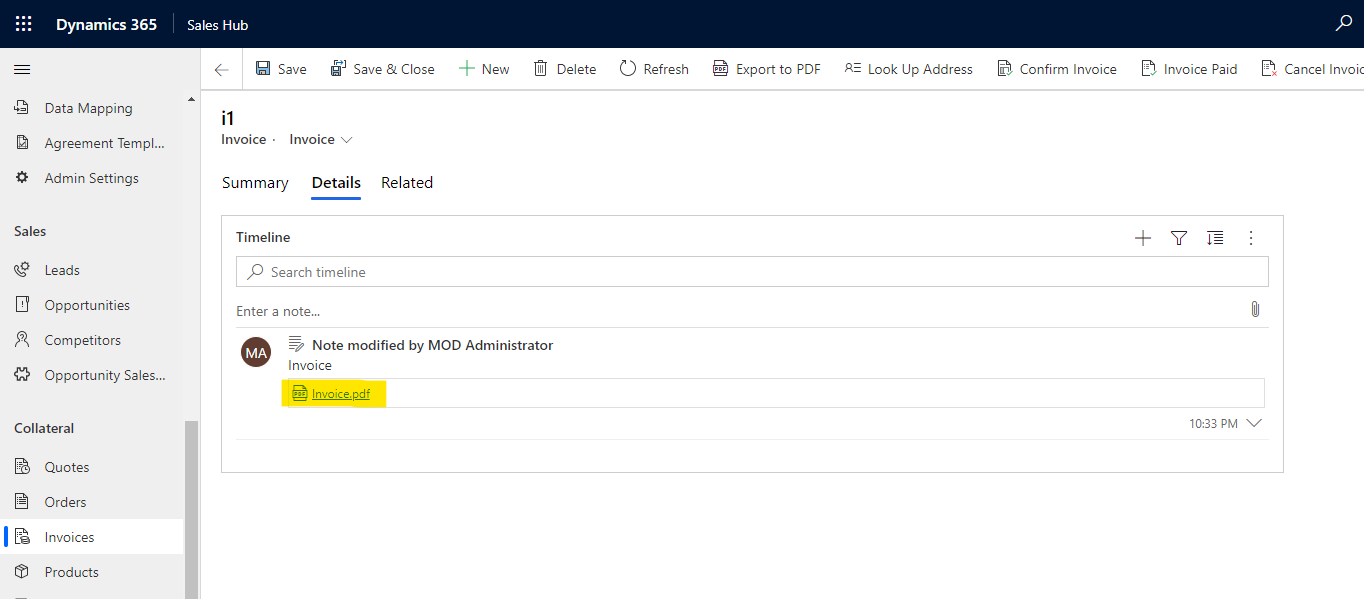
    The Invoice has not enabled sharepoint Document management.
    pastedimage1600439504697v1.png

    Then I export to PDF and save to dyanmics 365, it will save as an attachment of the note in the timeline.
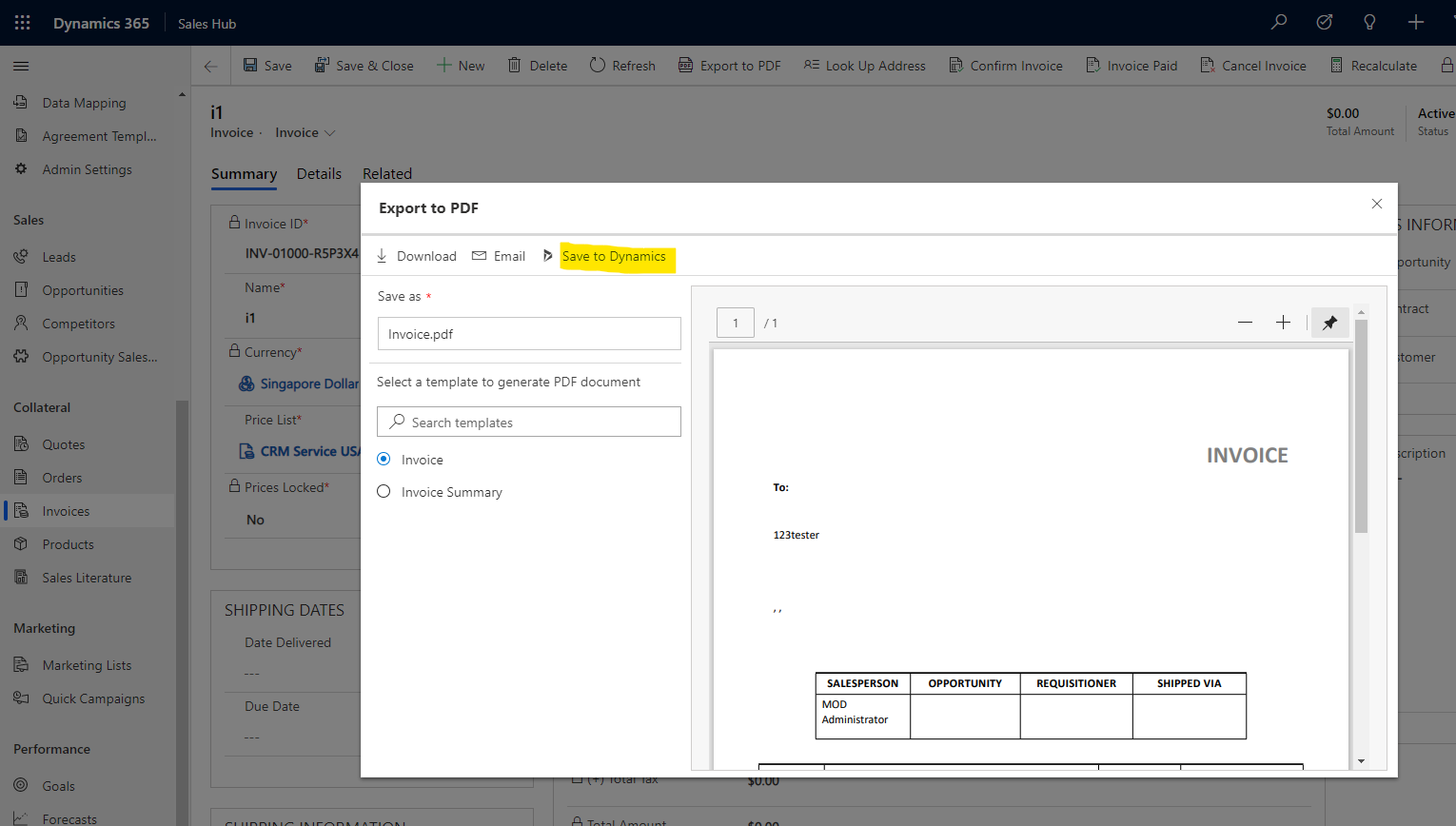
    pastedimage1600439577108v3.png

    pastedimage1600439591823v4.png    pastedimage1600439611610v5.png

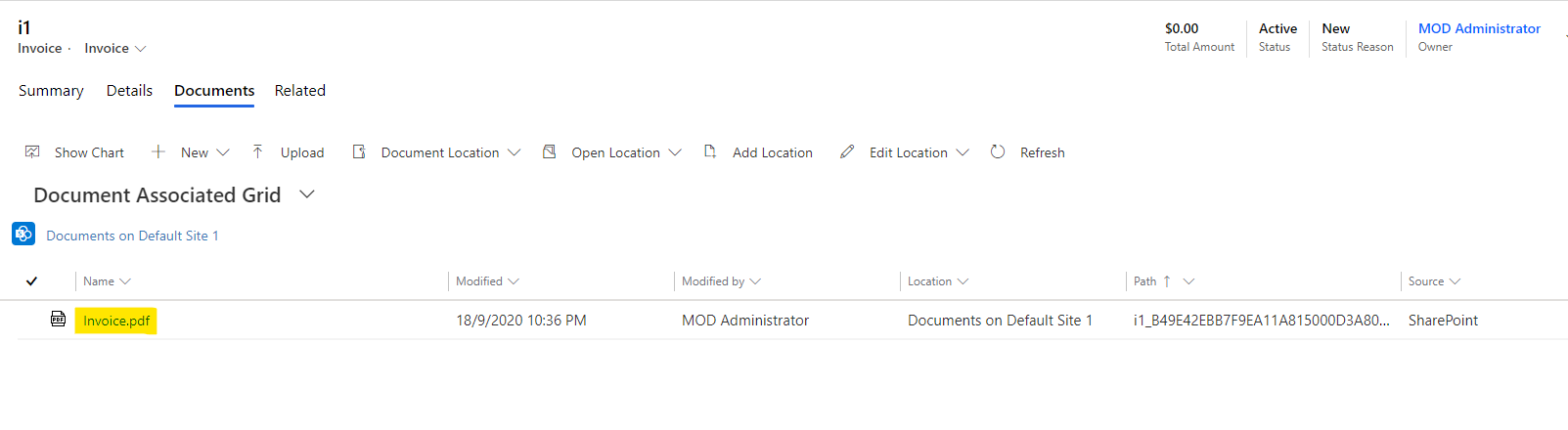
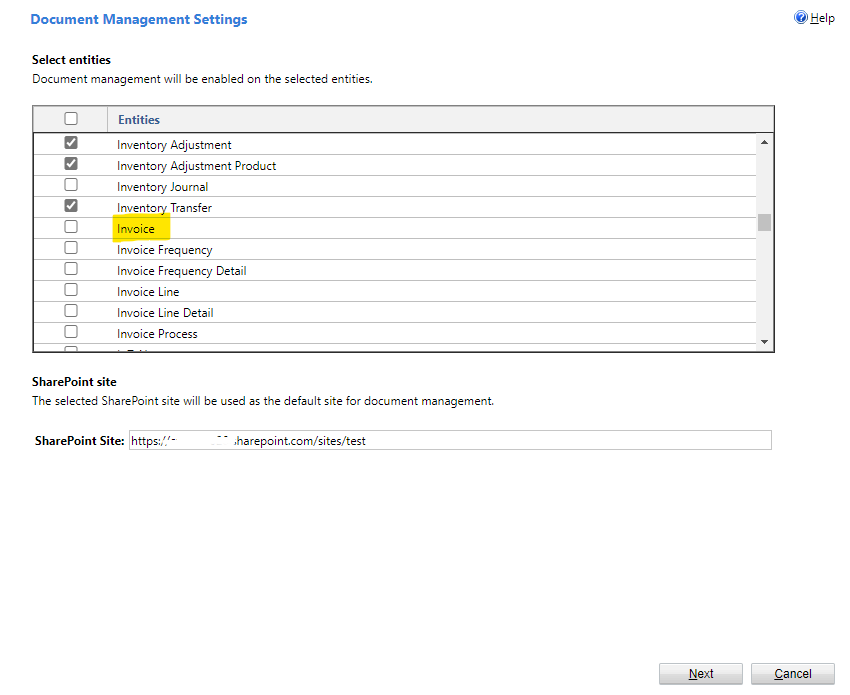
    Next I enabled sharepoint Document management for Invoice entity.
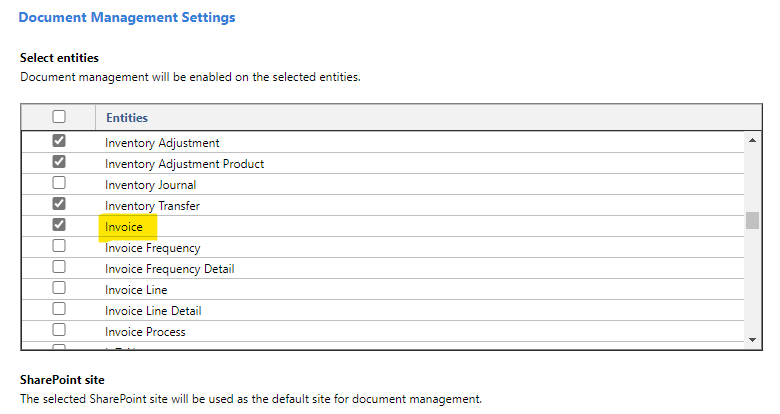
    pastedimage1600439720431v6.png

    Then I export to PDF, "save to dyanmics 365" is changed to "save to sharepoint", and it will store as a file in the sharepoint site.
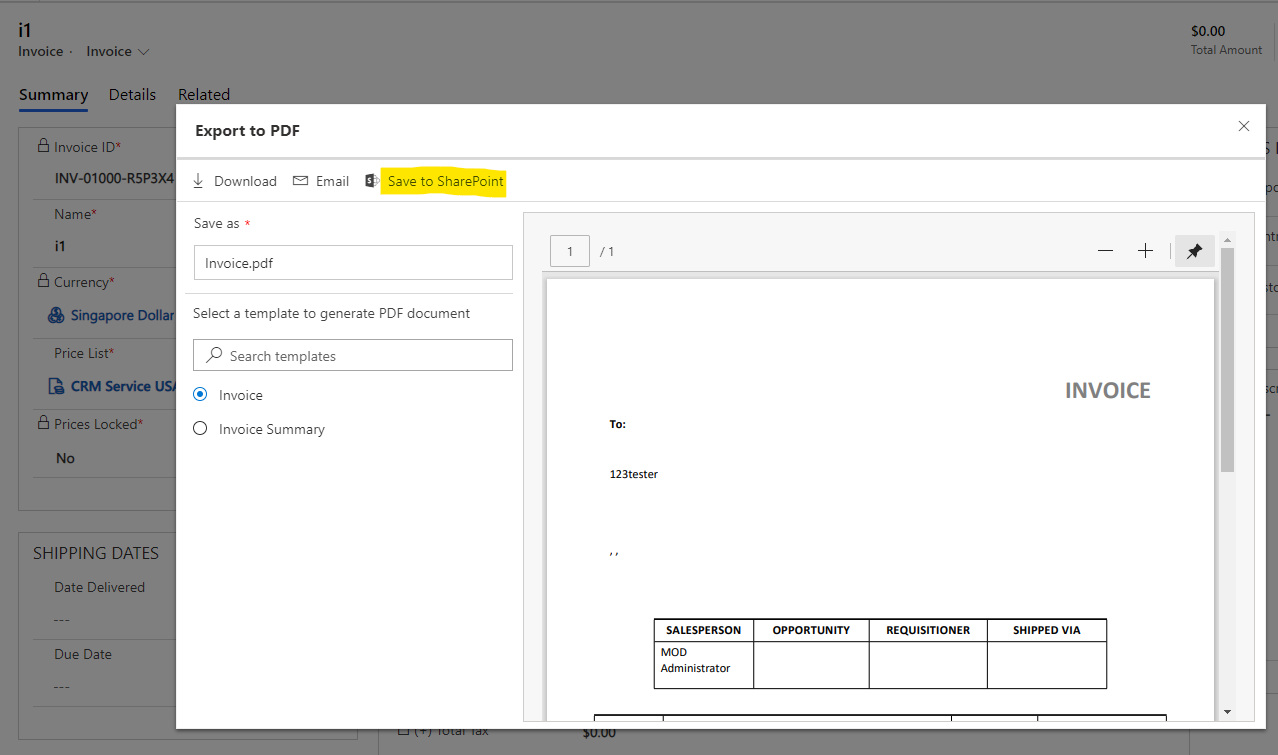
    pastedimage1600439806367v7.png

    pastedimage1600439870052v8.png    pastedimage1600439897383v9.png

    In summary, as long as the entity is enabled sharepoint Document management, the PDF will store as a file in the sharepoint site.

    The steps to enable are going to Advanced Settings > Documents Management > Document Management Settings, then select the entity.
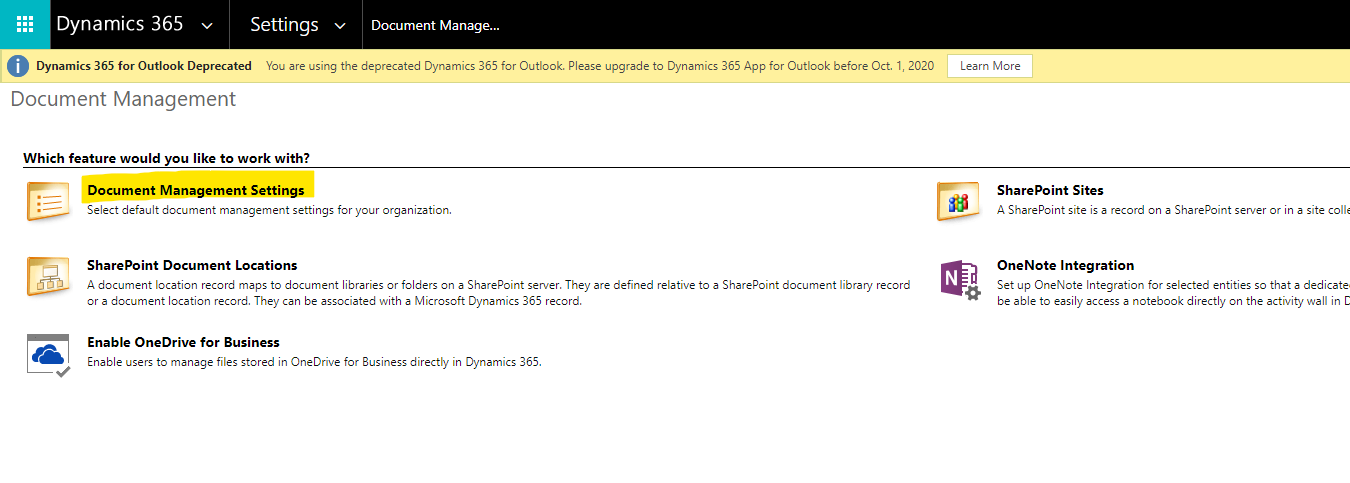
    pastedimage1600439974586v10.png

  • Community Member Profile Picture
    on at

    Hai Hao,

    Thank you for your answer!

    I made all the settings you described above. However, "save to Sharepoint" is not displayed with the button.

    I'll add two screenshots to you.

    Schritt1.PNG

    I am currently going to the profile of our contact. Then on the assigment in contact.

    Here I can then see "Send PDF as e-mail" in the upper bar. This opens the window in which I can compose an email and see my attachment on the right.

    Schritt2.PNG

    However, it only says "save" and "save and close".

    I hope you can understand my Steps. 

    Thanks for your help. 

    best regards 

    sharon

  • LuHao Profile Picture
    40,892 on at

    Hi Sharon,

    1. The solution I offer requires your environment to have 2020 release wave 2 enabled first.

    Please refer to this documentation on how to enable early access updates of 2020 release wave 2: https://docs.microsoft.com/en-us/power-platform/admin/opt-in-early-access-updates#how-to-enable-early-access-updates

    2. In my environment there is no "Send PDF as e-mail" button, so I cannot reproduce your problem.

Under review

Thank you for your reply! To ensure a great experience for everyone, your content is awaiting approval by our Community Managers. Please check back later.

Helpful resources

Quick Links

Introducing the 2026 Season 1 community Super Users

Congratulations to our 2026 Super Stars!

Meet the Microsoft Dynamics 365 Contact Center Champions

We are thrilled to have these Champions in our Community!

Congratulations to the March Top 10 Community Leaders

These are the community rock stars!

Leaderboard > Microsoft Dynamics 365 | Integration, Dataverse, and general topics

#1
11manish Profile Picture

11manish 176

#2
ManoVerse Profile Picture

ManoVerse 56 Super User 2026 Season 1

#3
Niki Patel Profile Picture

Niki Patel 42

Last 30 days Overall leaderboard

Product updates

Dynamics 365 release plans