web
You’re offline. This is a read only version of the page.
close
Skip to main content

Notifications

Announcements

No record found.

Community site session details

Community site session details

Session Id :
Microsoft Dynamics 365 | Integration, Dataverse...
Suggested Answer

Why does my Header not show all the fields on form?

(0) ShareShare
ReportReport
Posted on by 25

I have never seen where I have created a form and not all the header fields show up on it. For some reason, if you see the 'user form' below, it is only accessible by clicking on the down arrow. 

For the record, I have tried to make the header a 'high density' header and it works but has a separate issue. Just want to solve for viewing the 4 fields without having to click the down arrow.
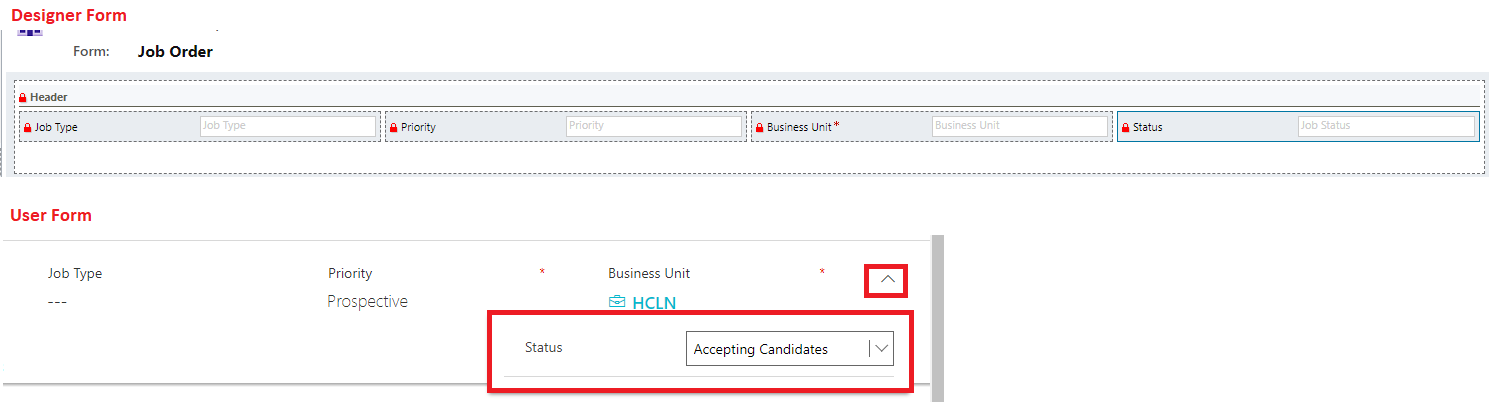
form2.png

I have the same question (0)
  • onurizgi Profile Picture
    360 on at

    Hi Shap,

    This problem was stems for your computer display settings. It will be visible when the browser zooms out. You should to add a maximum of 3 fields.

    Zoom = %110 :

    2626.png

    Zoom = %100 : 

    8255.png

    My computer display properties : 

    pastedimage1610105835966v2.png

    I hope helpful. 

    Regards.

  • Shap1 Profile Picture
    25 on at

    Thanks Onur. This is true I can do this, however, we have many users who will have to do this then and that's not a good user experience. Typically, we should be able to see 4 columns by default.

  • onurizgi Profile Picture
    360 on at

    I regret that you will not be able to do this. You can try add only tree fields. You have to give up someone :) There isn't anyway

  • Suggested answer
    Henry J. Profile Picture
    5,237 on at

    Hello Shap1 -

    What is the separate issue you're having with high-density headers?
    I advise to favor their usage in place of low-density:
    https://docs.microsoft.com/en-us/powerapps/maker/model-driven-apps/form-designer-header-properties 

    Please share your feature requests on Power Apps Ideas: https://aka.ms/PAIdeas

    Henry 

  • Shap1 Profile Picture
    25 on at

    Thanks Henry.

    In my screenshot here: https://ibb.co/QKGhdnp, the 'Status' field is the only one that does not show in high-density headers. This causes confusion for many users as they do not realize that there is a tiny down arrow to click it. Why does MS allow for 4 columns in the form editor for the high-density header but have a dropdown on the form to show the fourth value? Seems to me like it would make sense to have 4 columns showing instead of 3.

  • Suggested answer
    Henry J. Profile Picture
    5,237 on at

    I'm not entirely sure what the rule is, but the high-density header can display 4 fields (you can see examples on Configure header properties in the form designer - Power Apps | Microsoft Docs)

Under review

Thank you for your reply! To ensure a great experience for everyone, your content is awaiting approval by our Community Managers. Please check back later.

Helpful resources

Quick Links

Responsible AI policies

As AI tools become more common, we’re introducing a Responsible AI Use…

Neeraj Kumar – Community Spotlight

We are honored to recognize Neeraj Kumar as our Community Spotlight honoree for…

Leaderboard > Microsoft Dynamics 365 | Integration, Dataverse, and general topics

#1
iampranjal Profile Picture

iampranjal 41

#2
Martin Dráb Profile Picture

Martin Dráb 38 Most Valuable Professional

#3
Satyam Prakash Profile Picture

Satyam Prakash 35

Last 30 days Overall leaderboard

Product updates

Dynamics 365 release plans
