web
You’re offline. This is a read only version of the page.
close
Skip to main content

Announcements

No record found.

News and Announcements icon
Community site session details

Community site session details

Session Id :
Microsoft Dynamics GP (Archived)

Dynamic GP 2010 Cross reference reportis coming up empty of data

(0) ShareShare
ReportReport
Posted on by

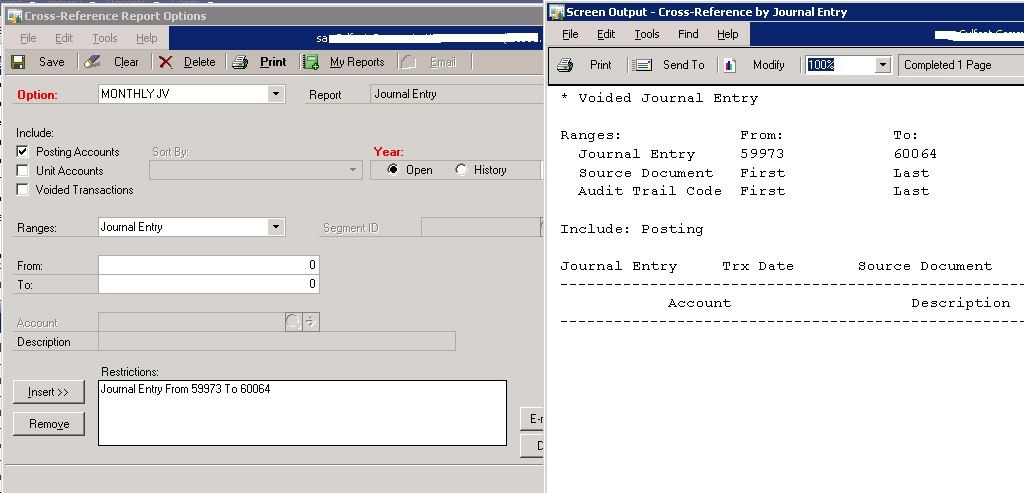
In cross reference Every report is coming up empty of data.    Actual input journals  were entered  with the correct source code. And I have selected all options in cross reference report.But no result. Any ideas why this won't populate? some body please help?
cross-reference.jpg

*This post is locked for comments

I have the same question (0)
  • Suggested answer
    Community Member Profile Picture
    on at

    some body please help

  • Suggested answer
    babubaskaran@outlook.com Profile Picture
    12 on at

    Hi Belraj,

    Please run Financial-reconcile then try this.

  • Community Member Profile Picture
    on at

    Thank you Mr.Babu Baskaran... I had clicked three check box in financial reconciliation window and reconciled for open year without any error report...but still same problem on cross reference report..

  • Community Member Profile Picture
    on at

    please help ...

  • Richard Wheeler Profile Picture
    75,852 Moderator on at

    If you go to Inquiry->Financial-Journal Entry and enter one of these journal numbers do you see the entry? One thing you can try is to get everyone out of GP, run Check Links on the complete financial series and then try again.

    MS Dynamics GP->Maintenance->Check Links choose Financial as the series and insert everything by clicking the All button.

  • Community Member Profile Picture
    on at

    Thank you very much for your response Mr.Richard E Wheeler.

    These journal numbers are available in Inquiry->Financial>Journal Entry enquiry window.

    I had run check links for entire financial serious after everyone logout.

    Still cross reference report is not working for any search selection ..!

    Kindly advice..

  • Richard Wheeler Profile Picture
    75,852 Moderator on at

    OK, then my next question is had anyone modified this report? Perhaps someone has put a restriction on this report that inhibits data from appearing.  If you run a SmartList for the same J/E range does it return data? Also, what is the current GP date? Have you perhaps gone one year into the future where there is no data? If you ask for an historical year and do not specify a J/E range does any data get returned? What about removing the data range on this search? Is it possible someone posted these entries into the wrong year?

  • Suggested answer
    Bill Campbell Profile Picture
    12 on at

    Can you post a shot of the General Ledger Setup screen - Financial >> Setup >> General Ledger ) and as well from Financial >> Transactions >> General.

    This is to verify the range of JE's you are looking for fits in the range you are asking to print in the report, and to see what Historical options you have set for the GL

  • Suggested answer
    babubaskaran@outlook.com Profile Picture
    12 on at

    Belraj,

    I think this might be due to damage on forms.dic file which I found on another post on the community.  Please try the below and let us know.

    Steps provided by MS Tech Support:

    1)      Damage to the Form’s.DIC can also cause issues with this report. If you have a Forms.DIC please recreate it and see if the issue continues.

    2)      The DIC’s may need to be synchronized (you would likely also be having issues in the TB report if this is the cause however).

    a.       Locate the Dex.ini of the machine you are working on. (GP root folder\Data\Dex.ini)

    b.      Locate the following line. “Synchronize=FALSE”

    c.       Change it to. “Synchronize=TRUE”

    d.      Save the change.

    e.      Launch GP Utilities.

    f.        This will synchronize the DYNAMICS.DIC.

    g.       When you get the additional window select “Synchronize Forms and reports”.

    h.      It will ask you to locate the DYNAMICS.SET file.

    i.         After locating the file process the change.

    j.        See if the issue is resolved.

  • Community Member Profile Picture
    on at

    Thank you very much for your response Mr.Richard Wheeler..

    We are using default GP crosse reference report page.

    I am able to get same J/E range datas from Smart list.

    If i go for historical year cross reference report with (same year JE range) OR without specify JE range,Both search returning datas correctly .All other your questions’ answer is no.

    One thing I noticed , the historical years are displaying only up to 2013?Is that any problem?

    regards...

Under review

Thank you for your reply! To ensure a great experience for everyone, your content is awaiting approval by our Community Managers. Please check back later.

Helpful resources

Quick Links

Introducing the 2026 Season 1 community Super Users

Congratulations to our 2026 Super Stars!

Meet the Microsoft Dynamics 365 Contact Center Champions

We are thrilled to have these Champions in our Community!

Congratulations to the April Top 10 Community Leaders

These are the community rock stars!

Leaderboard > 🔒一 Microsoft Dynamics GP (Archived)

#1
Shravan Attelli Profile Picture

Shravan Attelli 1

Last 30 days Overall leaderboard

Featured topics

Product updates

Dynamics 365 release plans
