web
You’re offline. This is a read only version of the page.
close
Skip to main content

Announcements

No record found.

News and Announcements icon
Community site session details

Community site session details

Session Id :
Microsoft Dynamics GP (Archived)

Item Stock Inquiry - Negative balance

(0) ShareShare
ReportReport
Posted on by 1,080

Hi,

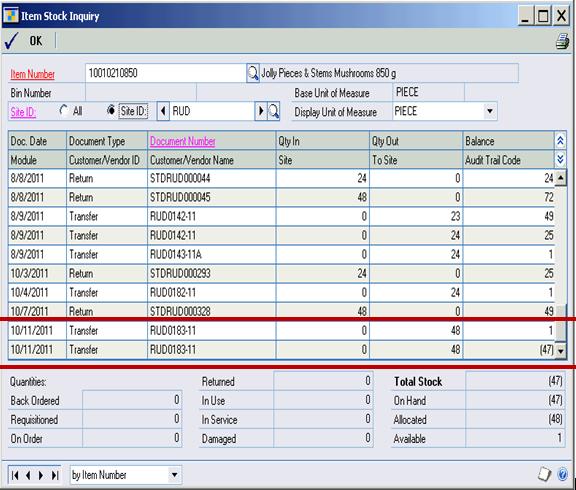
I've client having problem in the Item Stock Inquiry window, the transfer document number create a duplicate and the duplicate record have a negative balance.

During posting the batch using the inventory series posting window they encountered error "A save operation on table 'IV_TRX_HIST_HDR' has created a duplicate key". When they inquire the item in the Item Stock Inquiry window they find out that transfer document has a duplicate record and the duplicate record was negative balance. Please see below screenshot.

As of now I don't know how to fix the error. Please advice.
*This post is locked for comments

I have the same question (0)
  • Suggested answer
    Frank Hamelly | MVP, MCP, CSA Profile Picture
    46,631 Moderator on at

    Run Checklinks on the Inventory Transaction tables and then the Reconcile Utility on that item number.  If that doesn't fix it, you'll have to fix it directly in the tables.

    Hope this helps,

  • Suggested answer
    Ronie Profile Picture
    1,080 on at

    Hi,

    Thanks for the suggestion to reconcile the item - after reconcile the allocated was fixed but the duplicate record didn't. I data fix the duplicate in the tables and everything is fine.

    Thanks

  • Ronie Profile Picture
    1,080 on at

    Hi,

    After I data fix the duplicate documents and looks all fine in the Item Stock Inquiry window. However when we rerun the reconcile for the item then check the item in the Item Stock Inquiry window the balance was recompute and almost of the balance amount are negative. What I did is revert back what I did in data fixing. My problem now is how/where can I delete the duplicate document, is there specific table where should I check?

  • Frank Hamelly | MVP, MCP, CSA Profile Picture
    46,631 Moderator on at

    Which table(s) did you make the original fix to?  You need to affect  the Transaction History tables (IV30200, IV30300, IV30301, and if using Multi Bin, IV30302) and the Item Quantity Master (IV00102).  Further, if you're using Lot or Serial numbers, then you'd have to affect the adjustments in IV00200 (Serial Number Master) or IV00300 (Lot Number Master) and IV30400 (Item Serial and Lot Number History).

    Hope this helps,

  • Yash.V Profile Picture
    220 on at

    Hi Frank & Ronie,

    We are having the same issue now. And we could note that, the transactions are duplicated in below tables.

    IV10201, IV30300, IV30301 - Contains duplicates.

    IV10200, IV30200 - Proper with out duplicates.

    Do we need to check any other tables apart from these? And which tables should we delete the duplicates from? Please could you advise.

Under review

Thank you for your reply! To ensure a great experience for everyone, your content is awaiting approval by our Community Managers. Please check back later.

Helpful resources

Quick Links

Introducing the 2026 Season 1 community Super Users

Congratulations to our 2026 Super Stars!

Meet the Microsoft Dynamics 365 Contact Center Champions

We are thrilled to have these Champions in our Community!

Congratulations to the April Top 10 Community Leaders

These are the community rock stars!

Leaderboard > 🔒一 Microsoft Dynamics GP (Archived)

#1
talty09 Profile Picture

talty09 2

#1
Anthony Beatty Profile Picture

Anthony Beatty 2

#3
CP04-islander Profile Picture

CP04-islander 1

Last 30 days Overall leaderboard

Featured topics

Product updates

Dynamics 365 release plans
