web
You’re offline. This is a read only version of the page.
close
Skip to main content

Announcements

No record found.

News and Announcements icon
Community site session details

Community site session details

Session Id :
Small and medium business | Business Central, N...
Answered

Standard "Page" action group from a Card Page in Business Central

(6) ShareShare
ReportReport
Posted on by 311

Hello everyone,

How to remove/hide the standard "Page" action group from a Card Page in Business Central?
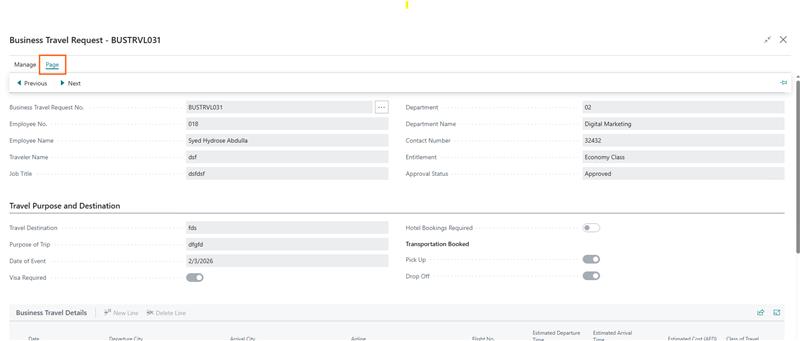
I am opening a Card Page from an action, and I see the "Page" action group displayed in the action bar. I have not added any custom actions under area(Page) — this group appears from standard behavior. Is there any supported way in AL to completely hide or remove the Page action group from a Card Page? 

Looking for best practices or confirmation if this is not possible.

I have the same question (0)
  • Suggested answer
    Dhiren Nagar Profile Picture
    2,886 Super User 2026 Season 1 on at
    Hi,
     
    You can do that with page extension. You need to create page extension for that page.
     
    In action section add modify(ActionGroupName) then set the visible and enabled property as false.
     
     
    Regards,
    Dhiren.
  • Suggested answer
    YUN ZHU Profile Picture
    100,974 Super User 2026 Season 1 on at
    First, try using the Design feature to see if you can hide it. If you can, download the Design code for reference.
     
    Hope this can give you some hints.
    Thanks.
    ZHU
  • Verified answer
    OussamaSabbouh Profile Picture
    16,074 Super User 2026 Season 1 on at
    Hello,
     
    There is no supported way in AL to remove or hide the standard “Page” action group on a Card page — it’s injected by the platform and only individual actions can be controlled, not the system group itself; if you need a cleaner UI without that group, the accepted workaround is to avoid Card pages and instead use a StandardDialog or NavigatePage (modal, minimal actions) or redesign the UI using CardPart pages, which don’t expose the full action bar.
     
    Regards,
    Oussama Sabbouh

Under review

Thank you for your reply! To ensure a great experience for everyone, your content is awaiting approval by our Community Managers. Please check back later.

Helpful resources

Quick Links

Introducing the 2026 Season 1 community Super Users

Congratulations to our 2026 Super Stars!

Meet the Microsoft Dynamics 365 Contact Center Champions

We are thrilled to have these Champions in our Community!

Congratulations to the April Top 10 Community Leaders

These are the community rock stars!

Leaderboard > Small and medium business | Business Central, NAV, RMS

#1
OussamaSabbouh Profile Picture

OussamaSabbouh 2,086 Super User 2026 Season 1

#2
YUN ZHU Profile Picture

YUN ZHU 1,290 Super User 2026 Season 1

#3
AndrewThomas81 Profile Picture

AndrewThomas81 1,218

Last 30 days Overall leaderboard

Featured topics

Product updates

Dynamics 365 release plans
