web
You’re offline. This is a read only version of the page.
close
Skip to main content

Announcements

No record found.

News and Announcements icon
Community site session details

Community site session details

Session Id :
Small and medium business | Business Central, N...
Answered

Remove customer invoice discount lines?

(0) ShareShare
ReportReport
Posted on by 25

Hi all,

We are running BC14 and are using the "Customer invoice discount" to add freight charges as a "Service charge" for orders below the minimum amount:
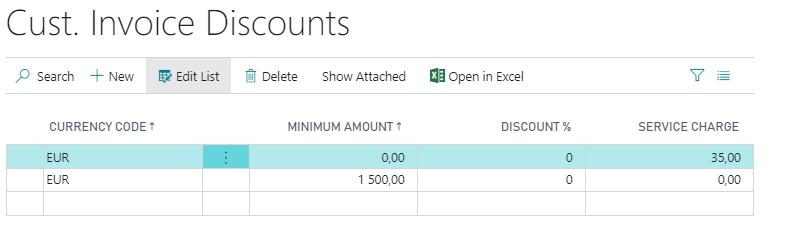
pastedimage1651235179535v1.png

We have the setting "Calc. Inv. Discount" = True on the "Sales & Receivables Setup" page. So the freight charge is applied automatically as a line on sales orders and sales invoices:

pastedimage1651235549073v2.png

In some cases however, we want to remove this line, for example on sales invoices for price adjustments (where there is no shipping). It also happens if a sales order initially is above the the minimum amount for freight charge, but then goes below it after the first shipping and some lines which can't be shipped are removed from the order.

We can remove the line, but it's always added again automatically on posting. Any ideas on how to solve this?

Thanks!

Magnus

I have the same question (0)
  • Suggested answer
    Dallefeld Profile Picture
    229 User Group Leader on at

    Seems like the problem is that you want the system to automatically add sometimes and not others.  When a requirements is such as this, you will need a customization. Or use a different method to add the Service Charge, like using recurring sales lines....

  • Suggested answer
    Community Member Profile Picture
    on at

    Magnus,

    The Invoice Discount Code is a field on the Sales Header. If you ask your Partner to expose this to the Sales Order, you can blank it out after deleting the Sales Line.

    Hope this helps.

    Thanks,

    Steve

  • Magnus Gassner Profile Picture
    25 on at

    Kim,

    Thanks for your reply. I will consider this.

    Regards,

    Magnus

  • Verified answer
    Magnus Gassner Profile Picture
    25 on at

    Steve,

    Thanks for your reply. I will consider this.

    Regards,

    Magnus

Under review

Thank you for your reply! To ensure a great experience for everyone, your content is awaiting approval by our Community Managers. Please check back later.

Helpful resources

Quick Links

Introducing the 2026 Season 1 community Super Users

Congratulations to our 2026 Super Stars!

Congratulations to our 2025 Community Spotlights

Thanks to all of our 2025 Community Spotlight stars!

Leaderboard > Small and medium business | Business Central, NAV, RMS

#1
OussamaSabbouh Profile Picture

OussamaSabbouh 1,926 Super User 2026 Season 1

#2
YUN ZHU Profile Picture

YUN ZHU 1,158 Super User 2026 Season 1

#3
Khushbu Rajvi. Profile Picture

Khushbu Rajvi. 533 Super User 2026 Season 1

Last 30 days Overall leaderboard

Featured topics

Product updates

Dynamics 365 release plans
