web
You’re offline. This is a read only version of the page.
close
Skip to main content

Notifications

Announcements

No record found.

Community site session details

Community site session details

Session Id :
Microsoft Dynamics CRM (Archived)

Microsoft CRM dynamics is not cross browser compatible

(0) ShareShare
ReportReport
Posted on by

Hi Team,

I hope you are doing well :)

We are facing some issues with Dynamics CRM in our organisation. 

We have recently upgraded to windows 10 machines and we are using Chrome as the default browser.

Dynamics is not compatible with chrome and when we try to open it in IE we get the below error:
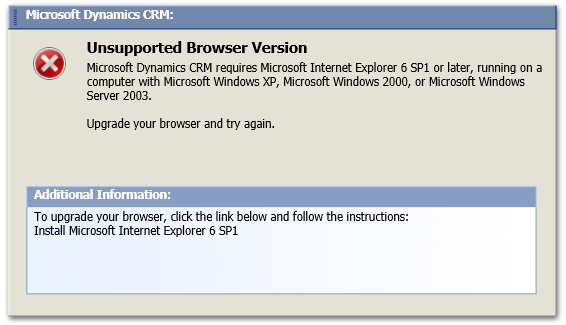
55818.Capture.PNG

We have tried different browser Emulation such as Enterprise mode / Native mode but that did not help.

Since we use Chrome as the default browser, we use Legacy Browser Support extension so that the site would redirect to IE when opened in chrome.

I hope you can help us out here, any input from your end would be much appreciated as we are quite exhausted on what needs to be done.

We did try to add it to compatibility view settings and it works but we do not want to do the same as that would cause issues to other applications that fall under the same domain.

Thanks in Advance

Regards

Camrron James

*This post is locked for comments

I have the same question (0)
  • Suggested answer
    gdas Profile Picture
    50,091 Moderator on at

    Hi James ,

    Which version of Dynamics CRM and browser  you are using ?

    Seems there may be unsupported browser version you are using . Could you please check below compatibility options depending on  your CRM version .

    support.microsoft.com/.../compatibility-with-microsoft-dynamics-crm

    Hope this helps.

  • Community Member Profile Picture
    on at

    Thank you for your response, much appreciated. (bow)

    I would get back with you on those details ASAP.

    Thanks

    Camrron

  • Community Member Profile Picture
    on at

    Hi,

    The version we are using is MS Dynamics 4.0 

    Internet Explorer version on Windows10 machine: 11.2068.14393.0, Update Version: 11.0.51(KB4074736.)

    Regards

    Camrron

  • Suggested answer
    Community Member Profile Picture
    on at

    Hello,

    you need to check this link.

    support.microsoft.com/.../compatibility-with-microsoft-dynamics-crm-4-0

    Hope you can understand what I mean!

  • Suggested answer
    Ryan Maclean Profile Picture
    3,070 on at

    The version of CRM you are using is very old, and therefore isn't compatible with modern browsers.

    Microsoft will be ending extended support for CRM 4.0 on April 10th, and their official recommendation is to upgrade to CRM 2013 or newer by then to ensure you maintain supportability - https://blogs.msdn.microsoft.com/crm/2017/06/20/support-ending-for-microsoft-dynamics-crm-4-0/

  • Suggested answer
    Community Member Profile Picture
    on at

    You can use IE only with CRM 4.0. IE 11(Compatibility mode enabled) is the best option for you since you are on windows 10.

    CRM 4.0 is 10-year-old product, strongly recommends to upgrade.

    Mansoor

  • Suggested answer
    Community Member Profile Picture
    on at

    Thank you for the update, I have informed my organisation on the same.

    We should be upgrading the application soon.

  • Community Member Profile Picture
    on at

    Hi, unfortunately for some security reasons we have blocked the compatibility view option for IE on Windows 10 machines, was wondering if there is any other workaround.

    Maybe a few registry changes that we could make through GPO.

    //Camrron

  • Community Member Profile Picture
    on at

    Hi,

    Please refer the below blog. You may have an idea on CrossBrowserCompatibility.
    www.meritedin.com/.../api-compliance

    Please don't forget to take a look on the videos listed on their playlist.

Under review

Thank you for your reply! To ensure a great experience for everyone, your content is awaiting approval by our Community Managers. Please check back later.

Helpful resources

Quick Links

Responsible AI policies

As AI tools become more common, we’re introducing a Responsible AI Use…

Neeraj Kumar – Community Spotlight

We are honored to recognize Neeraj Kumar as our Community Spotlight honoree for…

Leaderboard > 🔒一 Microsoft Dynamics CRM (Archived)

#1
SA-08121319-0 Profile Picture

SA-08121319-0 4

#1
Calum MacFarlane Profile Picture

Calum MacFarlane 4

#3
Alex Fun Wei Jie Profile Picture

Alex Fun Wei Jie 2

Last 30 days Overall leaderboard

Featured topics

Product updates

Dynamics 365 release plans
