web
You’re offline. This is a read only version of the page.
close
Skip to main content

Announcements

No record found.

News and Announcements icon
Community site session details

Community site session details

Session Id :
Small and medium business | Business Central, N...
Suggested Answer

Passing a value in the notification.Message

(0) ShareShare
ReportReport
Posted on by 1,037

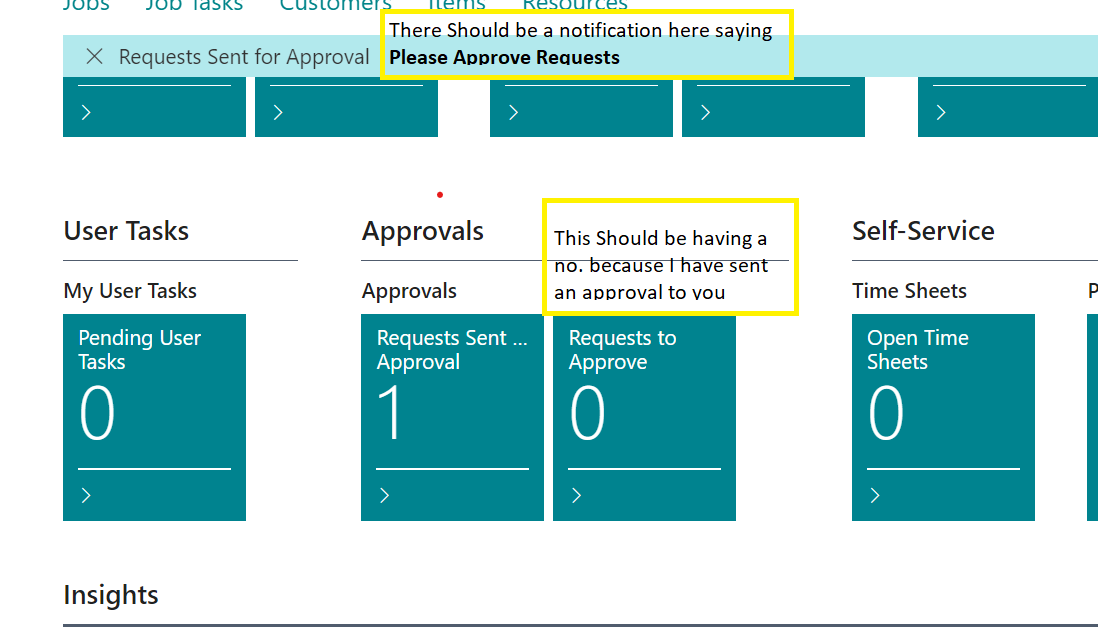
HomeScreen.png

Hi All,

I am back with my never ending queries :D

The notifications that come above a page is there a way to send a value  to it.

For Example

When the Requests to approve is more than 1 then the notifications should show how many pending.

Presently have developed that it is only showing approvals pending.

Regards,

Indira

  • Indira88 Profile Picture
    1,037 on at

    Thank you I have got the solution it was an issue to convert integer to text so I converted Integer to Code and passed that to the message.

    Thank you with your help I am learning gradually.

    Regards

    Indira

  • Suggested answer
    AliHamza Profile Picture
    175 on at

    Hi Indira,

    Try this:

    MyNotification.Message := 'This is a notification';

    MyNotification.Send();

Under review

Thank you for your reply! To ensure a great experience for everyone, your content is awaiting approval by our Community Managers. Please check back later.

Helpful resources

Quick Links

Season of Sharing Community Challenge Winners!

Congratulations to our community stars!

Women in Power Builds Momentum

Expanding mentorship, skilling, and AI innovation

Leaderboard > Small and medium business | Business Central, NAV, RMS

#1
OussamaSabbouh Profile Picture

OussamaSabbouh 665 Super User 2026 Season 2

#2
YUN ZHU Profile Picture

YUN ZHU 418 Super User 2026 Season 2

#3
Teagen Boll Profile Picture

Teagen Boll 280 Super User 2026 Season 2

Last 30 days Overall leaderboard

Featured topics

Microsoft Training Manuals

Product updates

Dynamics 365 release plans
