web
You’re offline. This is a read only version of the page.
close
Skip to main content

Notifications

Announcements

No record found.

Community site session details

Community site session details

Session Id :
Microsoft Dynamics GP (Archived)

Designing Financial Statements - Questions

(0) ShareShare
ReportReport
Posted on by

I'm wanting to see my financial statements in GP... such as cash flows, balance sheet, etc... I try to go to reports -> financial -> financial statements , but it just brings up an empty box. I don't even have the choice to make a new one.
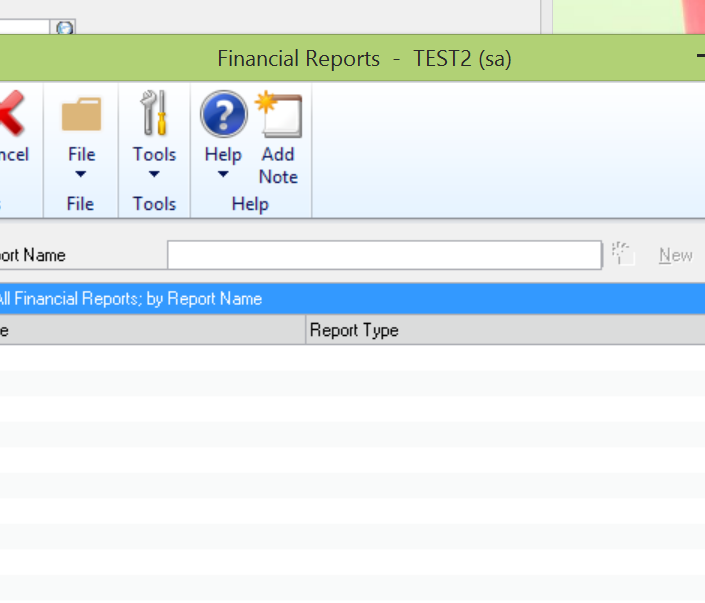
Screenshot-_2800_29_2900_.png

Next, I tried to find these reports in Management Reporter. So I found a cash flow and clicked to generate the report but I received this error.


Can anyone help me with either of these issues? I honestly feel like I'm overlooking something extremely simple.  Goodness it's been a long day!

Thanks!

*This post is locked for comments

I have the same question (0)
  • Suggested answer
    Frank Hamelly | MVP, MCP, CSA Profile Picture
    46,625 Super User 2025 Season 2 on at

    Kimberly, you have to develop financials specific to your company.  The ones you see in MR are sample reports that are not defined to your account structure.  You really need to avail yourself of some training before using Management Reporter.

  • Community Member Profile Picture
    on at

    Do you have any Management Reporter training suggestions? Alas, GP isn't my main job, I'm just figuring out piece by piece when I can.

  • Community Member Profile Picture
    on at

    Also, I wanted to build a report - but that was part of the issue, the "New" button was greyed out.

  • Suggested answer
    Frank Hamelly | MVP, MCP, CSA Profile Picture
    46,625 Super User 2025 Season 2 on at

    Use the Report Wizard to give you and idea how MR reports are designed.  I don't have MR in front of me right now but try the 'Tools' menu item in the Main Menu.

  • Suggested answer
    Bill Campbell Profile Picture
    12 on at

    Kimberly, that is likely the easier of the questions - if the new button is not available, then it is likely you are not a DESIGNER user in MR.  

    You would need to have that level of permission assigned by the Administrator for that to happen.

    Hope this helps.

  • Verified answer
    babubaskaran@outlook.com Profile Picture
    12 on at

    Hi Kimberly,

    Just to add to the valuable suggestions by Frank and Bill.  You can check how to build simple income statement by Steve Chapman on the following link.

    dynamicserpnow.com/management-reporter-simple-income-statement

  • Community Member Profile Picture
    on at

    The new button isn't displaying in GP, and I'm a poweruser. As far as MR goes, I definitely agree with Frank that I need to do some extensive studying. I'll just keep chugging along. Thanks everyone!

Under review

Thank you for your reply! To ensure a great experience for everyone, your content is awaiting approval by our Community Managers. Please check back later.

Helpful resources

Quick Links

Responsible AI policies

As AI tools become more common, we’re introducing a Responsible AI Use…

Neeraj Kumar – Community Spotlight

We are honored to recognize Neeraj Kumar as our Community Spotlight honoree for…

Leaderboard > 🔒一 Microsoft Dynamics GP (Archived)

#1
mtabor Profile Picture

mtabor 1

Last 30 days Overall leaderboard

Featured topics

Product updates

Dynamics 365 release plans
