web
You’re offline. This is a read only version of the page.
close
Skip to main content

Notifications

Announcements

No record found.

Community site session details

Community site session details

Session Id :
Microsoft Dynamics 365 | Integration, Dataverse...
Suggested Answer

Alphabetic filtering in the Unified Interface

(0) ShareShare
ReportReport
Posted on by 45

Hi everyone,

I'm trying to have a view filtered by a certain column by the alphabetic filtering at the bottom of the view in the Unified Interface.

I read elsewhere that in the Unified Interface, the alphabetic filtering is always on the leftmost column, however, this simply doesn't seem to be the case. The alphabetic filtering always filters for the name of the entity, even if the name column is not the leftmost column or if it's not even included in the view (I've tried both):
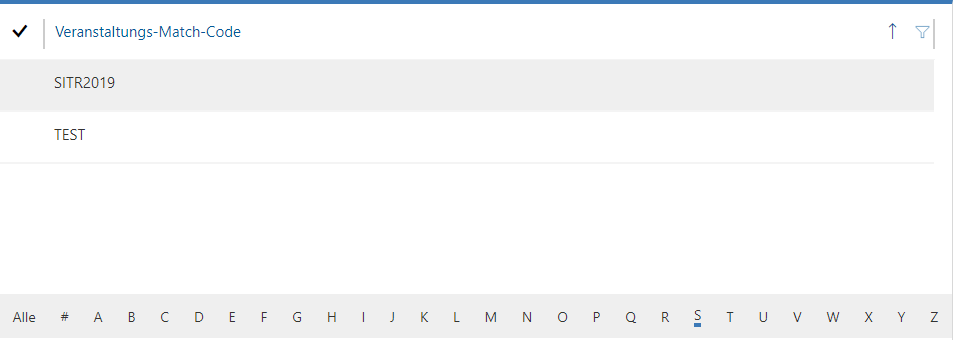
pastedimage1570781447149v1.png

(It's filtered by S but showing an entity for which the displayed field starts with T, but the name starts with S.)

The entity is a custom entity, if that matters.

Is there any way to have the alphabet bar filter by anything other than the name?

I have the same question (0)
  • Suggested answer
    LuHao Profile Picture
    40,892 on at

    Hi partner,

    You can first click on a column of the view, sort the records by this column, and then click on the alphabet bar, which will filter the records according to the sorted columns.

    This is what the view looks like at the beginning.

    pastedimage1570787288313v1.png

    I click on the column name ‘Owner’ and the view is sorted by it.

    pastedimage1570787384479v2.png

    Finally I click on the alphabet bar and it is filtered by the column Owner.

    pastedimage1570787469881v3.png

  • DexterFishpaw Profile Picture
    45 on at

    Thank you for your answer, but this does not work for me. I know that this is how it worked in the old interface, but I was under the impression that in the Unified Interface, it always goes by leftmost column (but that doesn't work for me either as explained in the original post).

    I'm a bit surprised since you seem to be on UI, but I thought filtering didn't work like that anymore in the new interface. Is it a version issue? The system should be fairly up to date though, the version is showing as 9.1.0000.9033.

  • LuHao Profile Picture
    40,892 on at

    Hi partner,

    Which app do you use? Sales hub or customer service hub or other?

    In addition, my instacne has enabled 2019 release wave 2, so its UI is not the same as the instacne which has not enabled it.

    My D365 version is 9.1.0000.9621.

    pastedimage1571022667140v1.png

Under review

Thank you for your reply! To ensure a great experience for everyone, your content is awaiting approval by our Community Managers. Please check back later.

Helpful resources

Quick Links

Responsible AI policies

As AI tools become more common, we’re introducing a Responsible AI Use…

Neeraj Kumar – Community Spotlight

We are honored to recognize Neeraj Kumar as our Community Spotlight honoree for…

Leaderboard > Microsoft Dynamics 365 | Integration, Dataverse, and general topics

#1
Siv Sagar Profile Picture

Siv Sagar 93 Super User 2025 Season 2

#2
#ManoVerse Profile Picture

#ManoVerse 74

#3
Martin Dráb Profile Picture

Martin Dráb 64 Most Valuable Professional

Last 30 days Overall leaderboard

Product updates

Dynamics 365 release plans
