We are experiencing a problem with data being displayed on the Item Maintenance window not reflecting what is in the item master table (IV00101). This is only happening on a few recently created items.
Looking at one specific item, the records in the IV00101 table:
select ITEMNMBR, UOMSCHDL, DECPLQTY from iv00101 where itemnmbr = '870-0089-3FT'
returns the following
ITEMNMBR UOMSCHDL DECPLQTY
870-0089-3FT EACH 4
However when I bring up the the item in Item Maintenance Window the following is shown:
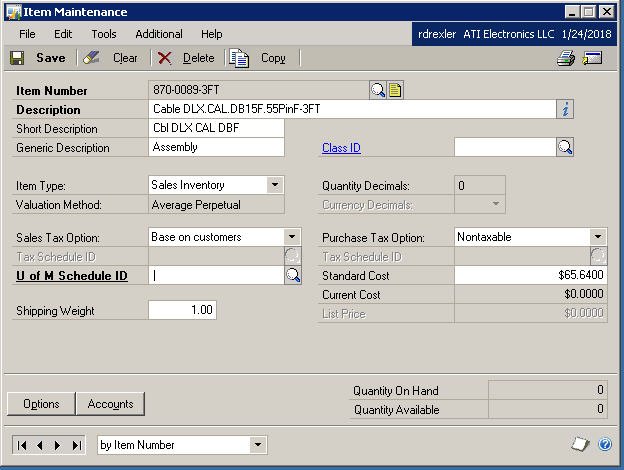
When the Item Maintenance window is display it appears to initially show the correct value in the Quantity Decimals field, but it quickly is updated to the above screen.
It appears as if there is some conflicting information some where but I cannot seem to find it. Utilizing the SQLLogSQLStmt setting in DEX.INI I have a full log of the retrieval of the information for the Item Maintenance window which I have exhaustively walked through and I cannot find any issue (meaning the data returned from various SQL statements looks correct and reflects the information in the database table)
If I try to select a U of M Schedule that has a quantity decimal setting of 3 I get the error "Decimal Places for the U of M Schedule and the item must match". Looking at the database the values do match. I am presuming the validation is using the data shown in the Item Maintenance window and not the actual values in the database.
We are experiencing this issue on a number of items. I suspect I can fix the issue using the Change Decimal Places utility but I would like to understand this issue to prevent it from happening in the future.
Thanks in advance.
Regards,
Ron


