web
You’re offline. This is a read only version of the page.
close
Skip to main content

Notifications

Announcements

No record found.

Community site session details

Community site session details

Session Id :
Supply chain | Supply Chain Management, Commerce
Suggested Answer

Asset Management Forum re newly release Asset Management Module

(0) ShareShare
ReportReport
Posted on by 50

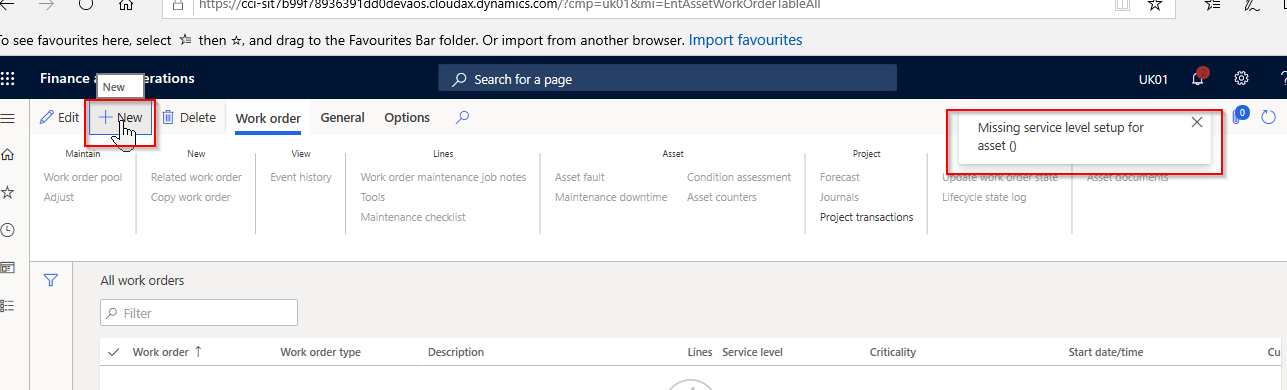
I am looking for anyone who has recently successfully configured Asset Management in D365 (recently licenced by MS from Dynaway - Enterprise Asset Management). I have done some configuration but am not able to create a works order. I get the error below:
pastedimage1570358972480v1.png

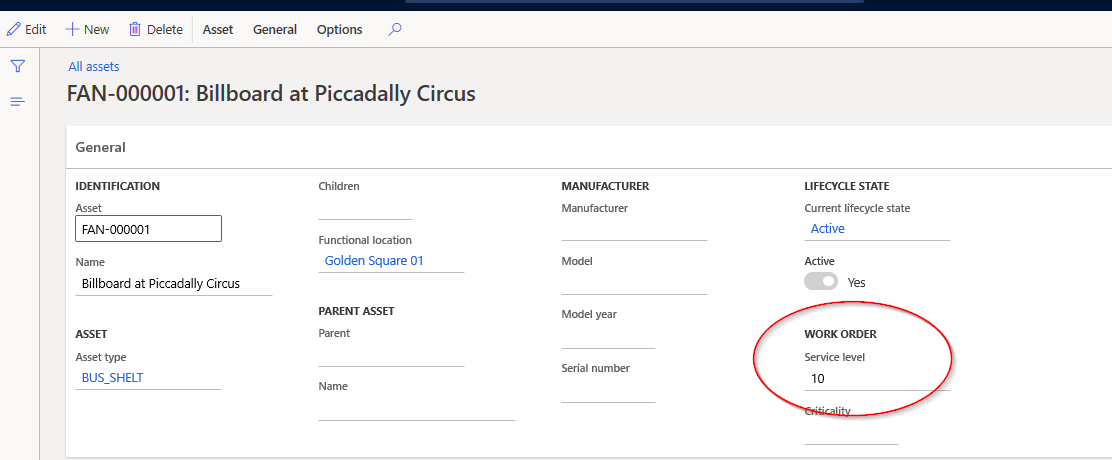
Yet I have that set up for the 2 test assets
pastedimage1570359153959v2.png

What I cannot understand about the error is that I have not yet selected the asset that requires the works order

I have the same question (0)
  • John Ray Patajo Profile Picture
    837 on at

    Wow, is Asset Management applicable for all D365FO?

    Regards,

    JR

  • André Arnaud de Calavon Profile Picture
    300,911 Super User 2025 Season 2 on at

    Hi Jag,

    Can you provide the steps you have done to create this work order in detail? It looks like the error message is missing an asset number.

  • jagnayee Profile Picture
    50 on at

    Hi Andre,

    Please see below steps ( from - [View:https://docs.microsoft.com/en-us/dynamics365/supply-chain/asset-management/index:750:50])

    • Functional location lifecycle states

    pastedimage1570433958701v2.png

    • Functional location lifecycle models

    pastedimage1570434117165v3.png

    Create functional locations

    pastedimage1570434219381v4.png

    Install an asset structure on a functional location

    pastedimage1570434353266v5.png

    Install an asset structure on a functional location

    pastedimage1570434494117v6.png

    After this I tried to create the Works Order

  • Suggested answer
    jagnayee Profile Picture
    50 on at

    Please ignore this query. I had missing format relating to 'Work Order Project Setup'

  • jagnayee Profile Picture
    50 on at

    To clarify, a default Asset Service Level was missing. After adding below, I do nor get the error:

    pastedimage1570529437145v1.png

  • Suggested answer
    jagnayee Profile Picture
    50 on at

    From Version 10.0.5 (Update 29)

  • André Arnaud de Calavon Profile Picture
    300,911 Super User 2025 Season 2 on at

    Thanks for the update that you found the issue yourself.

Under review

Thank you for your reply! To ensure a great experience for everyone, your content is awaiting approval by our Community Managers. Please check back later.

Helpful resources

Quick Links

Responsible AI policies

As AI tools become more common, we’re introducing a Responsible AI Use…

Neeraj Kumar – Community Spotlight

We are honored to recognize Neeraj Kumar as our Community Spotlight honoree for…

Leaderboard > Supply chain | Supply Chain Management, Commerce

#1
Siv Sagar Profile Picture

Siv Sagar 283 Super User 2025 Season 2

#2
Laurens vd Tang Profile Picture

Laurens vd Tang 213 Super User 2025 Season 2

#3
André Arnaud de Calavon Profile Picture

André Arnaud de Cal... 152 Super User 2025 Season 2

Last 30 days Overall leaderboard

Featured topics

Product updates

Dynamics 365 release plans
