web
You’re offline. This is a read only version of the page.
close
Skip to main content

Notifications

Announcements

No record found.

Community site session details

Community site session details

Session Id :
Microsoft Dynamics GP (Archived)

Display 2 Definition Columns on Management Reporter

(0) ShareShare
ReportReport
Posted on by 1,175

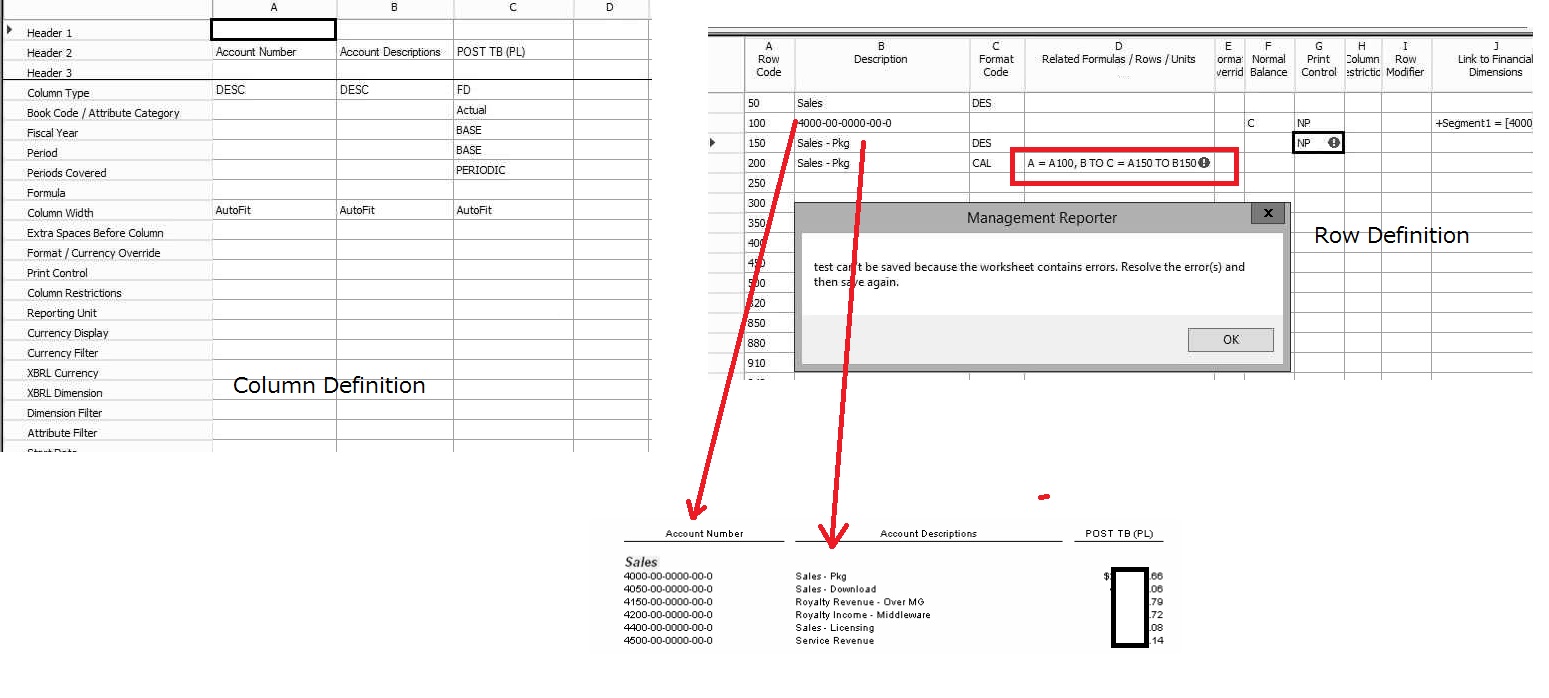
On FRx, we were able to manage to show two different description columns on the reports. However, the calculation we used on the FRx does not work on management reporter and try to figure out how we can do to come out with the same result as FRx report.

We are using MR 2.1 (version 2.12.14001.45) running with GP2015.

Basically, we'd like to show Row 100 on Column A, Row 150 on Column B, Row 200 on Column C to show the amount which is related with the segment setup on Row 100.

Please advise how we should set up to show the result as below.
MR.jpg

*This post is locked for comments

I have the same question (0)
  • Mike Bufano Profile Picture
    1,484 on at

    TRY

    A=A.100, B=B.150, C=C.200

  • JBS ERP Profile Picture
    1,175 on at

    Hi Mike,

    Thank you for your reply. I found out that there is no way to set 2 description columns on Management Reporter although there was a way to do it on FRx. I had to put long description and need to separate the columns on excel.

  • Suggested answer
    serbach Profile Picture
    571 on at

    jbserp,

    In the MR column definition there is an ACCT column type that will, indeed, place the Account Number in a separate column. Since that seems to be what you're looking for, I'd try that.

    Sincerely,

    Steve Erbach

  • Community Member Profile Picture
    on at

    Hi!, we actually have this problem, where did you found this information?. (about you can't print two columns in the same report)

Under review

Thank you for your reply! To ensure a great experience for everyone, your content is awaiting approval by our Community Managers. Please check back later.

Helpful resources

Quick Links

Responsible AI policies

As AI tools become more common, we’re introducing a Responsible AI Use…

Neeraj Kumar – Community Spotlight

We are honored to recognize Neeraj Kumar as our Community Spotlight honoree for…

Leaderboard > 🔒一 Microsoft Dynamics GP (Archived)

#1
mtabor Profile Picture

mtabor 1

Last 30 days Overall leaderboard

Featured topics

Product updates

Dynamics 365 release plans
