web
You’re offline. This is a read only version of the page.
close
Skip to main content

Announcements

No record found.

News and Announcements icon
Community site session details

Community site session details

Session Id :
Microsoft Dynamics CRM (Archived)

Portal Comments created inside case not showing on website

(0) ShareShare
ReportReport
Posted on by 1,328

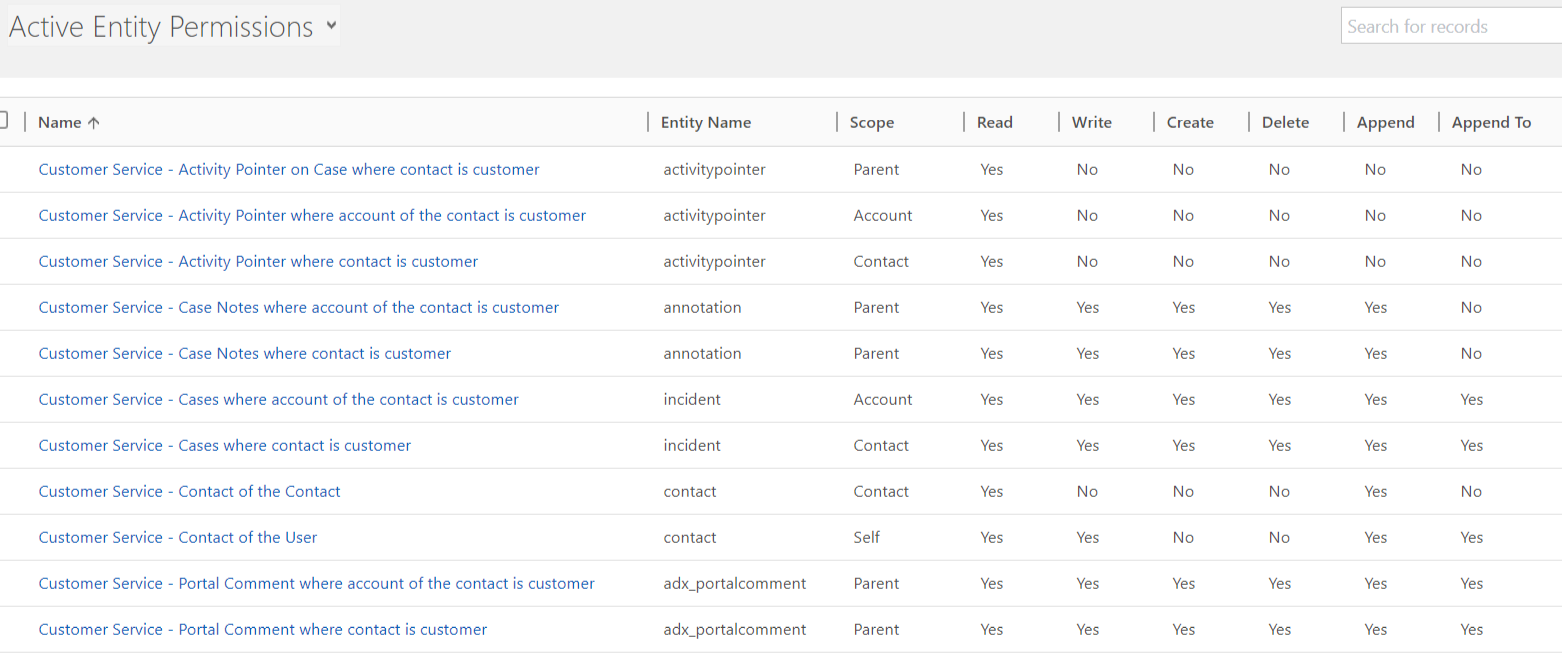
When I create a portal comment from inside a case in CRM, it does not appear on the portal case on the website. However, when I create a Portal Comment from the website, it appears in CRM inside the case. How do I make portal comments appear BOTH inside the case and on the website? Here is a screenshot of my entity permissions.
4346360.Capture.PNG

*This post is locked for comments

I have the same question (0)
  • Verified answer
    Arun Vinoth Profile Picture
    11,615 Moderator on at

    Make sure you click the "send" button in Portal comment that you created in CRM, till then it will be open & only completed/sent comment will be available in Portal.

    blogs.technet.microsoft.com/.../the-new-crm-portal-and-portal-comments

  • Suggested answer
    RaviKashyap Profile Picture
    55,410 Moderator on at

    Hi,

    As also mentioned above, you need to click on "send" button to actualy make the comment visible on portal.

    Hope this helps.

  • Suggested answer
    Tino Rabe Profile Picture
    652 on at

    Exactly, only completed activities will be considererd in the Portals Timeline.

  • Verified answer
    epark06 Profile Picture
    1,328 on at

    Thanks all, I noticed that even the Sent/Completed activities weren't showing on the Portal immediately, BUT they would show later on at random times, sometimes after 5 minutes, sometimes after hours. I'm suspecting this to be a sync issue between CRM and Portal. I've tried clearing portal cache, which seemed to have made it display more "immediately", but at times it's still slow. If anyone knows how to improve the sync, please let me know. Thanks.

  • Verified answer
    RaviKashyap Profile Picture
    55,410 Moderator on at

    Hi,

    I had the same issue and figured out its a bug/ issue. So the portal comments will not be visible unless you update that case. It seems there is some internal handling which only shows the portal comment after the case is updated.

    I got this confirmed from MS and they suggested to create a workflow on portal comment entity and update the title of the case with same value.

    This worked for us.

    Hope this helps.

Under review

Thank you for your reply! To ensure a great experience for everyone, your content is awaiting approval by our Community Managers. Please check back later.

Helpful resources

Quick Links

Introducing the 2026 Season 1 community Super Users

Congratulations to our 2026 Super Stars!

Meet the Microsoft Dynamics 365 Contact Center Champions

We are thrilled to have these Champions in our Community!

Congratulations to the April Top 10 Community Leaders

These are the community rock stars!

Leaderboard > 🔒一 Microsoft Dynamics CRM (Archived)

#1
ScottDurow Profile Picture

ScottDurow 2

#2
GJones Profile Picture

GJones 1

Last 30 days Overall leaderboard

Featured topics

Product updates

Dynamics 365 release plans
