web
You’re offline. This is a read only version of the page.
close
Skip to main content

Notifications

Announcements

No record found.

Community site session details

Community site session details

Session Id :
Microsoft Dynamics CRM (Archived)

Product and Price Lists

(0) ShareShare
ReportReport
Posted on by 405

I've been banging my head against the wall on this one for quite some time and could really use some assistance.  I've never done sales before, and this is my first time with any sort of CRM solution.  I'll just describe what I would like to do and what I've done thus far, and hopefully someone will recognize either the path to success here or at least identify some holes in my process.


I've imported around 500 products into CRM using the Excel template, each with their own quantity and price point.  I tried to place a test order, and I was told that I need a price list for each item.  I created a generic price list with Currency and a Name and thought I could just assign that to each product.  That didn't work.  After doing some research, I find that the price list controls the individual price of every product associated with it.  Here's the thing though - I'm not selling a bunch of like objects.  Well, to a certain extent, yes, but each product has a different price at this point.  There's similarities in what is being sold, but not in the price point at which each item is sold.  So now I'm left with the unenviable task of creating a price list, manually, for all 500 products currently in the system.  It seems to me like I'm creating products twice at this point.


Is it possible to just sell products?  Why do I need a price list for each one?  And what is the point of even having a price on the product itself, if it means nothing in the end?  Any help would be greatly appreciated.  I know I'm obviously missing something here, but I cannot for the life of me figure out what that something is.

Thank you,

Phil

*This post is locked for comments

I have the same question (0)
  • Verified answer
    Aileen Gusni Profile Picture
    44,524 on at

    Hi Phil,

    I understand the pain to re-key again.
    Actually you can ask a developer to always automatically create price list

    item in CRM.

    https://community.dynamics.com/crm/b/magnetismsolutionscrmblog/archive/2012/10/30/auto-create-price-list-item-for-dynamics-crm-2011-products.aspx

    It is easier later.

    But, since you are in charge in Sales, I would not recommend this way first.

    So I explain now, basically in CRM, you cannot create a Quote and also key in

    Opportunity product without having a Price List.

    I know you might not need this because you don't have Price List for each

    product and it seems like another additional work.

    Let we know the usage and the purpose of this Price List:
    1. Price List will be used to choose products that are parts of a Price List

    as Price List Item
    2. To get default pricing
    3. To count the default extended amount, otherwise you have 0.

    However, You can still choose product that is not a Price List Item of that

    Price List, but you need to have Default Price List for that product.

    So, for another word, yes, you need to have at least 1 Price List for 1

    Product as the Default price List.

    Anything you want to know about Default Price List you can see this post:

    http://missdynamicscrm.blogspot.com/2014/07/10-facts-about-default-price-list-in-CRM2011-2013-that-you-might-not-have-noticed.html

    And since you said you have imported 500 products and you have the Excel

    Template for Product, I would suggest you to continue this method, but now is

    to Import the Price List Item.

    The Price List Item is basically a combination of Price List and Product and

    Unit.
    And it is very recommended to have one Price List, as per I mentioned before,

    you only need 1 Price List, at least, no need to have many Price List unless

    you have 1 Product in different Price and Unit, for example:
    1. Product ABC 1 PC in Price List Normal Price is $1000
    2. Product ABC 1 PC in Price List Thanksgiving Promotion Price is cheaper,

    $800
    3. Product ABC 1 PC in Price List Clearance Sales November Promotion price is

    even cheaper, it is $500

    Then you need 3 Price Lists + 3 Price List Item for 1 Product ABC

    But dont worry, you can still using the same method for your 500 Products,

    that is using Import Wizard.
    First, you need to create a Price List as I mentioned before.

    You can refer to this link:

    http://rc.crm.dynamics.com/RC/2011/en-us/online/5.1_CTP/importpricelist.aspx

    You can download the Import Template:
    From Data Management --> Templates for Data Import --> Choose Price List Item

    And Download It.
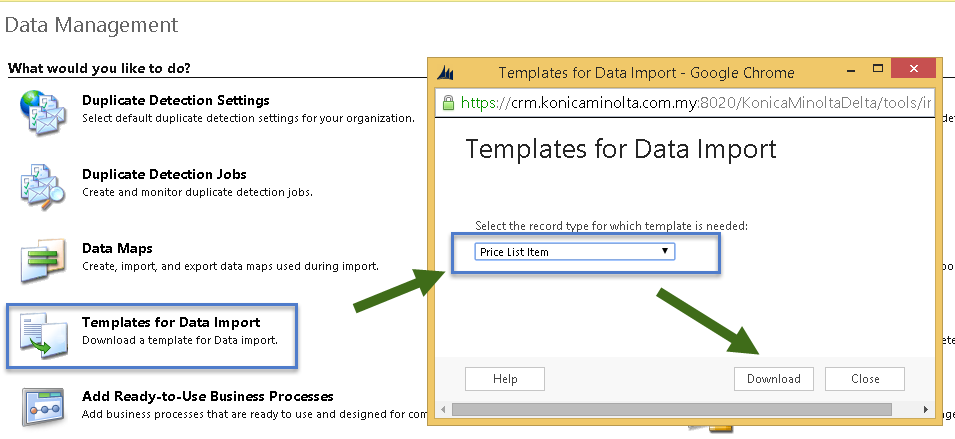
    Then you will have the .XML File and then you need to key in the Mandatory Field (a Bold column)

    You can compare to the Price List Item'
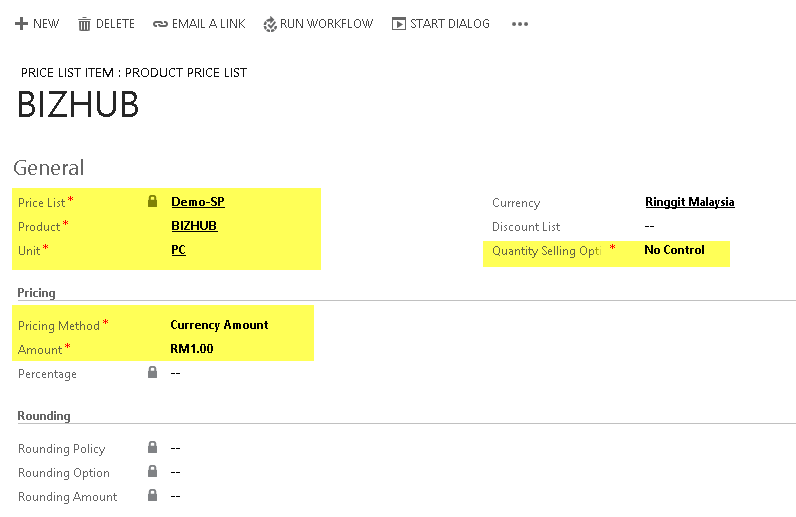
    If you only have a Price List then you can name it to Normal Price List, All, or Default Price List.

    And to see what you have imported you can see this post as well:

    http://niiranen.eu/crm/2014/03/working-price-list-items-dynamics-crm/

    I think if still using the Import Template it is the most efficient way for Sales people.

    If you want to know more about Import Template you can refer to this link:

    http://missdynamicscrm.blogspot.com/2014/09/understanding-import-template-crm-2011-2013-fields.html

    I hope this can help you.

    Thank you.

  • Muhammad Asimuddin Profile Picture
    on at

    What I understood from your point that you are creating price list for your products where you do not exactly need it. So in this case make one default price list and add all your products against that price list.

    You can export all your products in excel and import again after adding default price list name with all products.

    See the below link, it may help you to export and do the changes and import again

    niiranen.eu/.../working-price-list-items-dynamics-crm

  • Phil Meyer Profile Picture
    405 on at

    Muhammad,

    Yes, you are correct.  I do not need nor want price lists.  I just want to set the price to be based on the price that I put in the product.  If I create a column for price list, will that be a lookup field, forcing me to create one anyway or will that just place a value in the necessary box allowing me to then add product to orders like I would prefer?

    Thank you,

    Phil

  • Phil Meyer Profile Picture
    405 on at

    Aileen,

    Thank you so much for your very informative response.  I'm still reading it over and will let you know if this solves my problem.

    For everyone's reference, I'm not in sales, just the lone IT person for the small business of 5 or so employees.  I was hoping it wouldn't be this complicated.  I definitely don't have a developer at my disposal!  Wish I did though!

  • Aileen Gusni Profile Picture
    44,524 on at

    Hi Phil,

    I see...

    So you are the one who responsible for data import? :)

    Yes, you can read it first.

    Price List is mandatory to key in the Product Line in CRM either Opportunity or Quote as well.

    If you think that the answer is helpful you can help to verify it  as well.

    Thank you.

  • Verified answer
    Community Member Profile Picture
    on at

    Aileen has provided lots of good detail. I'll try and give you the headlines (and I have done it this way lots of times):

    You imported your products and their standard List Prices.

    Now you need to create a single Price List (think of this as a catalogue)

    Then import a whole load of Price List Items. These are the link between a product and each price list it appears in - only one list in your case.

    The price list item specifies what price the product is sold at in this particular price list. So you could have a preferred customer price list with different prices for the same products (or eg retail vs distributor).

    In your case, you want one price list item for each product. To specify the price, I would suggest you do NOT specify this as a currency amount. Specify it as "Percent of List" so that later if you change the list price of the product that will automatically be reflected through to the price list.

    To import your price list items, you will need a column for the name of the Price List, and columns for Pricing Method (="Percent of List" all the way down), Percentage (=100), and Rounding Policy (=None). And of course the product name or ID. Depending on what it is that you are selling, you might also want a column for Quantity Selling Option set to "Whole" to prevent people selling fractional quantities.

    Although you only have one price list, bear in mind what this means for you in the long term - if you stop selling a particular product, you can keep the product record in the system (for historical records of past sales), but remove the price list item to keep things simple and make sure no-one continues to add it to new opportunities or quotes.

  • Community Member Profile Picture
    on at

    Hi, I read your post and I´m working as well with the product catalog and have the same problem, adding multiple products to a price list with the import wizard. My problem is that when I add products to the price list item template an unexpected error occurs (0x80040216), do you know what kind of error is this, and how can I fix it

    Regards

  • Aileen Gusni Profile Picture
    44,524 on at

    Abraham,

    I replied to your post

    First of all you need to know which row or column causing the problem and make sure you have nothing of plugin that is custom one.

    Thanks

  • yleclerc Profile Picture
    1,549 on at

    Adam and Aileen - you guys are so helpful!!!

    Here is a scenario - I would like to make sure I'm not doing anything wrong.

    I have a product that can sell at 5 different prices. I will create 1 product, 5 price lists. And then I will create 5 price list items for that product.

    Now, I have another product that sells at a unique price that might go on the same opportunity quote as the first product. I still have to create 1 product and 5 price list items even if the price doesn't change depending on the price list?

    In the end, I will have 2 products, 5 prices lists, and 10 price list items.

    Correct?

Under review

Thank you for your reply! To ensure a great experience for everyone, your content is awaiting approval by our Community Managers. Please check back later.

Helpful resources

Quick Links

Responsible AI policies

As AI tools become more common, we’re introducing a Responsible AI Use…

Neeraj Kumar – Community Spotlight

We are honored to recognize Neeraj Kumar as our Community Spotlight honoree for…

Leaderboard > 🔒一 Microsoft Dynamics CRM (Archived)

#1
SA-08121319-0 Profile Picture

SA-08121319-0 4

#1
Calum MacFarlane Profile Picture

Calum MacFarlane 4

#3
Alex Fun Wei Jie Profile Picture

Alex Fun Wei Jie 2

Last 30 days Overall leaderboard

Featured topics

Product updates

Dynamics 365 release plans
