web
You’re offline. This is a read only version of the page.
close
Skip to main content

Announcements

No record found.

News and Announcements icon
Community site session details

Community site session details

Session Id :
Microsoft Dynamics GP (Archived)

"Purchase" is missing from Actions menu in Sales Transaction Entry window

(0) ShareShare
ReportReport
Posted on by

Hello there,

I'm working with Dynamics GP 2018 R2. I used to be able to Purchase a back ordered item from the Sales Transaction Entry window via the menu> Actions> Purchase. However, the Purchase button suddently disappeared and I could not find a way to get it back...

Any helps/thoughts are greatly appriciated!
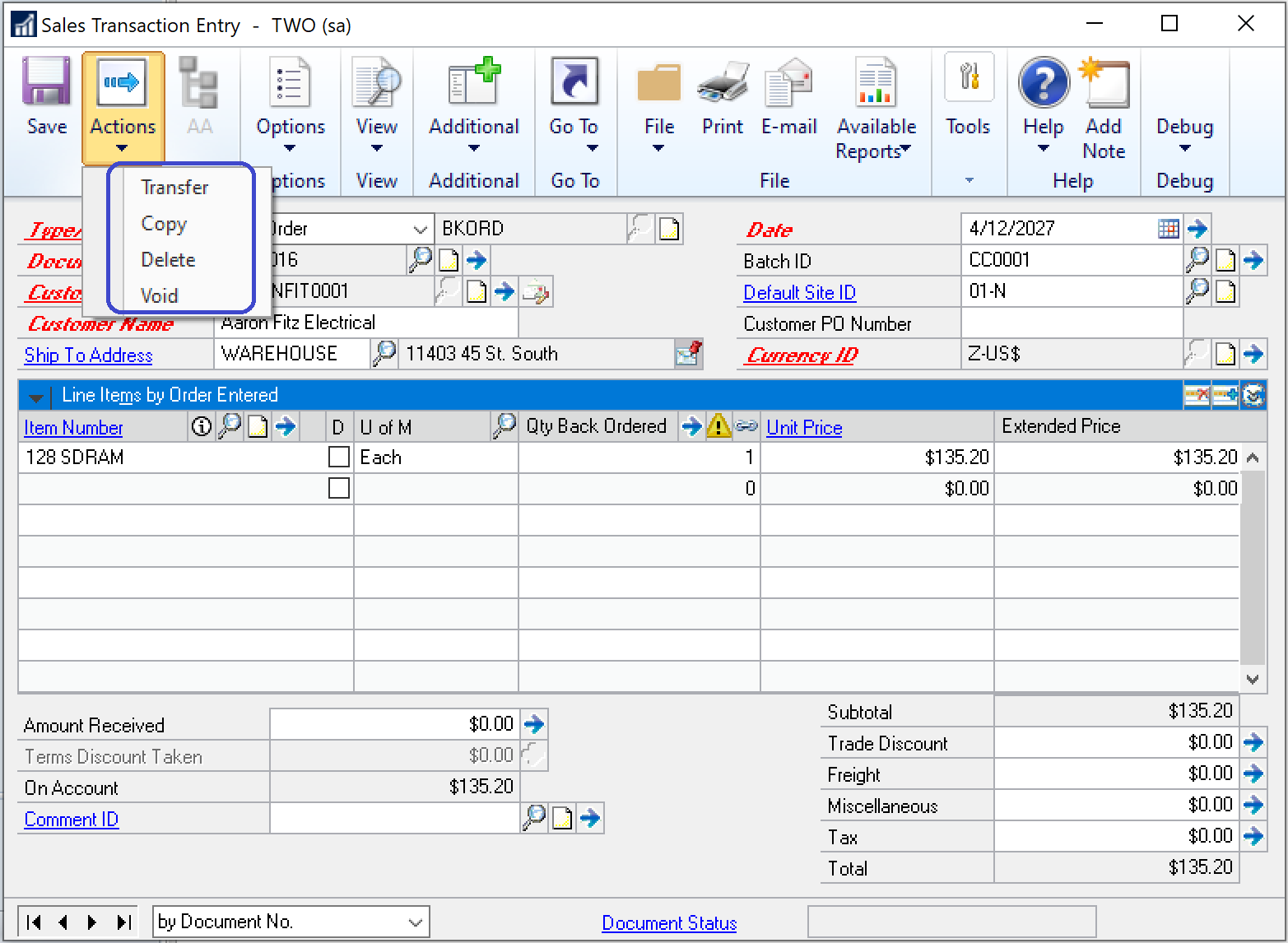
SOP_2D00_Purchase_2D00_Missing_2D00_From_2D00_Actions.png

Thanks!

*This post is locked for comments

I have the same question (0)
  • L Vail Profile Picture
    65,271 on at

    Hi,

    Please expand the line item so that we can see all of the quantity fields.

  • Community Member Profile Picture
    on at

    Hi Leslie,

    Thanks for your reply. Here are the two screenshots with the line item expanded. 

    pastedimage1568602901339v1.png

    pastedimage1568602911833v2.png

Under review

Thank you for your reply! To ensure a great experience for everyone, your content is awaiting approval by our Community Managers. Please check back later.

Helpful resources

Quick Links

Introducing the 2026 Season 1 community Super Users

Congratulations to our 2026 Super Stars!

Meet the Microsoft Dynamics 365 Contact Center Champions

We are thrilled to have these Champions in our Community!

Congratulations to the April Top 10 Community Leaders

These are the community rock stars!

Leaderboard > 🔒一 Microsoft Dynamics GP (Archived)

#1
talty09 Profile Picture

talty09 2

#1
Anthony Beatty Profile Picture

Anthony Beatty 2

#3
CP04-islander Profile Picture

CP04-islander 1

Last 30 days Overall leaderboard

Featured topics

Product updates

Dynamics 365 release plans
