web
You’re offline. This is a read only version of the page.
close
Skip to main content

Announcements

No record found.

News and Announcements icon
Community site session details

Community site session details

Session Id :
Microsoft Dynamics CRM (Archived)

Form Editor Buttons alignment issue

(0) ShareShare
ReportReport
Posted on by 100

Hi All,

Its bit of urgent. I was working and suddenly this happened:
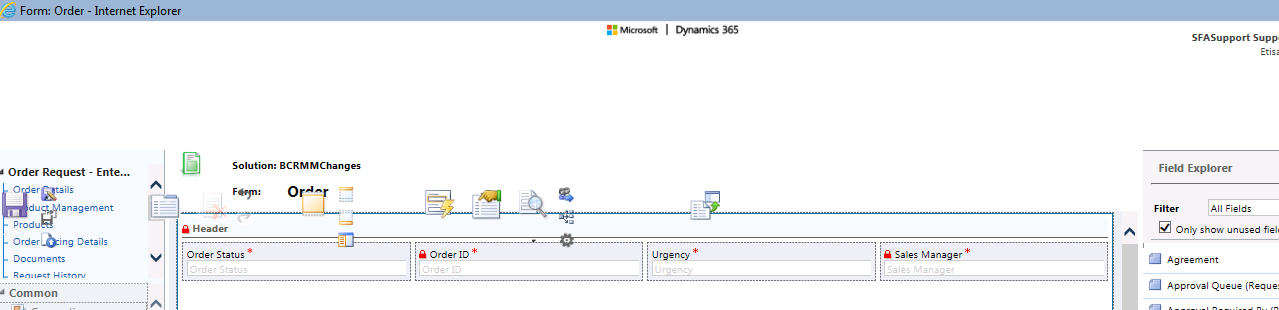
buttons-Icons-Alignment.png

Can anyone please share quick solution? As I couldn't find option to add new web_resource.

Environment Details given below:

1) Environment : Dynamics 365  V8.2  onpremise

2) I have changed version of IE but still same issue. I am using VM and

3) there is no other browser option so Only IE or Edge is possible.

4) Cleared cache as well.

5) It was fine so can't say there is some installation issue as it been installed a month before.

Thanks

*This post is locked for comments

I have the same question (0)
  • Suggested answer
    gdas Profile Picture
    50,091 Moderator on at

    Hi Ali,

    Normally this is happen when your environment is too slow may be someone doing publish or due to browser cache and resolution.

    I am pretty much sure this is machine specific, Restart your machine , clean browser cache re login system.

    Try to login with in private mode and from different machine and different user, different browser.

    In addition last suggestion to  restart  IIS if you are on-premise, and do Publish all customizations.

  • RaviKashyap Profile Picture
    55,410 Moderator on at

    Try InPrivate mode of Edge on the same machine and see if it works.

  • Verified answer
    Kevin Grech Profile Picture
    380 on at

    I have encountered the very same issue on both chrome and IE and just like you I couldn't get rid of it so I gave up on it and ended up replacing my machine. However, in IE I made myself a js bookmark to temporarily fix it (until the page reloads).

    Code:

    javascript:$("div.ms-crm-TopBarContainer").css("top","-120px");

    If you go this route, remember that When copy+paste'ing this into the bookmark, the browser will remove the initial "javascript:" for security reasons so you might have to type it again manually.

    PS. For the form editor, I use CTRL+N to open it in a normal tab so I can use my bookmark. (I've had this issue also in advanced find)

  • Ali Bajwa Profile Picture
    100 on at

    As I mentioned, I needed solution quick because I was in middle of urgent task :)

    @Kevin I did same as you mentioned but through debugger changed css.

    Temporarily it was resolved and I continued my work

    but there should be some permanent solution.

    Its really strange because at that Time only i was doing development. No one else was not even using that organization so can't say its because of someone else's publish and

    Yes I tried in private mode as well.

    IIS reset was also performed :).

    Anyways thanks all for your replies.

Under review

Thank you for your reply! To ensure a great experience for everyone, your content is awaiting approval by our Community Managers. Please check back later.

Helpful resources

Quick Links

Introducing the 2026 Season 1 community Super Users

Congratulations to our 2026 Super Stars!

Meet the Microsoft Dynamics 365 Contact Center Champions

We are thrilled to have these Champions in our Community!

Congratulations to the April Top 10 Community Leaders

These are the community rock stars!

Leaderboard > 🔒一 Microsoft Dynamics CRM (Archived)

#1
ScottDurow Profile Picture

ScottDurow 2

#2
GJones Profile Picture

GJones 1

Last 30 days Overall leaderboard

Featured topics

Product updates

Dynamics 365 release plans
