web
You’re offline. This is a read only version of the page.
close
Skip to main content

Announcements

No record found.

News and Announcements icon
Community site session details

Community site session details

Session Id :
Small and medium business | Business Central, N...
Answered

Custom Layout for Invoice Preview not working

(0) ShareShare
ReportReport
Posted on by 15

We are using several custom layouts (WORD) in Business Central to create documents in the design we need. 

A sample process: We create a new custom layout (e.g. Client specific invoice 1306 ), load it into BC via the "Custom layouts" screen and assign it to that client. It just WORKS

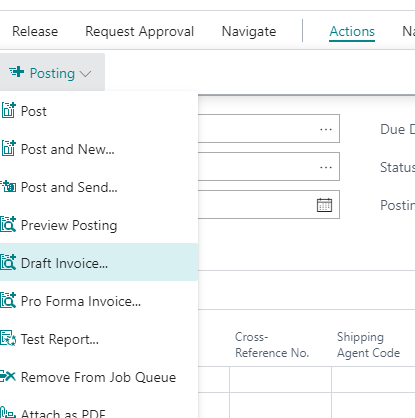
Now I want to give our accountant the chance to see the final layout of an invoice as a preview BEFORE the invoice is posted. I assumed that could be done with the "Draft Invoice"
pastedimage1604526372855v1.png

But unfortunately it doesnt work as expected. I Always get the same standard form layout. Somehow it seems that i can't change the standard to my new custom layout for the draft invoice. I assume the draft invoice is report type 1303? If I create a new Layout for 1303; assign it to the customer and open the draft of an Invoice, BC still shows me the old report. 

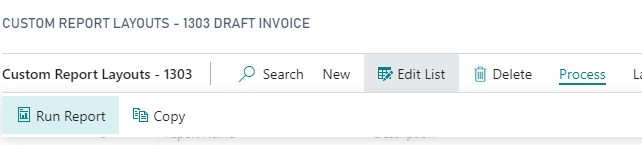
It gets even more confusing to me that if I create a report from the CUSTOM REPORT LAYOUTS screen with Process -> Run Report 
pastedimage1604526770975v2.png

I get the report in my new, edited custom layout..

Where am I doing wrong?

I have the same question (0)
  • Suggested answer
    JAngle Profile Picture
    157 on at

    It will be report selections. Go to report selections sales and check the id for a draft invoice. I don’t recall if draft invoice is an option in the document layouts you can assign at customer level or not. If it isn’t then you need to use report layout selections instead.

  • EikeKortz Profile Picture
    15 on at

    Hi Josh,

    thank you very much for your help! And you're right: 1303 dos not work with Customer level assignments. If I assign my new layout as the default, it works. But its strange that it is possible to do the customer specific assignment - but it just doesn't work.. Is that a bug? Especially as I would very much need that feature.

Under review

Thank you for your reply! To ensure a great experience for everyone, your content is awaiting approval by our Community Managers. Please check back later.

Helpful resources

Quick Links

Introducing the 2026 Season 1 community Super Users

Congratulations to our 2026 Super Stars!

Meet the Microsoft Dynamics 365 Contact Center Champions

We are thrilled to have these Champions in our Community!

Congratulations to the April Top 10 Community Leaders

These are the community rock stars!

Leaderboard > Small and medium business | Business Central, NAV, RMS

#1
OussamaSabbouh Profile Picture

OussamaSabbouh 2,138 Super User 2026 Season 1

#2
YUN ZHU Profile Picture

YUN ZHU 1,279 Super User 2026 Season 1

#3
AndrewThomas81 Profile Picture

AndrewThomas81 1,192

Last 30 days Overall leaderboard

Featured topics

Product updates

Dynamics 365 release plans
