web
You’re offline. This is a read only version of the page.
close
Skip to main content

Announcements

No record found.

News and Announcements icon
Community site session details

Community site session details

Session Id :
Supply chain | Supply Chain Management, Commerce
Unanswered

Price Trade Agreement - Issue with include generic currency conversion

(0) ShareShare
ReportReport
Posted on by 15

Why would an exchange rate apply differently for a trade agreement versus the normal sales price?

 Currency exchange rate conversion does not seem to be working is not working, but only for the trade agreement. 

I have a price agreement where I've entered the price to be 29 USD but I selected the include generic currency toggle to be able to convert to EUR.
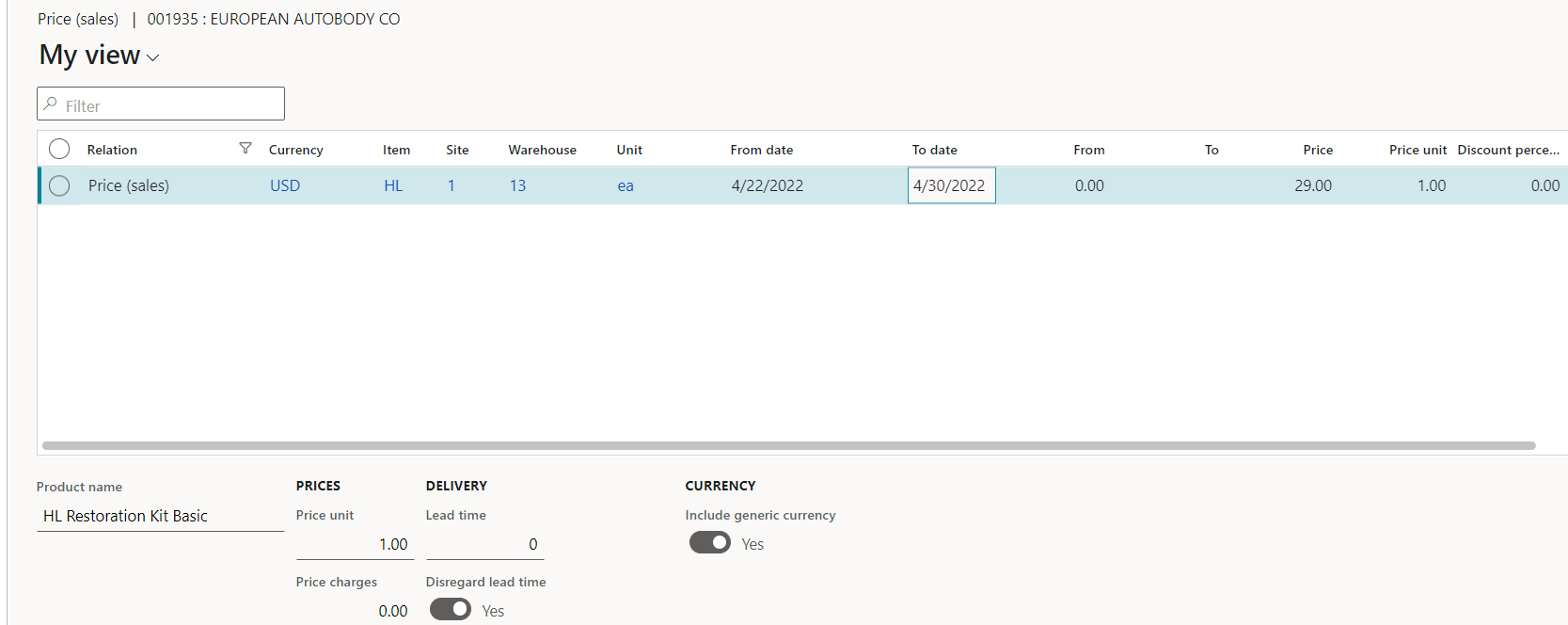
pastedimage1650663401859v1.png

Current exchange rate for USD to EURO is 92.63 as of 3/11/2022 in my environment

So I would expect to see the $29 converted to 26.86 EUR but 22.99 EUR is coming in on the sales order. I can't understand why. 

When I enter a sales order line for an item not on a price trade agreement, the conversion rate works fine. 

 No idea where 22.99 is coming from...

I have the same question (0)
  • Sally X Profile Picture
    252 on at

    Hi Steph Benkoss,

    Trade agreements are the primary means by which pricing and discounts are set up and applied in Dynamics 365 Finance and Operations.

    Please check whether a discount is set when you adjust price amount for the trade agreement lines. You may have set a discount on the current price of the selected line in the trade agreement or the default sales price setup for the item in the journal. Hence, when you enter a sales order line for an item on a price trade agreement, the displayed price in euros is actually a discount on the basis of exchange rate conversion. If this is the case, remove unnecessary discounts in trade agreements.

    pastedimage1650875057360v1.png

    Besides, the fixed exchange rate that you specify at the SO overwrites the default exchange rate. Make sure that when you are testing it out, the Customer currency as well as the sales order currency are correctly setup along with the exchange rates.

    Hope my answer can help you.

    Regards,

    Charlotte Xu

  • Steph Benkoss Profile Picture
    15 on at

    Thanks for responding. I actually figured it out. In the AR parameters, the currency rate was set to average vs default which is the one I was expecting to see.

  • Sally X Profile Picture
    252 on at

    You're welcome, if you have any other questions, feel free to ask.

Under review

Thank you for your reply! To ensure a great experience for everyone, your content is awaiting approval by our Community Managers. Please check back later.

Helpful resources

Quick Links

Introducing the 2026 Season 1 community Super Users

Congratulations to our 2026 Super Stars!

Congratulations to our 2025 Community Spotlights

Thanks to all of our 2025 Community Spotlight stars!

Leaderboard > Supply chain | Supply Chain Management, Commerce

#1
Mallesh Deshapaga Profile Picture

Mallesh Deshapaga 254

#2
Laurens vd Tang Profile Picture

Laurens vd Tang 192 Super User 2026 Season 1

#3
Syed Haris Shah Profile Picture

Syed Haris Shah 137 Super User 2026 Season 1

Last 30 days Overall leaderboard

Product updates

Dynamics 365 release plans
