web
You’re offline. This is a read only version of the page.
close
Skip to main content

Announcements

No record found.

News and Announcements icon
Community site session details

Community site session details

Session Id :
Microsoft Dynamics GP (Archived)

Issue with pending batches being grouped as one "batch"...

(0) ShareShare
ReportReport
Posted on by 40

Hello everyone! I'm very new to administrating and managing GP Dynamics so please bear with me. :) We are running GP Dynamics 10.0.

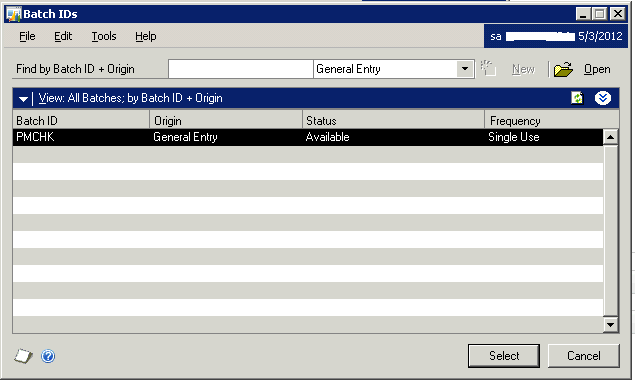
We seem to be having an issue where all pending batches on new companies (the ones that the previous sysadmin and I created) are grouped into one, like the picture below:
 

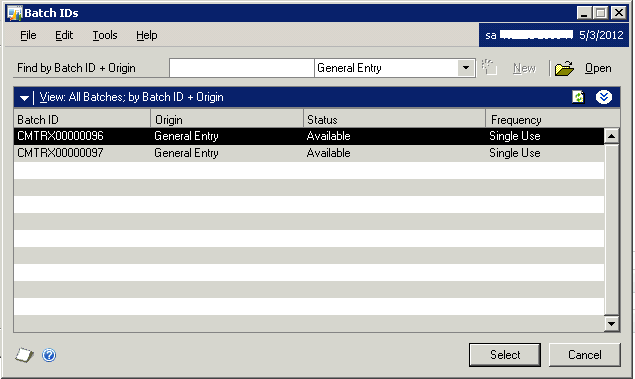
Ideally they'd look like the following, where each transaction entry is broken down individually:
 

Like I said, it only applies to new companies, so I'm certain it's something I'm doing wrong, but if anybody could point me in the right direction I'd appreciate it. I'd be happy to give more screenshots of different menus if you need them.

*This post is locked for comments

I have the same question (0)
  • Richard Wheeler Profile Picture
    75,852 Moderator on at

    These appear to be three different GL batches. The first one was created when you cut some checks in payables and the other two are bank transactions. A batch is a collection of transactions so coming down from the subledger if you cut 30 checks you will see one batch. Now with bank transactions since there are no batches, each transaction will appear separately. The same thing would be true if you were doing on line transactions in the subledgers where you choose not to post by batch but post by transaction.

  • pdethier Profile Picture
    40 on at

    Thank you for the quick reply Richard. Is there an option to have each check show up individually? Like the following (PMCHK00000314):

  • Verified answer
    Richard Wheeler Profile Picture
    75,852 Moderator on at

    I would question why you would want to see each check listed separately as individual ledger batches? You could go to the Payables Transaction Entry screen, enter your payable, print the check and do an online post. This would be a very slow way of printing checks. I think I am missing something here.

    One thought is to go to Tools->Setup->Posting->Posting for purchasing and see if you are creating a J/E per batch or transaction. Compare this with your other companies.

Under review

Thank you for your reply! To ensure a great experience for everyone, your content is awaiting approval by our Community Managers. Please check back later.

Helpful resources

Quick Links

Introducing the 2026 Season 1 community Super Users

Congratulations to our 2026 Super Stars!

Meet the Microsoft Dynamics 365 Contact Center Champions

We are thrilled to have these Champions in our Community!

Congratulations to the March Top 10 Community Leaders

These are the community rock stars!

Leaderboard > 🔒一 Microsoft Dynamics GP (Archived)

Last 30 days Overall leaderboard

Featured topics

Product updates

Dynamics 365 release plans
