web
You’re offline. This is a read only version of the page.
close
Skip to main content

Announcements

No record found.

News and Announcements icon
Community site session details

Community site session details

Session Id :
Microsoft Dynamics RMS (Archived)

Arabic is not supported in Reciept format of Store Operations Manager

(0) ShareShare
ReportReport
Posted on by 167

hi,

In Store Operations Manager there is an option for changing the reciept format so i want to add some of the fields of the reciept format in Arabic but when i tried to type the Arabic text it is not coming properly way. please find the below screen shot.
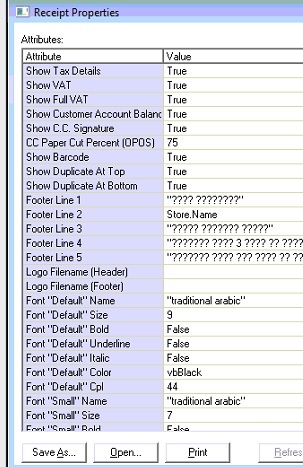
*This post is locked for comments

I have the same question (0)
  • Suggested answer
    raelhefn Profile Picture
    Microsoft Employee on at

    change machine Unicode language to be Arabic also check database collation format must be support Arabic language

  • Saleh Profile Picture
    167 on at

    it worked , thanks

  • Community Member Profile Picture
    on at

    how can i do that in steps please?

  • Saleh Profile Picture
    167 on at

    hi,

    check the below steps

    SOLUTION

    Notes

    You must be logged in with an account that has administrative privileges in order to change the system locale.

    The appropriate language packs should be installed on the operating system.

    View the System Locale settings for Windows

    Click Start, then Control Panel

    Click Clock, Language and Region

    Windows 10, Windows 8: Click Region

    Windows 7: Click Region and Language

    Windows XP: Click Regional and Language Options

    The Region and Language options dialog appears.

    Click the Administrative tab

    On Windows XP, click the Advanced tab

    If there is no Advanced tab, then you are not logged in with administrative privileges.

    Under the Language for non-Unicode programs section, click Change system locale and select the desired language.

    Click OK

    Restart the computer to apply the change.

  • Community Member Profile Picture
    on at

    thanks a lot for your help

    i do all back steps but it's still not reading arabic language

    if you have any suggestion please help me

    2251.Cap_4406_ture.PNG

  • Saleh Profile Picture
    167 on at

    hi,

    check the SQL Server Collation and change it to Arabic_CI_AS

  • Community Member Profile Picture
    on at

    thanks for your good reply

    but, could you help me in steps how can i do that

    BIG thanks

  • Community Member Profile Picture
    on at

    I Checked it many times but the problem still not fixed after all Trubleshooting

    i checked first the SQL Collation

    so, i checked the Store Operations Administrator

    and finally checked Windows Region setting

    ALL OKAY

    Ca1pture.PNG

    arabic in all sql server and DB

    Ca1pture.PNG

    waiting your reply

  • Saleh Profile Picture
    167 on at

    Hi,

    try to change to other Arabic -  Arabic(Saudi Arabia)

    this should be done in a system  where Store Operation POS is installed.

  • Community Member Profile Picture
    on at

    i changed my windows OSystem to arabic SA

    but i thinks the wrong with the receipt format

    because i changed some English words in receipt but not shown also

    C1apture.PNG

    could you help me with an XML arabic receipt

Under review

Thank you for your reply! To ensure a great experience for everyone, your content is awaiting approval by our Community Managers. Please check back later.

Helpful resources

Quick Links

Introducing the 2026 Season 1 community Super Users

Congratulations to our 2026 Super Stars!

Meet the Microsoft Dynamics 365 Contact Center Champions

We are thrilled to have these Champions in our Community!

Congratulations to the April Top 10 Community Leaders

These are the community rock stars!

Leaderboard > 🔒一 Microsoft Dynamics RMS (Archived)

Last 30 days Overall leaderboard

Featured topics

Product updates

Dynamics 365 release plans
