web
You’re offline. This is a read only version of the page.
close
Skip to main content

Announcements

No record found.

News and Announcements icon
Community site session details

Community site session details

Session Id :
Microsoft Dynamics CRM (Archived)

error in Java script while showing/hiding a tab

(0) ShareShare
ReportReport
Posted on by 790

Hi all


i dont know what is wrong in this code to show/hide a certain tab on CASE form , please help me.


TypeError: Cannot read property 'setVisible' of null
at showhide (hungerstation-sandbox.crm4.dynamics.com/.../new_showhidtabsoncase)
at eval (eval at RunHandlerInternal (hungerstation-sandbox.crm4.dynamics.com/.../ClientApiWrapper.aspx), <anonymous>:1:1)
at RunHandlerInternal (hungerstation-sandbox.crm4.dynamics.com/.../ClientApiWrapper.aspx)
at RunHandlers (hungerstation-sandbox.crm4.dynamics.com/.../ClientApiWrapper.aspx)
at ExecuteHandler (hungerstation-sandbox.crm4.dynamics.com/.../ClientApiWrapper.aspx)
at Mscrm.TurboForm.Control.CustomScriptsManager.$Dd_1 (hungerstation-sandbox.crm4.dynamics.com/.../formcontrols.js)
at Mscrm.TurboForm.Control.CustomScriptsManager.executeHandler (hungerstation-sandbox.crm4.dynamics.com/.../formcontrols.js)
at Mscrm.TurboForm.Control.CustomScriptsManager.executeHandlerByDescriptor (hungerstation-sandbox.crm4.dynamics.com/.../formcontrols.js)
at hungerstation-sandbox.crm4.dynamics.com/.../formcontrols.js
at hungerstation-sandbox.crm4.dynamics.com/.../global.ashx


the code is :


function showhide()
{
subjecttype = Xrm.Page.getAttribute("subjectid");
if (typeof (subjecttype) != "undefined" && subjecttype.getValue() != null)
{
if(subjecttype =="Content Upload")
{

//parent.Xrm.Page.ui.tabs.get("ContentUpload").setVisible(true);
parent.Xrm.Page.ui.tabs.get("general").sections.get("ContentUpload").setVisible(true);


}
else
{
parent.Xrm.Page.ui.tabs.get("general").sections.get("ContentUpload").setVisible(false);
}
}
}


and i am trying to hide/show the following circulated tab based on the selected subject.
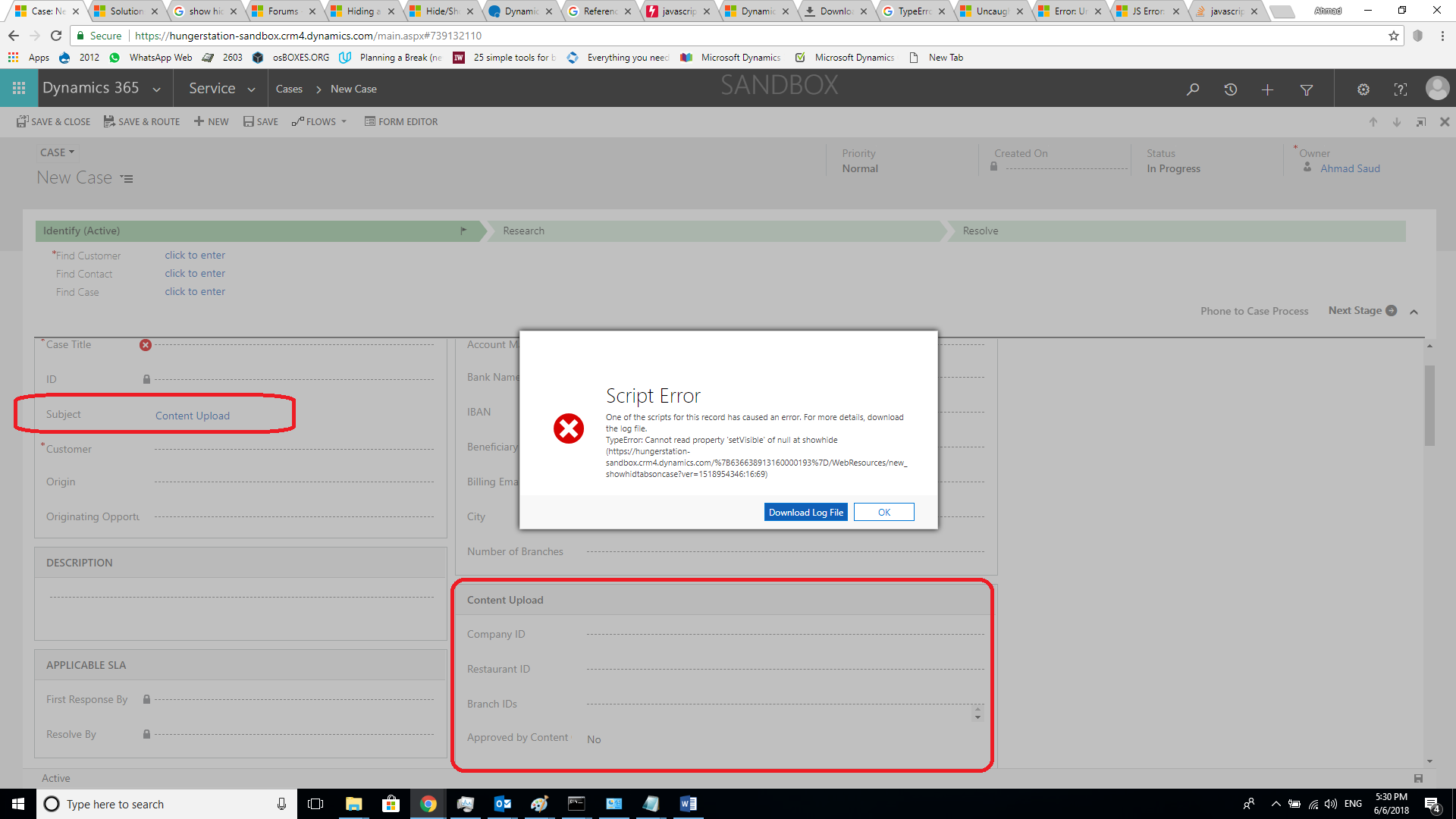
2626.Untitled5.png

*This post is locked for comments

I have the same question (0)
  • Suggested answer
    Mr Ramzy GHRIBI Profile Picture
    345 on at

    Hi,

    why you add parent every time ?

    try this code  please

    function showtab()

    {

    if(Xrm.Page.getAttribute("field").getValue()!=null)

    {Xrm.Page.ui.tabs.get("tabname").sections.get("tabname_section_name").setVisible(true);}

    else

    {Xrm.Page.ui.tabs.get("tab_2").sections.get("tab_2_section_3").setVisible(false);}

    }

  • Ahmad Saud Profile Picture
    790 on at

    i got the same error

    function showhide()

    {

    if(Xrm.Page.getAttribute("subjectid").getValue()=="ContentUpload")

    {Xrm.Page.ui.tabs.get("general").sections.get("ContentUpload").setVisible(true);}

    else

    {Xrm.Page.ui.tabs.get("general").sections.get("ContentUpload").setVisible(false);}

    }

  • Suggested answer
    Mr Ramzy GHRIBI Profile Picture
    345 on at

    the tab is visible by default ? please delete the  browser History  and try it.

  • Suggested answer
    sandeepstw Profile Picture
    4,601 on at

    Hi Ahmad,

    On which event you are adding code. Because first write console.log(parent.Xrm.Page.ui.tabs.get("general")) and check any of your object should not listed as null. It looks like when you are assessing tab object it was null.

    so make sure at time when you access object should has value.

    Mark as verified if helps !!

    Thanks,

    Sandeep

  • Ahmad Saud Profile Picture
    790 on at

    yes it is visible by default

  • Ahmad Saud Profile Picture
    790 on at

    the event is

    2018_2D00_06_2D00_06-18_5F00_23_5F00_09_2D00_Form_5F00_-Case.png

  • Verified answer
    Mr Ramzy GHRIBI Profile Picture
    345 on at

    can you send the screenshot of the tab and section name please?

  • Verified answer
    gdas Profile Picture
    50,091 Moderator on at

    Hi Ahmed ,

    Not sure why its not working ,ideally this should work. I found some additional brackets in previous posted code try with this  -

            function showhide()
            {
                if(Xrm.Page.getAttribute("subjectid").getValue() == "ContentUpload")
                {
                    Xrm.Page.ui.tabs.get("TabName").sections.get("SectionName").setVisible(true);   //  Make sure  you are providing correct sectionname , tab name
    
                }
                else
                {
                    Xrm.Page.ui.tabs.get("TabName").sections.get("SectionName").setVisible(false); // Make sure  you are providing correct sectionname , tab name
    
                }
    
            }


  • Verified answer
    Mr Ramzy GHRIBI Profile Picture
    345 on at

    tabproperty.PNG

    Make sure you enter the name not the label of tab .

  • Ahmad Saud Profile Picture
    790 on at

    thanks, but the names are correct.

Under review

Thank you for your reply! To ensure a great experience for everyone, your content is awaiting approval by our Community Managers. Please check back later.

Helpful resources

Quick Links

Introducing the 2026 Season 1 community Super Users

Congratulations to our 2026 Super Stars!

Meet the Microsoft Dynamics 365 Contact Center Champions

We are thrilled to have these Champions in our Community!

Congratulations to the April Top 10 Community Leaders

These are the community rock stars!

Leaderboard > 🔒一 Microsoft Dynamics CRM (Archived)

#1
ScottDurow Profile Picture

ScottDurow 2

#2
GJones Profile Picture

GJones 1

Last 30 days Overall leaderboard

Featured topics

Product updates

Dynamics 365 release plans
