web
You’re offline. This is a read only version of the page.
close
Skip to main content

Announcements

No record found.

News and Announcements icon
Community site session details

Community site session details

Session Id :
Microsoft Dynamics CRM (Archived)

Console App - Deleting records error

(0) ShareShare
ReportReport
Posted on by 1,540

I have a console app for cleaning up attachments in our CRM that for some reason is throwing an error today.

My relevant code is (I pass an Entity Collection of ActivityMimeAttachment records):

foreach (Entity r in records.Entities)
    service.Delete(r.LogicalName, r.Id);


On the delete line I get the error "Guid should contain 32 digits with 4 dashes (xxxxxxxx-xxxx-xxxx-xxxx-xxxxxxxxxxxx)." but the guid is 10f316ee-7a60-e511-8117-c4346bac3e84:
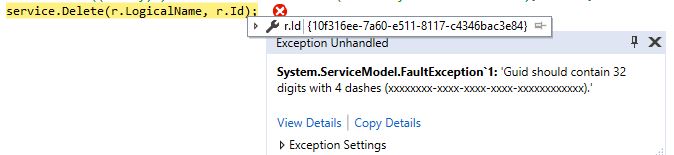
6406.err.JPG

How do I resolve this?

This is for CRM Online version 8.2 - could that have something to do with it?

Thanks

EDIT:

Further testing indicates this is specific to deleting attachments. I can delete other types of records by passing a different entity collection to the foreach loop

*This post is locked for comments

I have the same question (0)
  • Community Member Profile Picture
    on at

    Hi,

    I think you should probably remove the curly braces"{" and "}". It will surely resolve your problem

  • ChrisJC Profile Picture
    1,540 on at

    Hi Guillaume,

    The Guid is retrieved from the CRM so it should be formatted correctly.

    However, to check I have added the following but still get the same error:

    Guid id = new Guid(r.Id.ToString().Replace("{", "").Replace("}", ""));

    service.Delete(r.LogicalName, id);

    Thanks

    Chris

  • HenriquePalomo Profile Picture
    510 on at

    Hi Chris.

    Are those emails on draft state? If the answer is no, try to change to draft state using workflow for example and try to delete again.

  • ChrisJC Profile Picture
    1,540 on at

    Hi Henrique,

    I've tried that, the emails are in draft but I'm still getting the same error on the service.delete line.

    Thanks,

    Chris

  • Verified answer
    Nuno Profile Picture
    2,005 on at

    Hi,

    Don´t you have any plugin running on activitymimeattachment entity delete message. The error could come from it because it seems all ok with your code.

  • ChrisJC Profile Picture
    1,540 on at

    Thank you Nuno - good point. We have Adobe sign that has a plugin with a pre-delete step. I've disabled this while we clear out the data.

    Thanks,

    Chris

Under review

Thank you for your reply! To ensure a great experience for everyone, your content is awaiting approval by our Community Managers. Please check back later.

Helpful resources

Quick Links

Introducing the 2026 Season 1 community Super Users

Congratulations to our 2026 Super Stars!

Congratulations to our 2025 Community Spotlights

Thanks to all of our 2025 Community Spotlight stars!

Leaderboard > 🔒一 Microsoft Dynamics CRM (Archived)

#1
JS-09031509-0 Profile Picture

JS-09031509-0 3

#2
AS-17030037-0 Profile Picture

AS-17030037-0 2

#2
Mark Eckert Profile Picture

Mark Eckert 2

Last 30 days Overall leaderboard

Featured topics

Product updates

Dynamics 365 release plans
