web
You’re offline. This is a read only version of the page.
close
Skip to main content

Announcements

No record found.

News and Announcements icon
Community site session details

Community site session details

Session Id :
Small and medium business | Business Central, N...
Answered

Fixed Asset "Location" and Dimension "Location"

(0) ShareShare
ReportReport
Posted on by 3,518

Hi:

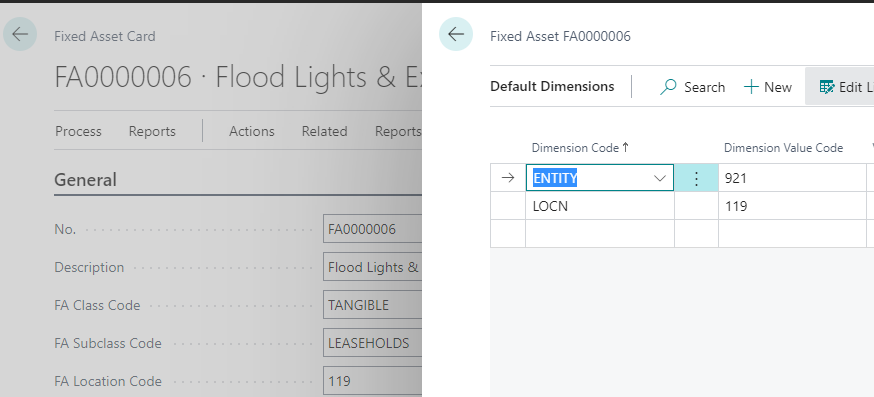
As you can see from the screenshot below, the Dimension Value Code for the Location (LOCN) dimension is the same as the Fixed Asset (FA) Location Code.

We may have times, however, where a fixed asset's LOCN will not be the same when first created within the Fixed Asset Card. 

They always need to be the same.

So, is there a way to ensure that the FA Location Code always matches the Dimension Value Code for LOCN?

Thanks!

John
pastedimage1663352313374v1.png

I have the same question (0)
  • Suggested answer
    Amit Baru Profile Picture
    3,037 on at

    Hi,

    Pls do the setup in FA Master for that dimension. Refer the below image:

    pastedimage1663419405380v1.png

    Regards

    Amit Sharma

    www.erpconsultors.com

  • Suggested answer
    Inge M. Bruvik Profile Picture
    1,161 Moderator on at

    There is no standard functionality to make sure they are always the same.

    You will have to manually maintain the default dimension setup on your FA to make sure it always has the same value as the FA Location Code.

Under review

Thank you for your reply! To ensure a great experience for everyone, your content is awaiting approval by our Community Managers. Please check back later.

Helpful resources

Quick Links

Introducing the 2026 Season 1 community Super Users

Congratulations to our 2026 Super Stars!

Congratulations to our 2025 Community Spotlights

Thanks to all of our 2025 Community Spotlight stars!

Leaderboard > Small and medium business | Business Central, NAV, RMS

#1
OussamaSabbouh Profile Picture

OussamaSabbouh 1,965 Super User 2026 Season 1

#2
YUN ZHU Profile Picture

YUN ZHU 1,125 Super User 2026 Season 1

#3
Dhiren Nagar Profile Picture

Dhiren Nagar 961 Super User 2026 Season 1

Last 30 days Overall leaderboard

Featured topics

Product updates

Dynamics 365 release plans
