web
You’re offline. This is a read only version of the page.
close
Skip to main content

Notifications

Announcements

No record found.

Community site session details

Community site session details

Session Id :
Microsoft Dynamics 365 | Integration, Dataverse...
Suggested Answer

Microsoft flow - bad request. error in query

(0) ShareShare
ReportReport
Posted on by 7,316

Hi, I am new to using flow and trying to just create a simple flow. Nothing complex.

I am getting this very generic error:

{"error":{"code":"0x0","message":"Bad Request - Error in query syntax.","innererror":{"message":"Bad Request - Error in query }

Not sure how to debug and what to troubleshoot for looking at this error. Can someone please guide me through this? Thanks for any help.

All I am doing is copying data from excel online and trying to import it into Dynamics 365 entity(Incident).

I have taken the import template from Dynamics 365 exported from advanced find and stored it in OneDrive.

My flow is picking up the file, getting the rows but won't update them in Dynamics(throws above error).
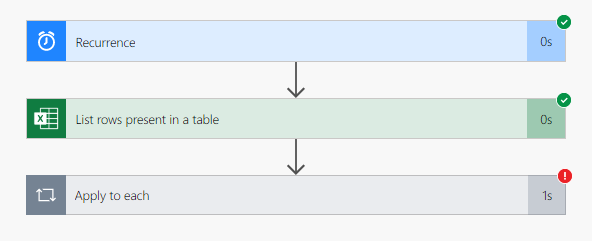
pastedimage1582147668867v1.png

What am I doing wrong? For the sake of testing I am only trying to update one field along with mandatory fields like Customer ID, Owner ID.. etc. Please help.

I have the same question (3)
  • meelamri Profile Picture
    13,216 User Group Leader on at

    Hello partner,

    Can you Please share more screenshots ? I want to see the last step in more details.

  • meenoo Profile Picture
    7,316 on at

    Here.. is this what you mean?

    pastedimage1582148799659v1.png

  • Suggested answer
    meelamri Profile Picture
    13,216 User Group Leader on at

    Maybe something is wrong with the record identifier.

    Please refer to this blog: www.c-sharpcorner.com/.../

  • meenoo Profile Picture
    7,316 on at

    hmm..

    I looked into the article and followed it but still getting the same error when it comes to update record action.

    It just simply says 'Bad Request - Error in query syntax.'

    I wish it errors out with some more information about which field fails, why it fails etc.

    This is not helping me and I can't figure out what is failing and why is it failing!! How else do I troubleshoot? Somebody please help!

    Thanks.

Under review

Thank you for your reply! To ensure a great experience for everyone, your content is awaiting approval by our Community Managers. Please check back later.

Helpful resources

Quick Links

Responsible AI policies

As AI tools become more common, we’re introducing a Responsible AI Use…

Neeraj Kumar – Community Spotlight

We are honored to recognize Neeraj Kumar as our Community Spotlight honoree for…

Leaderboard > Microsoft Dynamics 365 | Integration, Dataverse, and general topics

#1
Siv Sagar Profile Picture

Siv Sagar 93 Super User 2025 Season 2

#2
#ManoVerse Profile Picture

#ManoVerse 80

#3
Martin Dráb Profile Picture

Martin Dráb 64 Most Valuable Professional

Last 30 days Overall leaderboard

Product updates

Dynamics 365 release plans
