web
You’re offline. This is a read only version of the page.
close
Skip to main content

Announcements

No record found.

News and Announcements icon
Community site session details

Community site session details

Session Id :
Small and medium business | Business Central, N...
Unanswered

Cloud Migration from GP to BC

(0) ShareShare
ReportReport
Posted on by 338

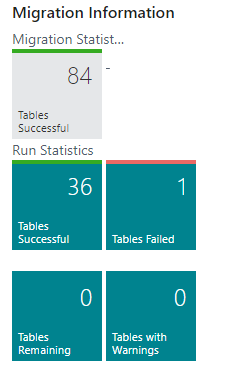
When I run the Cloud Migration from a Sandbox company, it appears to run correctly, but I'm not seeing any data in BC.

It shows 36 tables successful and 1 failed.  The failed table is the Item table due to item # length of some item in GP.

When I look at Chart of Accounts, Vendors, Customers.... the list is empty.  No filters are set.

pastedimage1635511695404v2.png

pastedimage1635511429054v1.png

I have the same question (0)
  • raelhefn Profile Picture
    Microsoft Employee on at

    Go to businesscentral.dynamics.com/ table information and check if data available in migrated tables and if data available just uninstall related extensions and reinstall all again. otherwise you need to fix error and try to upload all data again.

  • SMS Profile Picture
    338 on at

    Ramy,

    Thanks for the reply.  That did help.  That data is mostly in the tables within 'Table Information'.  

    Data is in strange tables...   GP Vendor, GP Customer...  (NOT IN CUSTOMER or VENDOR)

    pastedimage1635801545060v2.png

  • SMS Profile Picture
    338 on at

    Bumping this up again as I've not found any solution to this.  I can migrate TWO database, but not my client's production GP

    database.

  • Adam Helsene Profile Picture
    5 on at

    You'll need to correct the issue that's blocking the Item table. GP migration uses a staging approach, where the tables you are seeing (GP Account, GP Customer, etc) are staging tables to hold data before it's finalized into the core BC tables. If tables fail part of the process, your data may not be consistent, so the process is not fully completed.

    Diagnostic runs are also a good tool to check for potential issues like this one.

Under review

Thank you for your reply! To ensure a great experience for everyone, your content is awaiting approval by our Community Managers. Please check back later.

Helpful resources

Quick Links

Introducing the 2026 Season 1 community Super Users

Congratulations to our 2026 Super Stars!

Meet the Microsoft Dynamics 365 Contact Center Champions

We are thrilled to have these Champions in our Community!

Congratulations to the March Top 10 Community Leaders

These are the community rock stars!

Leaderboard > Small and medium business | Business Central, NAV, RMS

#1
OussamaSabbouh Profile Picture

OussamaSabbouh 1,993 Super User 2026 Season 1

#2
YUN ZHU Profile Picture

YUN ZHU 1,116 Super User 2026 Season 1

#3
Khushbu Rajvi. Profile Picture

Khushbu Rajvi. 557 Super User 2026 Season 1

Last 30 days Overall leaderboard

Featured topics

Product updates

Dynamics 365 release plans