web
You’re offline. This is a read only version of the page.
close
Skip to main content

Announcements

No record found.

News and Announcements icon
Community site session details

Community site session details

Session Id :
Microsoft Dynamics CRM (Archived)

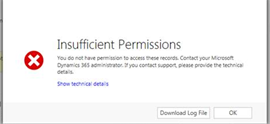
'Insufficient Permissions' error message when trying to REPLY to email from Queue

(0) ShareShare
ReportReport
Posted on by

Hello,

Users are unable to REPLY to emails from queue but CAN forward emails. 

0572.reply.PNG

3286.permissions.PNG

I'm pretty sure it's a security role issue. Below is what I've set up for them: 

3286.security.PNG

(As you can see, we don't want users deleting anything). 

All mailboxes for our users has been approved and set up for server-side sync both inbound/outbound.

Thanks!

*This post is locked for comments

I have the same question (0)
  • Community Member Profile Picture
    on at

    Hi,

    please download the Log File and post the content.

    best regards
    Niklas

  • Community Member Profile Picture
    on at

    Where can I download the log file from?

  • Community Member Profile Picture
    on at

    Its the button besides "OK" in your screenshot

  • Community Member Profile Picture
    on at

    Hi,

    please download the Log File and post the content.

    best regards

    Niklas

  • Community Member Profile Picture
    on at

    Is there a way to format it so it's easier to read?

  • Community Member Profile Picture
    on at

    search for     prv  

    there should be something like   "missing prvFooBar privilege"

  • Verified answer
    Community Member Profile Picture
    on at

    I discovered the issue. The append/ append to permissions were not set on the contact. I updated this and the problem has been resolved.

  • Community Member Profile Picture
    on at

    there you go

  • Community Member Profile Picture
    on at

    Can I know who is the recipient of the email, contact?

Under review

Thank you for your reply! To ensure a great experience for everyone, your content is awaiting approval by our Community Managers. Please check back later.

Helpful resources

Quick Links

Introducing the 2026 Season 1 community Super Users

Congratulations to our 2026 Super Stars!

Meet the Microsoft Dynamics 365 Contact Center Champions

We are thrilled to have these Champions in our Community!

Congratulations to the April Top 10 Community Leaders

These are the community rock stars!

Leaderboard > 🔒一 Microsoft Dynamics CRM (Archived)

Last 30 days Overall leaderboard

Featured topics

Product updates

Dynamics 365 release plans