web
You’re offline. This is a read only version of the page.
close
Skip to main content

Announcements

No record found.

News and Announcements icon
Community site session details

Community site session details

Session Id :
Microsoft Dynamics CRM (Archived)

View all activities from Lead form

(0) ShareShare
ReportReport
Posted on by

Hi all.

I'm trying to customize the Lead form to show all related activities (tasks, emails, calls, etc.), so I can easily see all contact history for the lead.

In the form, I have already the list of activities.
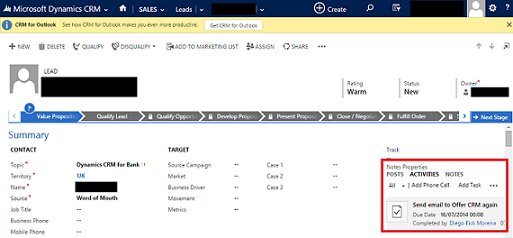
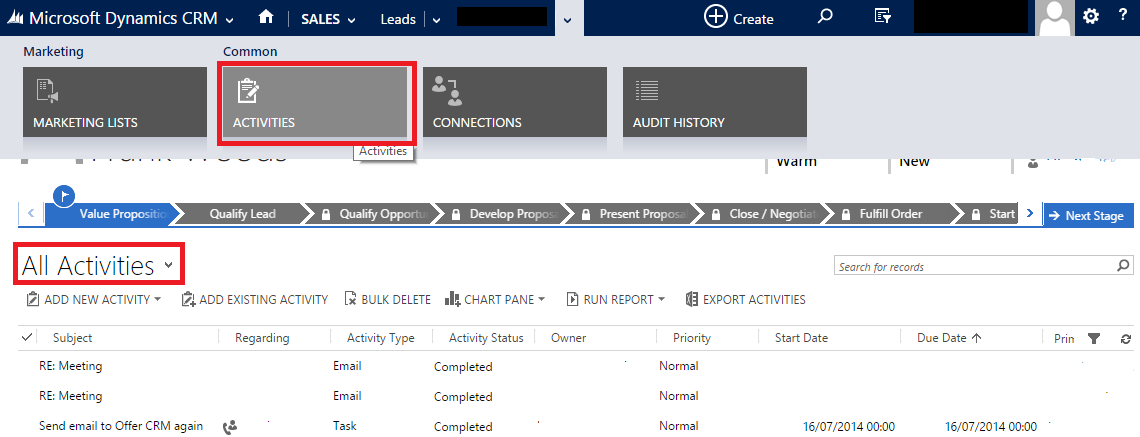
But from there I cannot see all activities, as available if I navigate to the list of related activities and then select the view All Activities.
I have already tried to add a sub-grid to the form, but no success.

Any ideas?

Thanks.

Diego.

*This post is locked for comments

I have the same question (0)
  • Wayne Walton Profile Picture
    13,730 on at

    What happened when you tried to add the sub-grid?  That's exactly how you should do it.

  • Suggested answer
    Mahadeo Matre Profile Picture
    17,021 on at

    Hi..

    When creating sub grid are selecting default view as "All Activities"?

    Once you select this view for sub grid.. then all activities related Lead will be shown in sub grid. 

    Hope this will help.. 

  • Community Member Profile Picture
    on at

    Hi, thanks for the reply.

    Check how I have created the sub-grid:

    Subgrid2.PNG

    2. Even selecting All Activities, the sub-grid doesn't show all activities.

    Subgrid3.PNG

    The only way to see all is to click on the icon highlighted in red (above) and then select again the view All Activities. 

    Somehow CRM doesn't show all activities in the sub-grid.

    Really strange behavior.

  • Suggested answer
    Mahadeo Matre Profile Picture
    17,021 on at

    In sub grid you can show only those activities whose Regarding is current lead.

    But in Associated view, you will see activities  which has current lead in To, CC, BCC, required, regarding, etc fields of activities.

    in other words In Sub grid, you will see only Regarding activities, but in associated view you will see all related Activities.

    Hope this will help..

  • Suggested answer
    Mithilesh Kumar Profile Picture
    10,047 on at

    Hi Diego,

    Check the Regarding Field in Lead Record. It should be populated to show up in Social Pane (Activities Tab).

    If you do not have that, it won't show up. However this behaviour is only for Lead Entity.

    For other Entity like Contact or Account, you can still show up the record even if the Regarding Field is not populated.

    Hope that helps

    Thanks

  • Suggested answer
    Aileen Gusni Profile Picture
    44,524 on at

    Hi Diego,

    Lead in Social Pane activities has no rollup feature to see all of the activities related to this Lead, either through 'To' field or Regarding, this is different from Account or Contact.

    In the social pane, you can only see Lead activities that is related through REGARDING field, so let's say you have Email, like the Re:Meeting in your data..

    As you can see, there is no Regarding field, right? But, it does exist in the All Activities associated view, because if you double click,  am sure, that this email having 'To field to this Lead.

    This is different from your third Email record, that is having this Lead as the Regarding field.

    So that once you go to the Social Pane in the main Lead form, you wont see email 1 and email two, you only can see Email number 3.

    This is same as well for Subgrid, because only related by Regarding field.

    This behavior is totally different with Contact, Account, and Opportunity while for those 3 entities you can see all activities, regardless the 'Regarding field' value.

    I have explained in this post, please kindly see this.

    community.dynamics.com/.../153209.aspx

    Hope this helps.

    Thanks

Under review

Thank you for your reply! To ensure a great experience for everyone, your content is awaiting approval by our Community Managers. Please check back later.

Helpful resources

Quick Links

Introducing the 2026 Season 1 community Super Users

Congratulations to our 2026 Super Stars!

Meet the Microsoft Dynamics 365 Contact Center Champions

We are thrilled to have these Champions in our Community!

Congratulations to the April Top 10 Community Leaders

These are the community rock stars!

Leaderboard > 🔒一 Microsoft Dynamics CRM (Archived)

#1
ScottDurow Profile Picture

ScottDurow 2

#2
GJones Profile Picture

GJones 1

Last 30 days Overall leaderboard

Featured topics

Product updates

Dynamics 365 release plans
