web
You’re offline. This is a read only version of the page.
close
Skip to main content

Announcements

No record found.

News and Announcements icon
Community site session details

Community site session details

Session Id :
Microsoft Dynamics CRM (Archived)

View associated with subgrid not working on expansion

(0) ShareShare
ReportReport
Posted on by

HI:

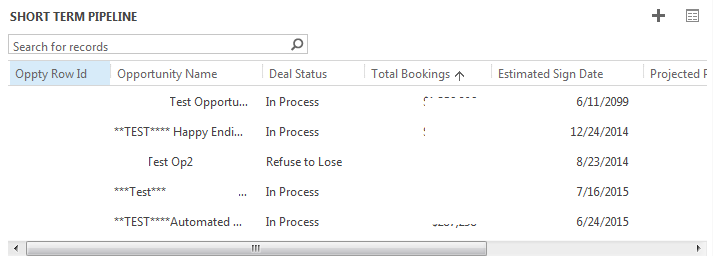
I have a short term pipeline subgrid on my client form in DYNAMICS CRM 2013  which looks perfect as a subgrid. shown below
stp2.PNG

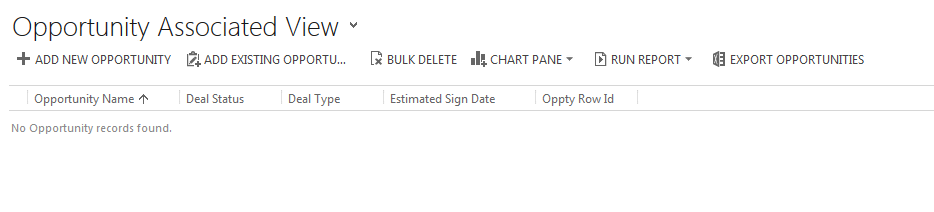
The problem is when I try to expand it to see the complete list by clicking the "See the records associated with this view" button, the new screen pops up to "Opportunity associated view" and when I change the view to "Short term pipeline", it doesn't show me any records ( the records were present in subgrid though).

stp3.PNG

Am I doing anything wrong or do I need to make any setting change or is it something which is an out of the box issue. I am new to dynamics so Any help would be appreciated.

Thanks

*This post is locked for comments

I have the same question (0)
  • Royal King Profile Picture
    27,686 on at

    In the subgrid probably you have different view , check what is the view you are showing in the subgrid view and select same view in the related records grid.As shown below find the view that shows the record in subgrid and select same view in the related records .

  • Community Member Profile Picture
    on at

    Royal King I do have the same view as my default view. Also my subgrid has the right records, it is just upon expanding that it doesn't show the same records.

  • Royal King Profile Picture
    27,686 on at

    what happens when you try to run the advanced find with same view and for the same record , can you see records in the result?

  • Community Member Profile Picture
    on at

    Royal King Yup Advance Find works perfect. Gives the same result as the subgrid gives.

  • Royal King Profile Picture
    27,686 on at

    Have you tried removing the subgrid and publish and readding the subgrid in the form?

  • Community Member Profile Picture
    on at

    Royal King Yup I have tried that, still not working. Could you check whether it is a one off situation or is it not working for you too in CRM 2013 ?

  • Royal King Profile Picture
    27,686 on at

    It works fine in all of my subgrids, 

  • Community Member Profile Picture
    on at

    Royal King : Well looks like there is a problem with Associated Filters for that View. I am able to get a few right records now, I think I need to just check for other filters to get the right results.

    Thanks for the help though.

Under review

Thank you for your reply! To ensure a great experience for everyone, your content is awaiting approval by our Community Managers. Please check back later.

Helpful resources

Quick Links

Introducing the 2026 Season 1 community Super Users

Congratulations to our 2026 Super Stars!

Meet the Microsoft Dynamics 365 Contact Center Champions

We are thrilled to have these Champions in our Community!

Congratulations to the April Top 10 Community Leaders

These are the community rock stars!

Leaderboard > 🔒一 Microsoft Dynamics CRM (Archived)

Last 30 days Overall leaderboard

Featured topics

Product updates

Dynamics 365 release plans
