web
You’re offline. This is a read only version of the page.
close
Skip to main content

Notifications

Announcements

No record found.

Community site session details

Community site session details

Session Id :
Microsoft Dynamics GP (Archived)

DBMS error in Payables Window

(0) ShareShare
ReportReport
Posted on by 2,280

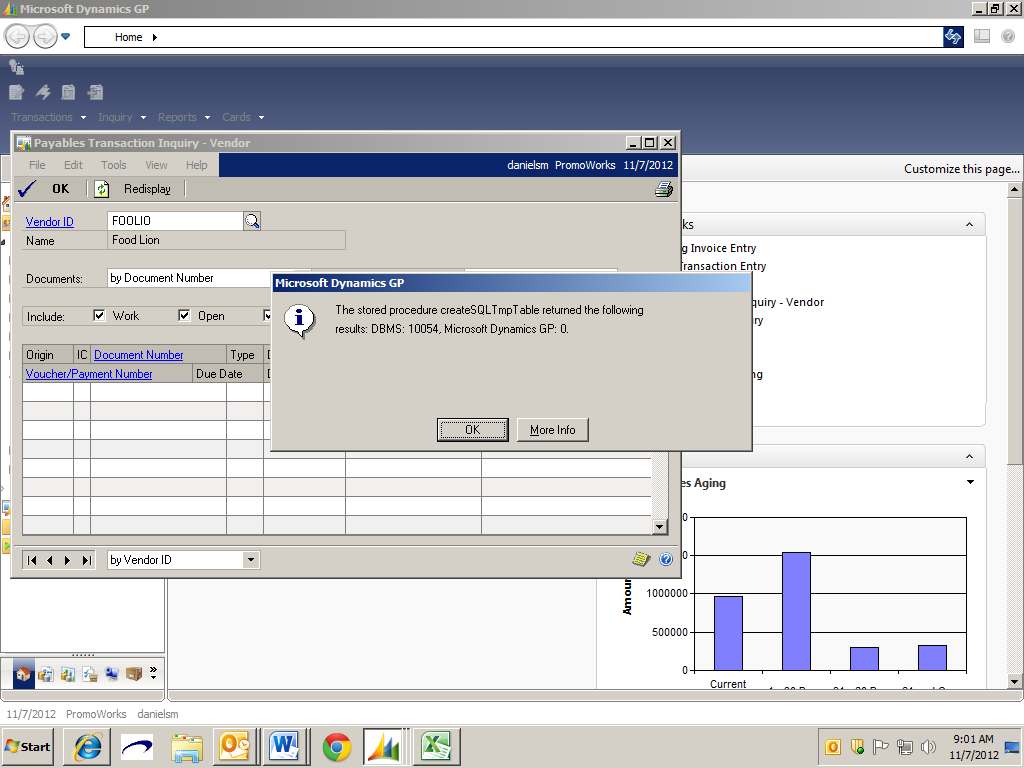
When accessing the Payables vendor inquiry screen the message shown below appeared. What would be causing this message?
[The stored procedure createSQLTmpTable returned the following results: DBMS: 10054, Microsoft Dynamics GP:0
*This post is locked for comments

I have the same question (0)
  • Mel Pigozzo Profile Picture
    30 on at

    I'm getting the same thing when trying to apply a payment. I restarted and it didn't appear again, but I'm still not sure why it happened in the first place either.

  • Carolyn Grady Profile Picture
    2,280 on at

    I have been researching this error message and I have learned that it may be a sporadic network connectivity issue.

  • Suggested answer
    Frank Hamelly | MVP, MCP, CSA Profile Picture
    46,625 Super User 2025 Season 2 on at

    You are correct Carolyn.  These messages typically indicate a network communications issue where the client cannot contact the application server.

  • Bradley Gehrls Profile Picture
    on at

    Hello Carolyn,

    Thank you for using Microsoft Online Communities.  I understand that you are receiving the message:  “The stored procedure createSQLTmpTable returned the following results: DBMS: 10054, Microsoft Dynamics GP:0”

    I have seen this error before and most of the time it is either related to duplicates in the system or issues with the temp tables.  This window uses a temp table to populate since it pulls records from the Work, Open and History tables.  If there are duplicates in the system it would cause an error or if the temp table did not get deleted or cleared out it could cause this error.

    To see if there are duplicates you could uncheck the work and open and see if you get records, and try that for the other check boxes and see if the results are returned.

    Does this happen for all vendors?

    If there are no duplicaets and happens for all vendors then one item you could try one everyone is out of the system is stopping and starting the SQL server to clear the temp tables.

    If you have any other questions please let me know.

    Best regards,

    Brad G

    Microsoft Dynamics GP

    We hope you get value from our new forums platform! Tell us what you think

    community.dynamics.com/.../default.aspx

    This posting is provided AS IS with no warranties, and confers no rights

  • SteveO Profile Picture
    45 on at

    Also cause by the computer going to sleep while GP is open.

Under review

Thank you for your reply! To ensure a great experience for everyone, your content is awaiting approval by our Community Managers. Please check back later.

Helpful resources

Quick Links

Responsible AI policies

As AI tools become more common, we’re introducing a Responsible AI Use…

Neeraj Kumar – Community Spotlight

We are honored to recognize Neeraj Kumar as our Community Spotlight honoree for…

Leaderboard > 🔒一 Microsoft Dynamics GP (Archived)

#1
mtabor Profile Picture

mtabor 1

Last 30 days Overall leaderboard

Featured topics

Product updates

Dynamics 365 release plans
